Shopping Cart


- Articles
- IT Management
- Huawei OceanStor 5120 vs 5220 vs Dorado 2020
Huawei OceanStor 5120 vs 5220 vs Dorado 2020
Huawei OceanStor 5120 vs 5220 vs Dorado 2020 compared: hybrid or all-flash, SAN or NAS, cache and scale, with Saudi data residency and backup advice.
By Blue Edge Team | Published Oct 21, 2026 | Updated Nov 13, 2026 | 9 min read
Quick answer
The OceanStor 5120 and 5220 are the same hybrid flash system with different cache, 32 or 64 GB against 64 or 96 GB, and both serve block and file storage. The Dorado 2020 is all-flash and block-only over FC and iSCSI, so choose it for databases and virtual machines, not for file shares.
Huawei's entry storage range looks simple on a price list: two hybrid systems with similar names and one all-flash system. The differences are bigger than they appear, because one of the three cannot share files at all, and the other two differ in only one specification. Buying on name or price alone can leave you with storage that cannot share files, or cache you never use.
This guide compares the OceanStor 5120, OceanStor 5220 and OceanStor Dorado 2020 using Huawei's own datasheets, explains when hybrid flash or all-flash makes sense, and covers what Saudi organisations should plan for, from data residency to ransomware. If ransomware is the main reason you are looking at storage, read our guide to protecting your business from ransomware alongside this one.
What are the OceanStor 5120, 5220 and Dorado 2020?
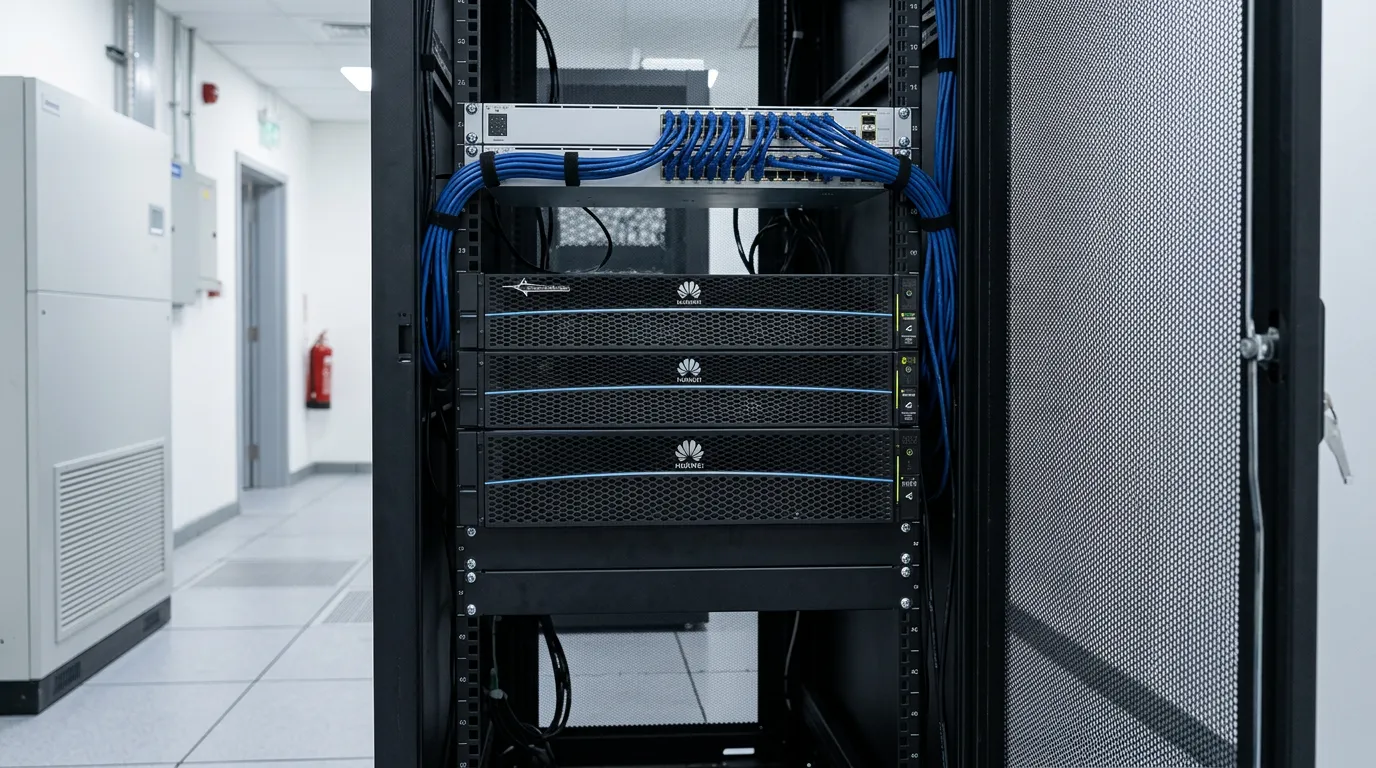
They are Huawei's entry storage systems for small and medium businesses: 2U, dual-controller arrays that hold an organisation's databases, virtual machines and shared files in one place. Huawei positions the 5120 and 5220 for database, virtualisation, VDI and file-sharing workloads. In short:
- OceanStor 5120: hybrid flash, mixing SSD and hard drives, with block and file storage in one system.
- OceanStor 5220: the same hybrid flash platform with more cache, for busier workloads.
- OceanStor Dorado 2020: all-flash, using SAS SSDs only, for block storage over FC and iSCSI.
- Shared design: dual controllers in a 2U enclosure, scaling to 8 controllers, with RAID-TP protection.
- Drive bays: 12 x 3.5-inch or 25 x 2.5-inch on the 5120 and 5220, and 25 x 2.5-inch on the Dorado 2020.
What is the difference between the 5120 and 5220?
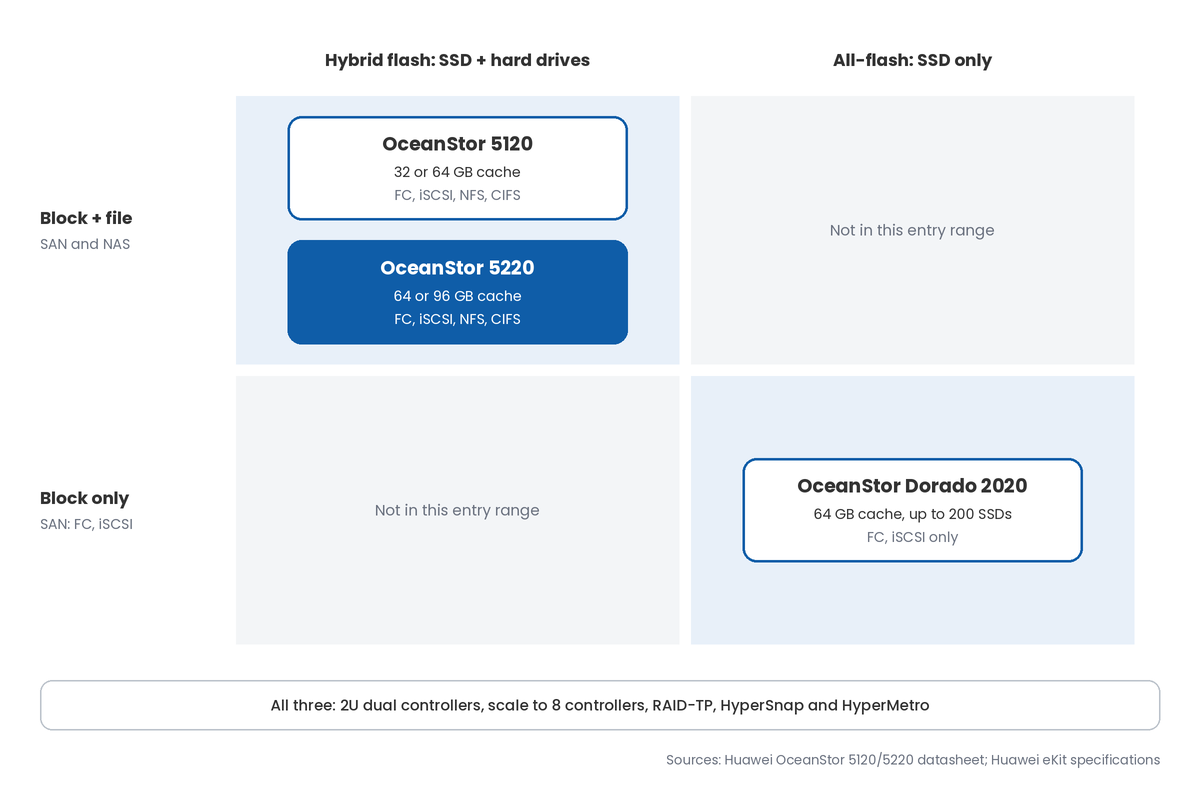
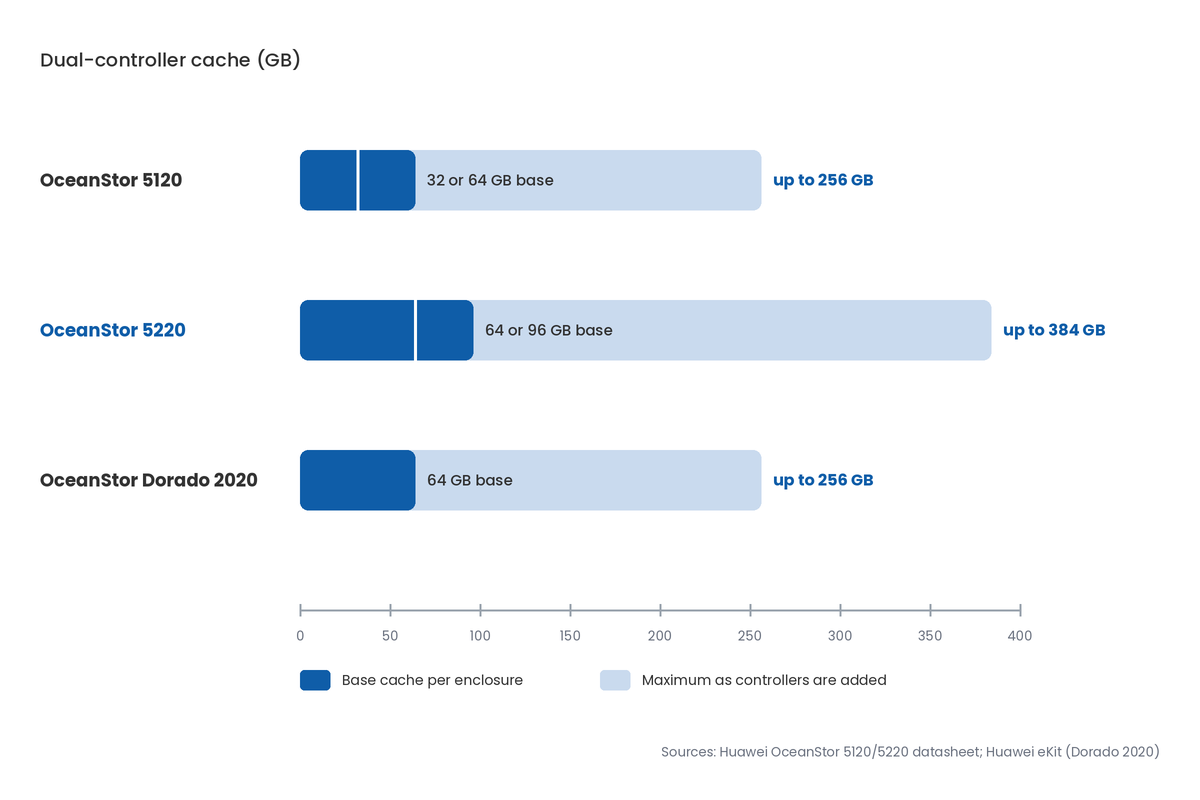
Cache, and only cache. Huawei's joint datasheet gives the OceanStor 5120 32 or 64 GB of dual-controller cache, expandable to 256 GB, and the OceanStor 5220 64 or 96 GB, expandable to 384 GB. Every other line in the specification table, from ports and drive types to RAID levels and software, is shared.
What makes the Dorado 2020 different?
The OceanStor Dorado 2020 is all-flash, taking only SAS SSDs from 960 GB to 7.68 TB, up to 200 of them. It supports FC and iSCSI block storage only, with no NFS or CIFS file sharing listed, so it suits databases and virtual machines rather than a shared file server.
How do you choose the right OceanStor?
Choose first by protocol, then by drive type, then by how hard the workload will push the cache. These are the key numbers from Huawei's datasheets and eKit specifications:
- Cache: 32 or 64 GB on the 5120, 64 or 96 GB on the 5220, and 64 GB on the Dorado 2020, per dual-controller enclosure.
- Maximum cache: 256 GB on the 5120 and Dorado 2020, and 384 GB on the 5220, as controllers are added.
- Controllers: dual controllers per 2U enclosure, scaling to 8.
- Front-end ports: up to 28 per controller enclosure, over 8/16/32 Gbps FC and 1/10/25 Gbps Ethernet.
- Drives: SAS SSD, SAS and NL-SAS on the 5120 and 5220; up to 200 SAS SSDs on the Dorado 2020.
- Availability: Huawei claims 99.9999% for the 5120 and 5220 with its Hyper series protection features.
Do you need SAN, NAS or both?
SAN (block) storage presents disks to servers, typically for databases and virtual machines, over FC or iSCSI. NAS (file) storage shares folders over the network, over NFS or CIFS, for users and applications. The 5120 and 5220 do both in one system; the Dorado 2020 does block only, so a file server would need to run on a server in front of it.
Hybrid flash or all-flash?
Hybrid flash mixes SSDs for frequently used data with large SAS or NL-SAS hard drives for bulk capacity, which keeps cost per terabyte down. All-flash uses only SSDs, for consistent response times on busy databases and virtual desktops. If most of your data is files that are rarely opened, hybrid is usually the better use of budget.
What protects the data inside the array?
All three support RAID 5, RAID 6, RAID 10 and RAID-TP, which Huawei says tolerates three drives failing at the same time. RAID-TP matters most with large hard drives, where a rebuild takes longer and a second or third failure during it is more likely. Snapshots (HyperSnap), replication (HyperReplication) and active-active clustering (HyperMetro) are listed for all three.
How do the three OceanStor models compare?
The 5120 and 5220 are the same system with different cache; the Dorado 2020 is a different kind of system. The table uses Huawei's datasheet for the 5120 and 5220 and Huawei's eKit specifications for the Dorado 2020.
| Factor | OceanStor 5120 | OceanStor 5220 | OceanStor Dorado 2020 |
|---|---|---|---|
| Storage type | Hybrid flash | Hybrid flash | All-flash |
| Drive types | SAS SSD, SAS, NL-SAS | SAS SSD, SAS, NL-SAS | SAS SSD only, 960 GB to 7.68 TB |
| Protocols | FC, iSCSI, NFS, CIFS | FC, iSCSI, NFS, CIFS | FC, iSCSI |
| Dual-controller cache | 32 or 64 GB | 64 or 96 GB | 64 GB |
| Maximum cache | 256 GB | 384 GB | 256 GB |
| Maximum controllers | 8 | 8 | 8 |
| Maximum drives | Not stated in datasheet | Not stated in datasheet | 200 SSDs |
| Front-end ports per enclosure | Up to 28 | Up to 28 | Up to 28 |
| Enclosures at Blue Edge | 12 x 3.5-inch or 25 x 2.5-inch | 12 x 3.5-inch or 25 x 2.5-inch | 25 x 2.5-inch |
| Best fit | File shares and mixed workloads on a budget | Busier mixed workloads and more VMs | Databases and VMs needing flash, block only |
Key takeaway
For most small and medium businesses that need both file shares and virtual machines, the OceanStor 5220 with 64 GB of cache is the safe middle choice, and the 5120 suits lighter loads. Choose the Dorado 2020 only when block workloads need all-flash response times and files are served elsewhere.
What do Saudi organisations need to consider?
Four local factors shape a storage decision as much as the specification sheet. Each is worth settling before the order is placed.
Does keeping data on-premises help with PDPL?
It helps. Saudi Arabia's Personal Data Protection Law restricts transferring personal data outside the Kingdom, and storage in your own data room keeps that data in Saudi Arabia by default. Organisations covered by the NCA Essential Cybersecurity Controls are also expected to host and store their information inside the Kingdom.
Do they help against ransomware?
Partly. Huawei's datasheet describes secure snapshots with a retention period during which the snapshot data cannot be deleted, and HyperLock and HyperEncryption are listed for the 5120 and 5220. Those help you recover after an attack, but they do not stop one, so they belong alongside endpoint protection, patching and staff training.
Is the array your backup?
No. Snapshots and RAID live on the same system as the data, so a fire, a controller failure or a compromised administrator account can affect both. Keep a separate backup copy on other media or another site, and test restoring from it.
What does the data room need?
Huawei rates these systems to operate from 5 to 35 °C in a cabinet, or 40 °C for the enclosure, at 10 to 90% humidity. Plan cooling for a Saudi summer, a UPS for clean shutdown, and power at 100 to 240 V AC, with DC input listed for disk enclosures. [NEED: warranty, spares and in-Kingdom support terms for OceanStor systems supplied by Blue Edge]
Blue Edge supplies the OceanStor 5120, 5220 and Dorado 2020 to projects across Saudi Arabia; see the Huawei OceanStor storage range for every configuration. Our IT installation and configuration service covers rack installation, set-up and handover. [NEED: confirm Blue Edge's status for the Huawei storage line before publishing]
What are the most common OceanStor buying mistakes?
- Buying the Dorado 2020 for file sharing. It is block-only, so file shares need an extra server, adding cost and a point of failure.
- Paying for the 5220 when the workload is light. The only difference is cache, so a small file server on a 5220 pays for capacity it does not use.
- Choosing the 5120's 32 GB cache for many virtual machines. Busy VMs compete for cache and slow each other down; the 64 GB or 5220 options suit them better.
- Treating snapshots as backup. If the array is lost, its snapshots go with it, and the business has nothing to restore from.
- Choosing 3.5-inch bays for an all-SSD plan. The 25 x 2.5-inch enclosures hold more SSDs per 2U; 3.5-inch bays suit large hard drives.
- Skipping a data room plan. Without cooling and a UPS, a storage system in a Saudi summer runs outside its rating.
Size by protocol, workload and growth, then test
Start by listing what the storage must hold: file shares, databases, virtual machines and backups, with their current size and expected growth. That tells you whether you need file sharing, how much flash, and how much raw capacity.
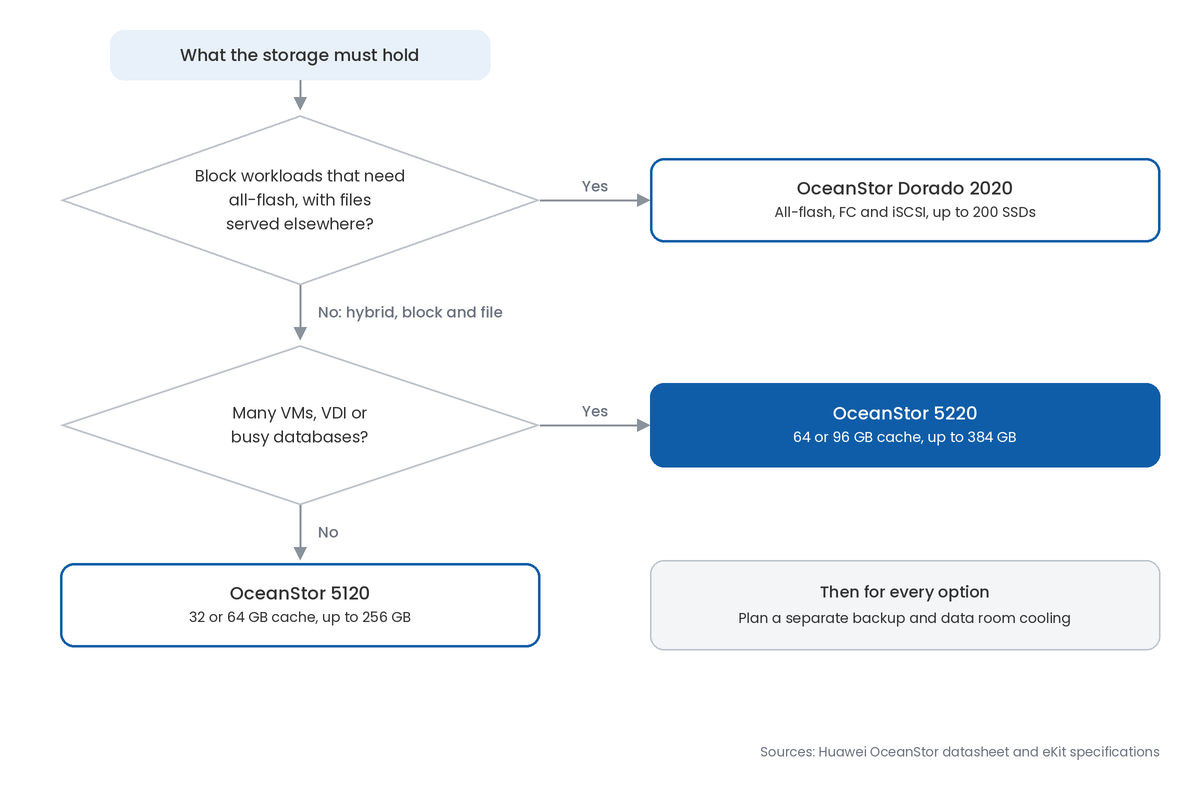
Next, choose the model and enclosure: 5120 or 5220 for mixed file and block, Dorado 2020 for all-flash block, and 2.5-inch or 3.5-inch bays to match your drives. Allow for growth in controllers, cache and disk enclosures.
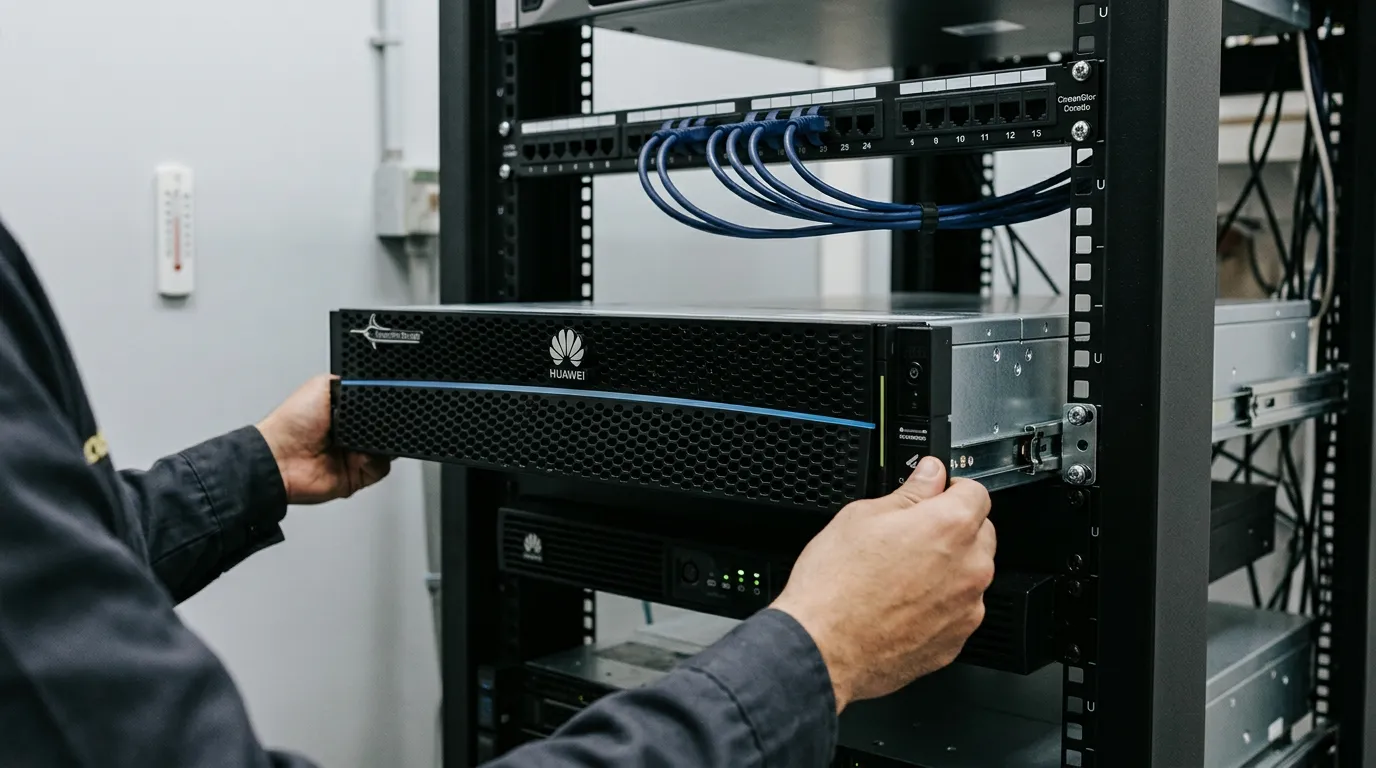
Then plan the data room, the backup copy and the network links, and test failover and restore before the system goes into production. Record the configuration so the next change starts from facts, not memory.
Schema about: Comparison of Huawei OceanStor 5120, 5220 and Dorado 2020 storage systems
Key Takeaways
- The OceanStor 5120 and 5220 are hybrid flash systems that serve both block (SAN) and file (NAS) storage.
- The only datasheet difference between them is cache: 32 or 64 GB on the 5120, 64 or 96 GB on the 5220.
- The OceanStor Dorado 2020 is all-flash, SAS SSD only, and block-only, over FC and iSCSI.
- All three are dual-controller 2U systems that scale to 8 controllers.
- All three support RAID-TP, which survives three drives failing at once.
- On-premises storage keeps data in the Kingdom, but it still needs a separate backup.
Frequently Asked Questions
-
Is the OceanStor 5220 faster than the 5120?
It has more cache: 64 or 96 GB per dual-controller enclosure against 32 or 64 GB, and up to 384 GB against 256 GB. More cache helps busy, mixed workloads with many virtual machines. Huawei's datasheet lists every other specification as shared, so for light workloads, the two will feel much the same in daily use.
-
Can the OceanStor 5120 or 5220 replace a Windows file server?
They can serve files directly over NFS and CIFS, the protocols Windows and Linux clients use for shared folders, without a separate file server. Plan permissions and user access before moving data. The Dorado 2020 cannot do this, because Huawei lists only FC and iSCSI block protocols for it.
-
Should I choose 12 x 3.5-inch or 25 x 2.5-inch bays?
Choose 3.5-inch bays for large-capacity hard drives, such as NL-SAS, where cost per terabyte matters most. Choose 2.5-inch bays for SSDs or a mix of SSD and SAS drives, since they fit more drives in the same 2U. Both enclosure types are offered on the 5120 and 5220; the Dorado 2020 uses 2.5-inch only.
-
What is HyperMetro on OceanStor?
HyperMetro is Huawei's active-active feature, which keeps two storage systems serving the same data at the same time, so one can take over if the other fails. It is listed for all three models. It needs two systems and suitable links between them, so it suits organisations that cannot accept storage downtime.
-
Can the OceanStor 5120 and 5220 work with storage from other vendors?
Yes, at array level. SmartVirtualization, listed for both, can take over storage arrays from other vendors and present them as part of one resource pool. That helps when moving off an older system. Confirm compatibility for your specific array with Huawei before planning a migration around it.
Sources & References
- Huawei — OceanStor 5120 and 5220 Hybrid Flash Storage Systems Data Sheet (27 June 2026), hosted on the Blue Edge product page vendor documentation
- Huawei eKit — OceanStor 5120 (32GB, 12*3.5" SAS) specifications vendor documentation
- Huawei eKit — OceanStor 5220 (64GB, 25*2.5" SAS) specifications vendor documentation
- Huawei eKit — OceanStor Dorado 2020 (64GB, 25*2.5" SAS) specifications vendor documentation
Planning storage for your business?
Blue Edge supplies Huawei OceanStor storage to organisations across Saudi Arabia, with installation and configuration support.
Call or WhatsApp +966 53 9855 188, contact the Blue Edge team, or see the Huawei OceanStor storage range.
About Blue Edge
Blue Edge Company is a value-added technology distributor based in Dammam, Saudi Arabia, supplying interactive displays, smart building systems, networking infrastructure and IT security software to businesses and residential projects across the Kingdom, with installation and technical support.
Learn more about Blue Edge →Published 21 October 2026 • Last updated 13 November 2026 • This article is reviewed when standards, regulations or product guidance change.