Shopping Cart


- Articles
- Cybersecurity
- Small Business Cybersecurity in Saudi Arabia: Checklist, Costs and Rules
Small Business Cybersecurity in Saudi Arabia: Checklist, Costs and Rules
Do small businesses in Saudi Arabia need cybersecurity? A staged checklist, what it costs, the NCA's new private sector controls and PDPL breach duties.
By Blue Edge Team | Published Oct 09, 2026 | Updated Oct 10, 2026 | 12 min read
Quick answer
Yes. Most attacks on small businesses are automated, using phishing, stolen passwords and unpatched software, and ransomware hits small firms hardest: Verizon's 2025 breach report found it in 88% of breaches at small and medium-sized businesses. A short baseline of multi-factor authentication, automatic updates, offline backups and staff training stops most of these attacks.
Many owners assume their business is too small to interest attackers. Attackers rarely choose by size: automated tools send phishing in bulk and scan the internet for unpatched systems, and whichever business has a reused password or an old router becomes the victim.
For a small business without an IT department, the harder question is not whether to act but what to do first and what it will cost. In Saudi Arabia there is now a regulatory reason too: the National Cybersecurity Authority has issued controls for private sector entities outside critical infrastructure, and they reach small and medium businesses. The attacks themselves are covered in the top cybersecurity threats in Saudi Arabia.
This guide sets out the baseline every small business needs, a staged checklist, how backups should work, what the costs are made of, and the Saudi rules that now apply.
What Does Cybersecurity Mean for a Small Business?
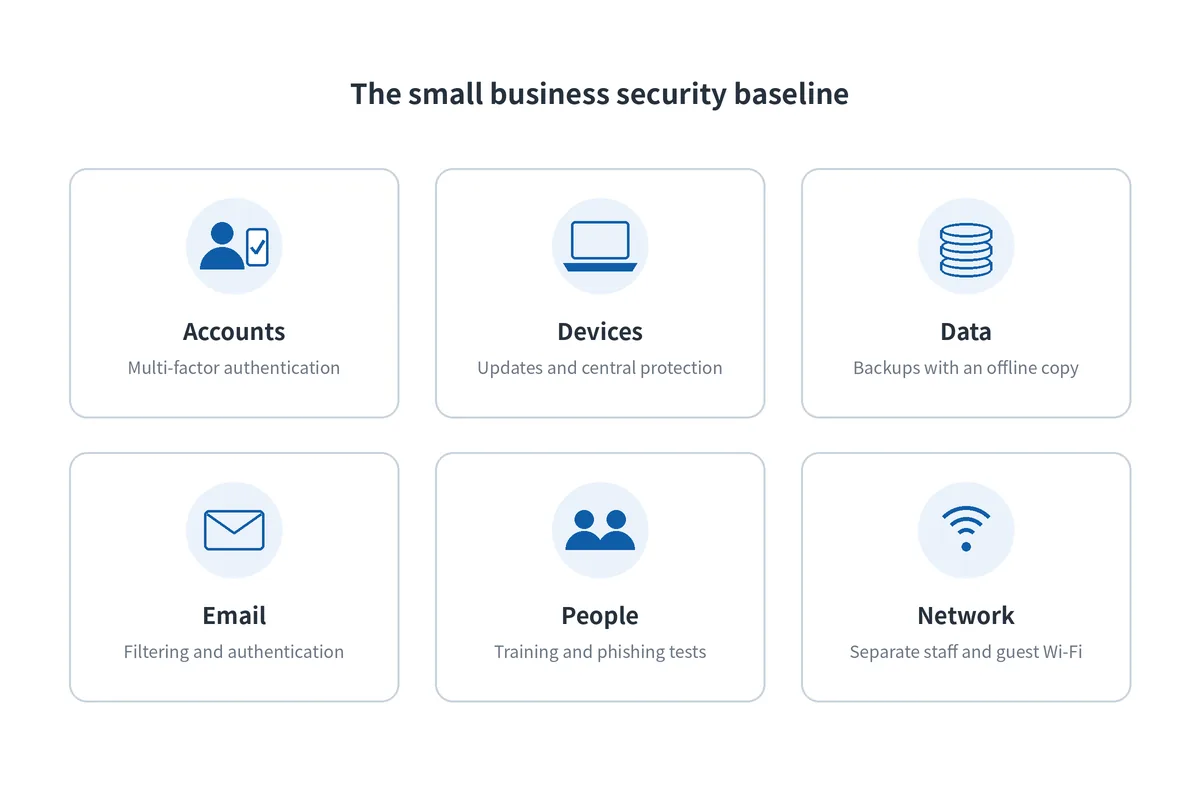
For a small business, cybersecurity means a short list of protections that stop the attacks it will actually face, not an enterprise security programme. Six areas cover almost all of it:
- Accounts: multi-factor authentication on email, banking, cloud and administrator accounts, so a stolen password is not enough to get in.
- Devices: automatic updates, centrally managed protection, and no administrator rights for everyday work.
- Data: backups that run automatically, with one copy that ransomware cannot reach.
- Email: filtering of malicious messages, and authentication of your domain.
- People: short, regular training and simulated phishing, so staff recognise and report suspicious messages.
- Network: a staff network kept separate from guests and connected devices, with router and firewall firmware kept current.
Why are small businesses targeted?
Small businesses are attacked because they are easier to break into, not because anyone chose them. Verizon's 2026 Data Breach Investigations Report found ransomware involved in 48% of all breaches, and exploited software vulnerabilities, behind 31% of breaches, have overtaken stolen passwords as the most common way in.
The pattern is consistent: a phishing message or a reused password opens an email account, or a flaw in an unpatched device opens the network, and ransomware or invoice fraud follows. Small firms suffer more because they rarely have an offline backup, a second person who knows the systems, or a plan for the first hour.
What Should a Small Business Cybersecurity Checklist Include?
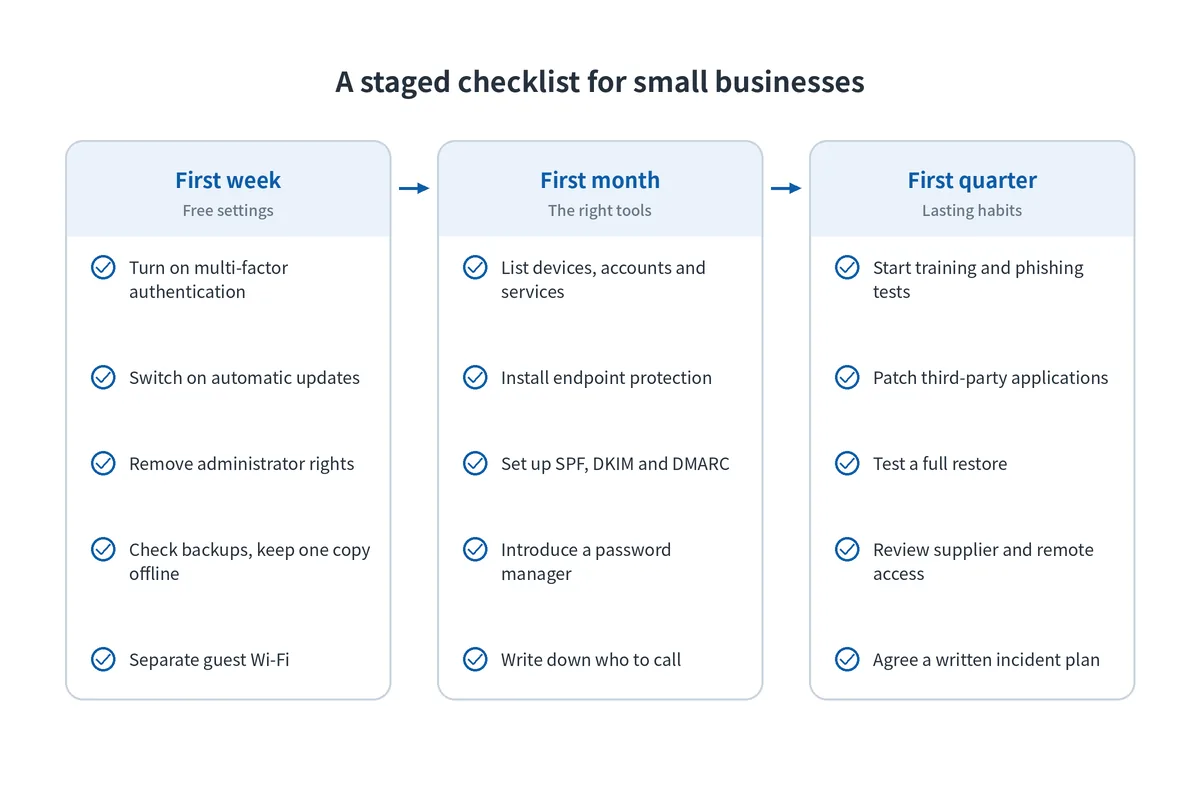
Work in three stages: settings you already pay for in the first week, the right tools in the first month, and lasting habits in the first quarter.
What should you do in the first week?
- Turn on multi-factor authentication for email, banking and every administrator account. Microsoft 365 and Google Workspace both include it at no extra cost, and multi-factor authentication blocks most attacks that rely on stolen passwords.
- Switch on automatic updates for operating systems, browsers and office software, and list any device that no longer receives updates.
- Remove administrator rights from everyday accounts, so a malicious attachment cannot install software.
- Check your backups run, and that at least one copy is offline or cannot be changed.
- Separate guest Wi-Fi from the staff network, as explained in how to set up a guest Wi-Fi network safely.
What should you do in the first month?
- List every device, account and cloud service, with an owner for each. You cannot protect what you do not know you have.
- Install business-grade endpoint protection on every laptop and server, managed centrally rather than left to each user.
- Set up SPF, DKIM and DMARC on your email domain, so criminals cannot easily send email that appears to come from you.
- Introduce a password manager and stop sharing passwords in chat messages.
- Write down who to call if something goes wrong: your IT contact, your bank and your email provider.
What should you do in the first quarter?
- Start security awareness training and phishing simulations, in the languages your staff actually read.
- Patch third-party applications as well as the operating system, with a tool that reports what is missing.
- Test a full restore of your most important system.
- Review supplier and remote access, removing accounts for former staff and vendors.
- Agree a short written incident plan, including how you would notify customers and regulators.
How Should a Small Business Back Up Its Data?
Keep at least one copy that ransomware cannot reach, and prove you can restore it.
What is the 3-2-1 backup rule?
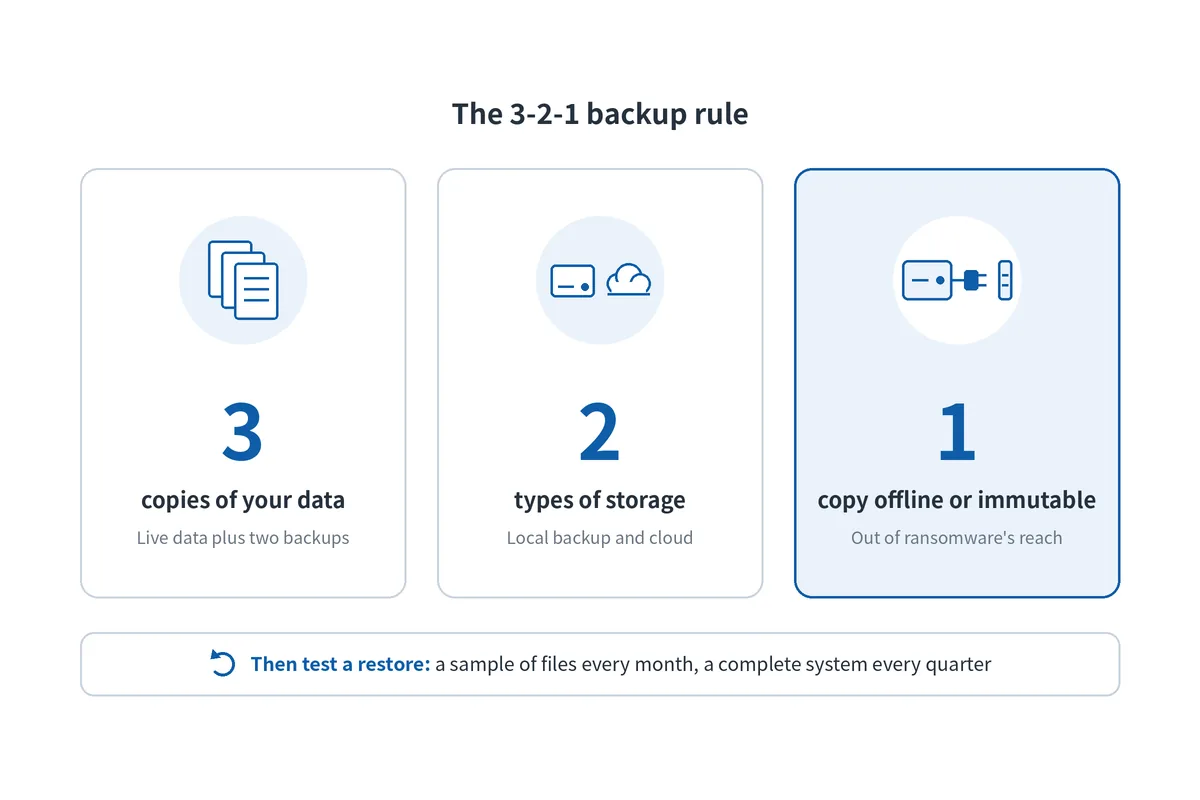
The 3-2-1 rule means keeping three copies of your data, on two different types of storage, with one copy offsite or offline. In practice that is the live data, a local backup for fast recovery, and a cloud or offline copy that is immutable, meaning it cannot be changed or deleted for a set period. File syncing services are not backups: they copy deletions and encrypted files as faithfully as good ones. More on stopping ransomware before it spreads is in how to protect your business from ransomware.
How do you know a backup will work?
Only by restoring from it. Restore a sample of files every month and a complete system every quarter, and time how long it takes. Protect the backup console with multi-factor authentication and separate credentials, because attackers look for it first.
What does disaster recovery mean for a small business?
Disaster recovery for a small business is a written answer to one question: if our main system disappeared today, how would we be working again tomorrow? Keep it to one page:
- Which systems come back first, such as email, accounting or the point of sale
- How much data you can afford to lose, which sets how often backups run
- How long you can be offline, which sets how fast restores must be
- Who decides and who does the work, with phone numbers that do not depend on the systems that failed
What Does Cybersecurity Cost a Small Business in Saudi Arabia?
The cost depends mainly on how many people and devices you have, because most security tools are licensed per user or per device. It is made up of five parts:
- Settings you already pay for: multi-factor authentication, automatic updates and disk encryption cost staff time, not new licences.
- Per-device subscriptions: patch management, monitoring and backup. NinjaOne, for example, is priced per device.
- Per-user subscriptions: security awareness training. KnowBe4 is priced per seat, with published seat bands starting at 25 users.
- One-off projects: separating the network, replacing an old firewall or recabling, priced by quotation.
- People's time: someone responsible for reviewing reports and acting on them, every month.
[NEED: optional — a typical monthly cost range in SAR for a 25-person office, from Blue Edge's sales team. Delete this line if not available.]
To get a usable quote, count your users, laptops, servers and phones, list the licences you already hold, and ask suppliers to price per-device and per-user items separately.
| Control | What it stops | How it is usually paid for | Effort to start |
|---|---|---|---|
| Multi-factor authentication | Logins with stolen passwords | Included in most email and cloud platforms | Low |
| Automatic updates | Attacks on known flaws in the operating system | Included in operating systems | Low |
| Removing admin rights | Malware installing itself | Staff time | Low |
| Offline or immutable backup | Permanent data loss from ransomware or failure | Per device or by storage used | Medium |
| Patch management tool | Unpatched third-party applications | Per device, usually monthly | Medium |
| Endpoint protection | Malware and suspicious activity on devices | Per device | Medium |
| SPF, DKIM and DMARC | Criminals sending email in your name | Staff or IT partner time | Medium |
| Security awareness training | Phishing and social engineering | Per user, on a subscription | Ongoing |
| Separate guest Wi-Fi | Visitors' devices reaching business systems | Usually existing equipment | Low |
Key takeaway
the controls that stop the most attacks are mostly free, so start with multi-factor authentication, updates, admin rights and guest Wi-Fi. For most small businesses, the first paid tools should be backup and patch management, followed by security awareness training.
What Do Saudi Small Businesses Need to Consider?
Four local factors change the picture for small businesses in the Kingdom.
New NCA controls now reach the private sector. The National Cybersecurity Authority has issued cybersecurity controls for private sector entities outside critical national infrastructure, known as NCNICC-1:2025. Published legal analyses describe a reduced baseline for small and medium entities, those with 6 to 249 full-time employees or annual revenue of SAR 3 million to SAR 200 million, with some controls mandatory and others recommended. They cover governance, technical defences such as access control, backup and vulnerability management, and third-party and cloud security. Confirm with the NCA how and when they apply to you.
Breaches of personal data have a 72-hour clock. Any business that processes personal data in the Kingdom falls under the Personal Data Protection Law. Its Implementing Regulation requires the controller to notify SDAIA within 72 hours of becoming aware of a reportable breach, and to tell affected individuals without undue delay. That deadline is only realistic with backups, logs and a written plan already in place.
Larger customers ask their suppliers for proof. Government entities and critical infrastructure operators covered by the NCA Essential Cybersecurity Controls must apply cybersecurity requirements to their third parties. Small businesses that supply them can be asked to show multi-factor authentication, backups and patching in contracts and questionnaires.
Scams arrive in Arabic and English, and on phones. Phishing aimed at Saudi staff impersonates banks, delivery companies and government services, often by SMS or WhatsApp rather than email. Verizon's 2026 report notes that people are more likely to fall for mobile threats, such as fake texts and scam calls, than for email phishing, so training should cover both languages and both channels.
Blue Edge, a value-added technology distributor based in Dammam, Saudi Arabia, is an authorised distributor for NinjaOne, used for patching, backup and device management, and for KnowBe4 security awareness training. It supplies both to businesses across the Kingdom, with licensing and onboarding support.
What Are the Most Common Small Business Cybersecurity Mistakes?
Six mistakes cause most of the damage, and the first turns any incident into a disaster.
Having no backup that ransomware cannot reach. If every copy is online and writable, ransomware encrypts the backups too, and the choice becomes paying or rebuilding from nothing.
Leaving email without multi-factor authentication. One stolen password gives an attacker the mailbox, the contacts and the ability to send convincing fake invoices to customers.
Working from administrator accounts. Any malicious attachment a user opens can install software and switch off protection.
Keeping devices that no longer receive updates. Old routers, storage boxes and out-of-support laptops carry known flaws that attackers scan for automatically.
Putting staff, guests and connected devices on one network. A compromised visitor's phone, camera or payment terminal can then reach business systems.
Having no plan for the first hour. Staff lose time working out who to call, evidence is overwritten, and the 72-hour notification window starts running before anyone has the facts.
Start With Accounts, Updates and Backups
Begin this week with the free settings on accounts and devices, then restore something from your backup. That one test tells you whether ransomware would be an inconvenience or the end of the business.
Bring patching and endpoint protection under central management within the month, and start training within the quarter, alongside a one-page incident plan.
Review the list every six months, and again whenever you add a site, a system or a large customer.
Key Takeaways
- Small businesses are attacked mainly through phishing, stolen passwords and unpatched software, and ransomware hits them hardest.
- Start with what you already pay for: multi-factor authentication, automatic updates, removing admin rights and an offline backup.
- Keep three copies of data on two types of storage, with one offline, and test a restore.
- Most security tools are licensed per user or per device, so cost follows headcount and device count.
- The NCA's 2025 controls for private sector entities set a reduced baseline for small and medium businesses.
- Under the PDPL, personal data breaches must be reported to SDAIA within 72 hours of becoming aware.
Frequently Asked Questions
-
Do the NCA's private sector cybersecurity controls apply to small businesses?
They can. The NCA's controls for private sector entities outside critical infrastructure define small and medium entities as those with 6 to 249 full-time employees or annual revenue between SAR 3 million and SAR 200 million, and set a reduced baseline for them, with some controls mandatory and others recommended. Published analyses do not cover businesses below those thresholds, so confirm your position with the NCA.
-
How much does cybersecurity cost a small business in Saudi Arabia?
It depends mainly on the number of users and devices, because most tools are licensed per user or per device. The first steps, such as multi-factor authentication, automatic updates and removing administrator rights, cost time rather than money. Paid tools usually follow: backup and patch management priced per device, and security awareness training priced per user, which makes quotes easy to compare once you know your counts.
-
What is the biggest cyber risk for a small business?
Ransomware is the most damaging, because it can stop the business entirely and destroy any data that was not backed up offline. It usually starts with something simpler: a phishing message, a reused password, or a software flaw that was never patched. Closing those three entry points, and keeping one backup out of reach, removes most of the risk.
-
Does a small business have to report a data breach in Saudi Arabia?
Yes, if the breach involves personal data and is reportable under the Personal Data Protection Law. Its Implementing Regulation requires the controller to notify SDAIA within 72 hours of becoming aware of the breach, and to inform affected individuals without undue delay. Company size does not change the duty, so small businesses need a plan for establishing the facts quickly.
-
How can a small business protect staff who work remotely?
Require multi-factor authentication on every account, manage laptops and phones centrally so updates and encryption are enforced, and keep business data in managed cloud services rather than on personal devices. Staff should avoid public Wi-Fi for work unless they use a VPN, and lost or stolen devices should be wiped remotely. The same steps protect staff who travel between sites.
Sources & References
- Verizon — 2026 Data Breach Investigations Report (covers incidents from 1 November 2024 to 31 October 2025) industry research
- Verizon — Verizon's 2025 Data Breach Investigations Report: Alarming surge in cyberattacks through third-parties (23 April 2025) industry research (press release)
- Baker McKenzie — Saudi Arabia: Cybersecurity Controls for Private Entities (July 2026) legal analysis of the NCA controls
- CMS — Kingdom of Saudi Arabia issues new Cybersecurity Controls for the Private Sector (March 2026) legal analysis of the NCA controls
- National Cybersecurity Authority (NCA) — Essential Cybersecurity Controls (ECC-2:2024) regulator
- Saudi Data and Artificial Intelligence Authority (SDAIA) — Laws and Regulations: Personal Data Protection Law and its Implementing Regulation regulator
- Clyde & Co — Saudi Arabia issues Implementing Regulations to the Personal Data Protection Law (September 2023) legal analysis (72-hour notification)
- National Cyber Security Centre (UK) — Small organisations guide to cyber security government guidance
- NinjaOne — Cloud-based RMM Software (pay-per-device pricing) vendor documentation
- KnowBe4 — Security Awareness Training pricing (per seat, seat bands) vendor documentation
Setting up security for a small business?
Blue Edge supplies NinjaOne and KnowBe4 across Saudi Arabia, with licensing and onboarding support.
Call +966 53 9855 188 or contact our team to discuss the users and devices you need to cover.
security software Blue Edge suppliesAbout Blue Edge
Blue Edge Company is a value-added technology distributor based in Dammam, Saudi Arabia, supplying interactive displays, smart building systems, networking infrastructure and IT security software to businesses and residential projects across the Kingdom, with installation and technical support.
Learn more about Blue Edge →Published 9 October 2026 • Last updated 10 October 2026 • This article is reviewed when standards, regulations or product guidance change.