Shopping Cart


- Articles
- Enterprise Communication
- Dahua Interactive Whiteboards Compared: MC480, MC470 and ST470
Dahua Interactive Whiteboards Compared: MC480, MC470 and ST470
Dahua MC480, MC470-P, MC470-C-S3 and ST470-L-S2 compared on microphones, touch points, apps and panel life, with the room each one suits best.
By Blue Edge Team | Published Sep 30, 2026 | Updated Oct 03, 2026 | 9 min read
Dahua's interactive whiteboard range is easy to buy and hard to compare. The model codes change with every hardware generation, the datasheets run to dozens of lines, and most quotes list only the screen size, so buyers end up choosing on price and inches rather than on how the room will actually be used.
This guide compares the four lines Blue Edge supplies in Saudi Arabia, using Dahua's own specifications, and matches each to the room it suits. If you are still deciding whether a room needs an interactive panel at all, our comparison of interactive displays and traditional whiteboards covers that first step. It also covers what Saudi buyers should check before ordering and the mistakes that cost the most.
What Separates Dahua's MC480, MC470 and ST470 Lines?
The three MC lines belong to Dahua's Business Series for meeting rooms and the ST470 line to its Education Series for classrooms, and within the Business Series they differ mainly in audio, apps and memory. In short:
- MC480: Android 15 with Google EDLA certification, so the Google Play Store is built in, plus an 8-microphone array rated to 12 m, four speakers and 100 W USB-C charging.
- MC470-P: the audio flagship, with a 16-microphone array rated for 8 to 12 m, 16 GB of RAM, fingerprint and NFC sign-in, and sizes up to 98 inches.
- MC470-C-S3: the newest line, on Android 16 with EDLA, 50 touch points under Android, an 8-microphone array and the lowest listed power draw.
- ST470-L-S2: the classroom panel, with 40 touch points under both Android and Windows, two 20 W speakers and an OPS slot for a Windows module.
What do all four have in common?
More than the model codes suggest. All four use 4K (3,840 × 2,160) panels with infrared touch, accept finger and stylus writing, run Windows through a plug-in module, and mount on a wall or a mobile stand.
What do the S2 and S3 suffixes mean?
They mark hardware generations within a line, and the differences can be large. Dahua now lists the earlier MC470-P-S2, which shipped with Android 11, as discontinued, while the current MC470-P runs Android 14.
How Do You Choose Between Them?
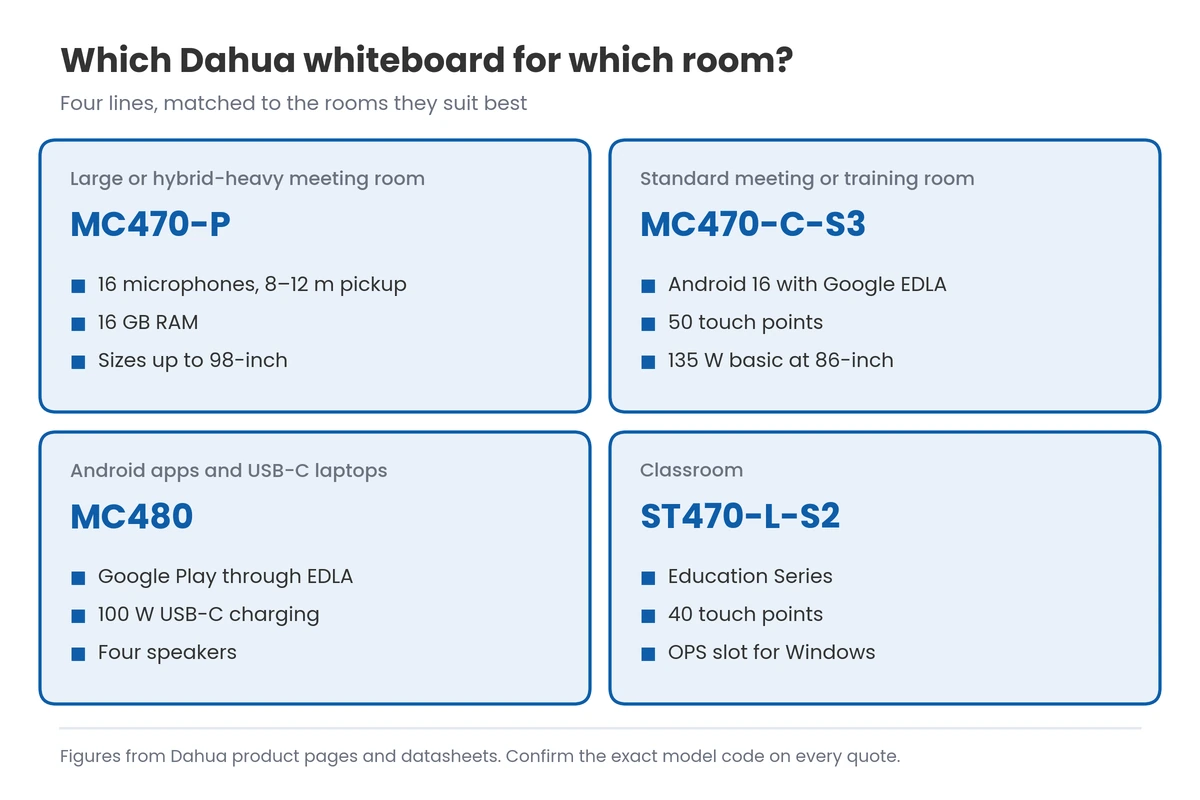
Start with the room, then check the few numbers that differ. The diagram maps each line to the room it suits best.
Which numbers matter most?
Many datasheet lines are near-identical across the four. These are the ones that change the result in a real room:
- Microphones: 16 on the MC470-P against 8 on the MC480 and MC470-C-S3, which matters when remote attendees must hear the far end of a long table.
- Touch points under Android: 50 on the MC470-C-S3, 40 on the ST470-L-S2 and 32 on the MC480 and MC470-P, which matters when several people write at once.
- Memory: 16 GB of RAM on the MC470-P against 8 GB on the others, which matters for heavy multitasking on the panel's own Android system.
- Rated panel life: 50,000 hours on the MC480 and MC470-P against 30,000 on the MC470-C-S3; at 10 hours a day, five days a week, that is roughly 19 years against 11.
How many people join remotely?
If remote attendees join most meetings, microphone coverage decides the model. The MC470-P's 16 microphones suit long boardrooms and the MC480 and MC470-C-S3 suit standard rooms, while the ST470-L-S2's datasheet lists no microphone array, so classrooms that stream lessons need an add-on such as the DHI-PKC-WM1A speakerphone; our video conferencing guide for Saudi meeting rooms covers room audio in detail.
Which apps need to run on the panel?
Check whether your meeting and teaching apps run on Android, because that decides whether you need a Windows module. The MC480 and MC470-C-S3 are Google EDLA-certified, which gives them the Google Play Store, while every line takes a plug-in Windows PC module for desktop software; Dahua also sells its DeepHub Meeting software for the MC470-P separately.
How Do the Four Lines Compare Side by Side?
The table puts Dahua's published specifications for the four lines next to each other. Where a figure varies by size, the 86-inch model is shown.
| Point | MC480 | MC470-P | MC470-C-S3 | ST470-L-S2 |
|---|---|---|---|---|
| Dahua range | Business Series | Business Series | Business Series | Education Series |
| Sizes | 65, 75 and 86-inch | 65, 75, 86 and 98-inch | 65, 75 and 86-inch | 65, 75 and 86-inch |
| Android | 15 | 14 | 16 | 14 |
| RAM and storage | 8 GB and 128 GB | 16 GB and 128 GB | 8 GB and 128 GB | 8 GB and 128 GB |
| Touch points (Android / Windows) | 32 / 50 | 32 / 50 | 50 / 50 | 40 / 40 |
| Built-in conferencing | Auto-framing and voice tracking | Auto-framing and voice tracking | Face detection with speaker focus | Not listed |
| Microphones | 8, pickup up to 12 m | 16, pickup 8–12 m | 8, pickup 8–12 m | Not listed |
| Google EDLA (Play Store) | Yes | Not listed | Yes | Not listed |
| Rated panel life | 50,000 hours or more | 50,000 hours or more | 30,000 hours or more | [NEED: ST470-L-S2 panel lifespan from Dahua] |
| 86-inch weight and maximum power | 64.4 kg, 650 W | 73 kg, 500 W | 62.3 kg, 400 W | [NEED: ST470-L-S2 86-inch weight and maximum power from Dahua] |
Key takeaway
Most buyers only need to shortlist two lines: the MC470-C-S3 as the everyday meeting and training room panel, and the MC470-P for rooms where remote attendees must hear everyone. The MC480 and ST470-L-S2 answer narrower needs, Google Play apps and classrooms respectively.
What Should Saudi Buyers Check Before Ordering?
Four local checks matter more than any line on the datasheet: Arabic support, heat and glare, the PDPL implications of sign-in and recording, and whether the stock is current and supported in the Kingdom. Each can turn a sound choice into a poor one.
Does the panel handle Arabic?
Test it with your own bilingual content before you buy. Check the whiteboard app, on-screen keyboard and handwriting recognition with Arabic and mixed Arabic-English text; on the EDLA-certified MC480 and MC470-C-S3, Arabic keyboard apps can also be installed from Google Play.
How do heat and glare affect the choice?
Dahua rates the MC480, MC470-P and MC470-C-S3 for 0 °C to 40 °C, which a room left without air conditioning over a summer weekend can exceed. Their 400 to 450 cd/m² brightness is meant for indoor rooms, so place panels side-on to windows and fit blinds whichever line you choose.
What does the PDPL mean for fingerprint and NFC sign-in?
Fingerprint sign-in on the MC470-P stores biometric data, which the PDPL treats as sensitive personal data, so make NFC cards or passwords the default and enrol fingerprints only with clear consent. Recorded meetings and lessons are personal data too, so set a purpose, a retention period and access rules before switching recording on.
How do you avoid old or grey stock?
Buy through an authorised channel with an in-Kingdom warranty, and with spare pens, remotes and stands held locally. Dahua notes that its specifications vary by country, so ask for the datasheet that matches the exact model code on your quote.
Blue Edge, a value-added technology distributor based in Dammam, is the authorised distributor in Saudi Arabia for Dahua interactive displays and meeting-room accessories, and supplies all four lines compared here to projects across the Kingdom. Blue Edge also provides IT installation and configuration for the panels, their Windows modules and the room network.
What Are the Most Common Mistakes When Buying Dahua Whiteboards?
The costly mistakes come from reading the screen size and price and skipping the rest of the quote. Here they are, worst first:
- Leaving the default password and old firmware in place. Dahua's own licence terms tell owners to change the factory default password and keep firmware updated, and a networked panel left as delivered is an easy way into the office network.
- Accepting a quote without the full model code. You may receive an earlier generation with an older Android version, and your apps drop support for it sooner.
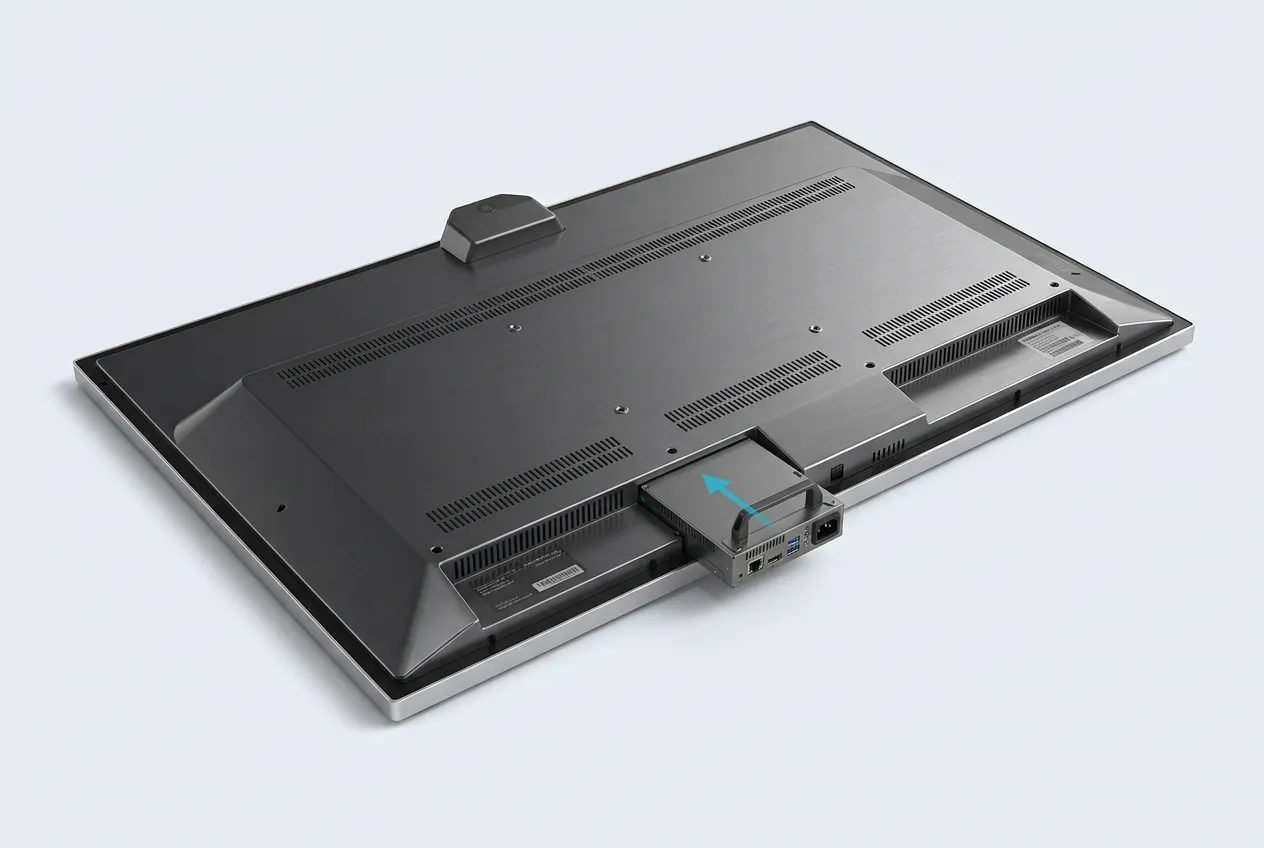
- Leaving the Windows module out of the budget. If your meeting or teaching software only runs on Windows, the OPS module is part of the price, and adding it after delivery means a second order and a second visit.
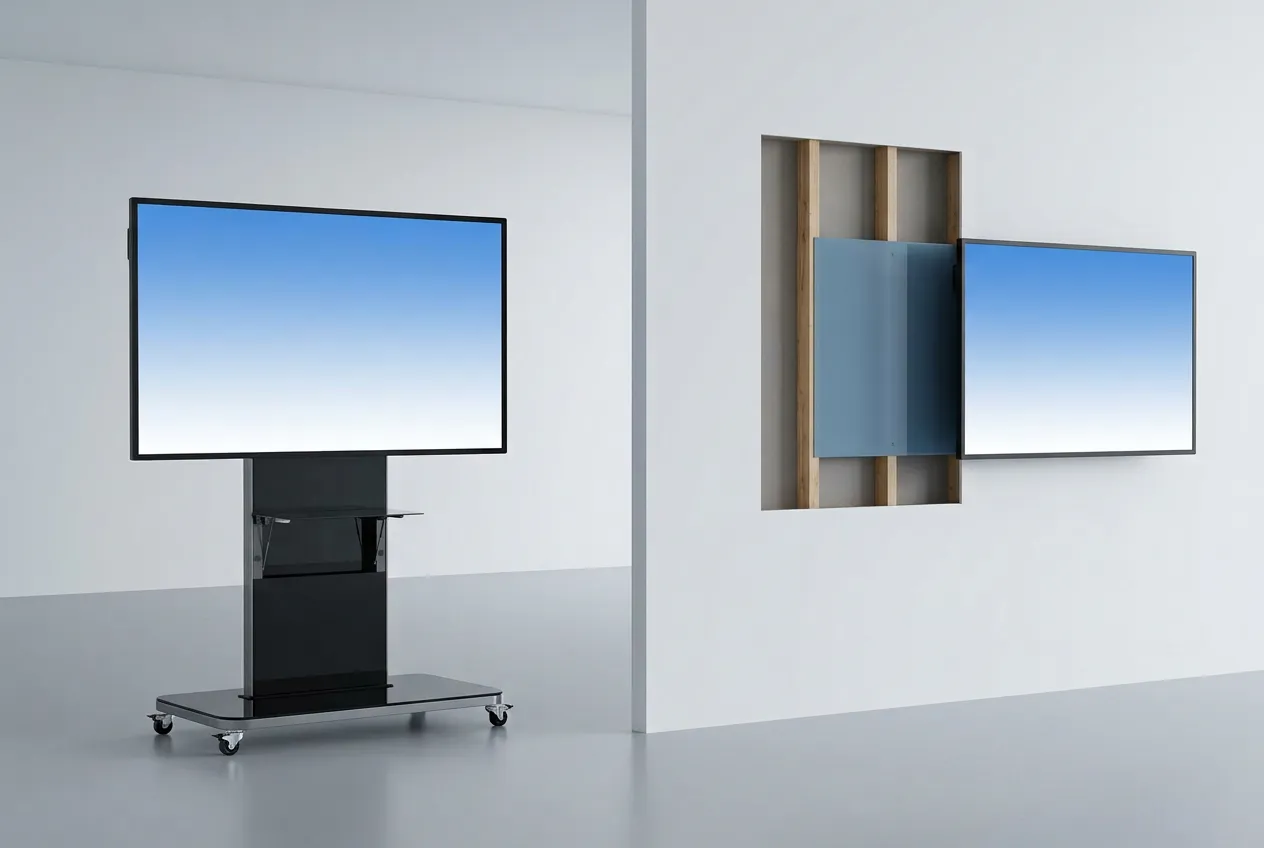
- Ordering a stand that is not listed for the model. Dahua lists compatible stands per model, such as the PKC-MS2B and PKC-MS1A for the MC480, and a stand from outside the list can mean a return and a delayed installation.
- Mounting an 86-inch panel on an unchecked wall. At 62 to 73 kg for the 86-inch Business Series panels, a plasterboard partition without backing means rework before the panel can go up.
Match Every Room to a Model Before You Ask for a Quote
List each room with its size, how many people join remotely, which apps must run and how many hours a day it is used. Those four answers pick the line for you.
Then ask for a quote that names the full model code, the Android version, the Windows module if you need one, the stand or wall bracket and the warranty terms. A quote missing any of these cannot be compared fairly.
Finally, trial one panel in a real room with Arabic content, a hybrid call and your own apps. Order the rest once it passes.
Key takeaways
- The MC480, MC470-P and MC470-C lines are Dahua Business Series panels; the ST470-L-S2 is Education Series.
- The MC470-P has the most microphones (16) and memory (16 GB), and the only 98-inch size of the four.
- The MC470-C-S3 is the newest line, on Android 16 with Google EDLA and the lowest listed power draw.
- The MC480 suits teams that need Google Play apps and 100 W USB-C charging.
- Check the full model code, Android version and rated panel life on every quote.
Frequently Asked Questions
-
What is the difference between Dahua's Business and Education Series?
The Business Series, which includes the MC480, MC470-P and MC470-C lines, is built for meeting rooms, with built-in conferencing features and NFC sign-in on the current models. The Education Series, which includes the ST470-L-S2, is aimed at classrooms, with high touch-point counts so several pupils can write on the board at once.
-
Can Dahua interactive whiteboards run Microsoft Teams or Zoom?
Yes, in two ways. The EDLA-certified MC480 and MC470-C-S3 can install meeting apps from Google Play where the app supports the device, and every line takes a plug-in Windows PC module that runs the full desktop versions. For regular hybrid meetings, the Windows module gives the most familiar experience for users and IT.
-
Which Dahua whiteboard is best for a classroom?
The ST470-L-S2 from Dahua's Education Series is the classroom line: it accepts 40 touch points under both Android and Windows, has two 20 W speakers and an OPS slot for a Windows module. If lessons are streamed, add a separate speakerphone, because its datasheet lists no microphone array.
-
Which Dahua whiteboard uses the least power?
The MC470-C-S3. Dahua lists 135 W basic and 400 W maximum for the 86-inch model, against 320 W typical and 650 W maximum for the MC480 and 425 W basic and 500 W maximum for the MC470-P. All three draw 0.5 W or less on standby, so power schedules save more than the choice of model.
-
What is Google EDLA certification on a whiteboard?
EDLA is Google's Enterprise Devices Licensing Agreement, the programme that certifies large-screen business devices to ship with Google services. On Dahua's MC480 and MC470-C-S3 it means the Google Play Store is built in, so staff can install approved Android apps without loading them from unofficial sources.
Sources & References
- Dahua Technology — LPH86-MC480-U 86 Inch Smart Interactive Whiteboard: specifications, compatible accessories and software licence terms vendor documentation
- Dahua Technology — LPH86-MC470-P 86 Inch Smart Interactive Whiteboard (current version): specifications vendor documentation
- Dahua Technology — LPH86-MC470-C-S3 86 Inch Smart Interactive Whiteboard: specifications vendor documentation
- Dahua Technology — LPH65-MC470-P-S2 (discontinued product, Android 11) vendor documentation
- Dahua Technology — DHI-LPH86-MC470-C-S3 datasheet (touch points, weight), as supplied to Blue Edge vendor documentation
- Dahua Technology — DHI-LPH65/75/86-ST470-L-S2 datasheet, as supplied to Blue Edge vendor documentation
- Dahua Technology — Interactive Whiteboards: Business Series vendor documentation
- Dahua Technology — Interactive Whiteboards: Education Series vendor documentation
Choosing Dahua whiteboards for several rooms?
Blue Edge supplies the MC480, MC470-P, MC470-C-S3 and ST470-L-S2 lines with Dahua meeting-room accessories, plus installation and configuration, to projects across the Kingdom.
Call or WhatsApp +966 53 9855 188, contact the Blue Edge team, or see the Dahua interactive display range.
About Blue Edge
Blue Edge Company is a value-added technology distributor based in Dammam, Saudi Arabia, supplying interactive displays, smart building systems, networking infrastructure and IT security software to businesses and residential projects across the Kingdom, with installation and technical support.
Learn more about Blue Edge →Published 30 September 2026 • Last updated 3 October 2026 • This article is reviewed when standards, regulations or product guidance change.