Shopping Cart


- Articles
- Enterprise Communication
- Huawei IdeaHub B3 Base Explained: Who Is It For?
Huawei IdeaHub B3 Base Explained: Who Is It For?
What the Huawei IdeaHub B3 Base includes, how it differs from the B3 and Board 3 Base, and which Teams and Zoom meeting rooms it suits in Saudi Arabia.
By Blue Edge Team | Published Oct 19, 2026 | Updated Nov 13, 2026 | 11 min read
Quick answer
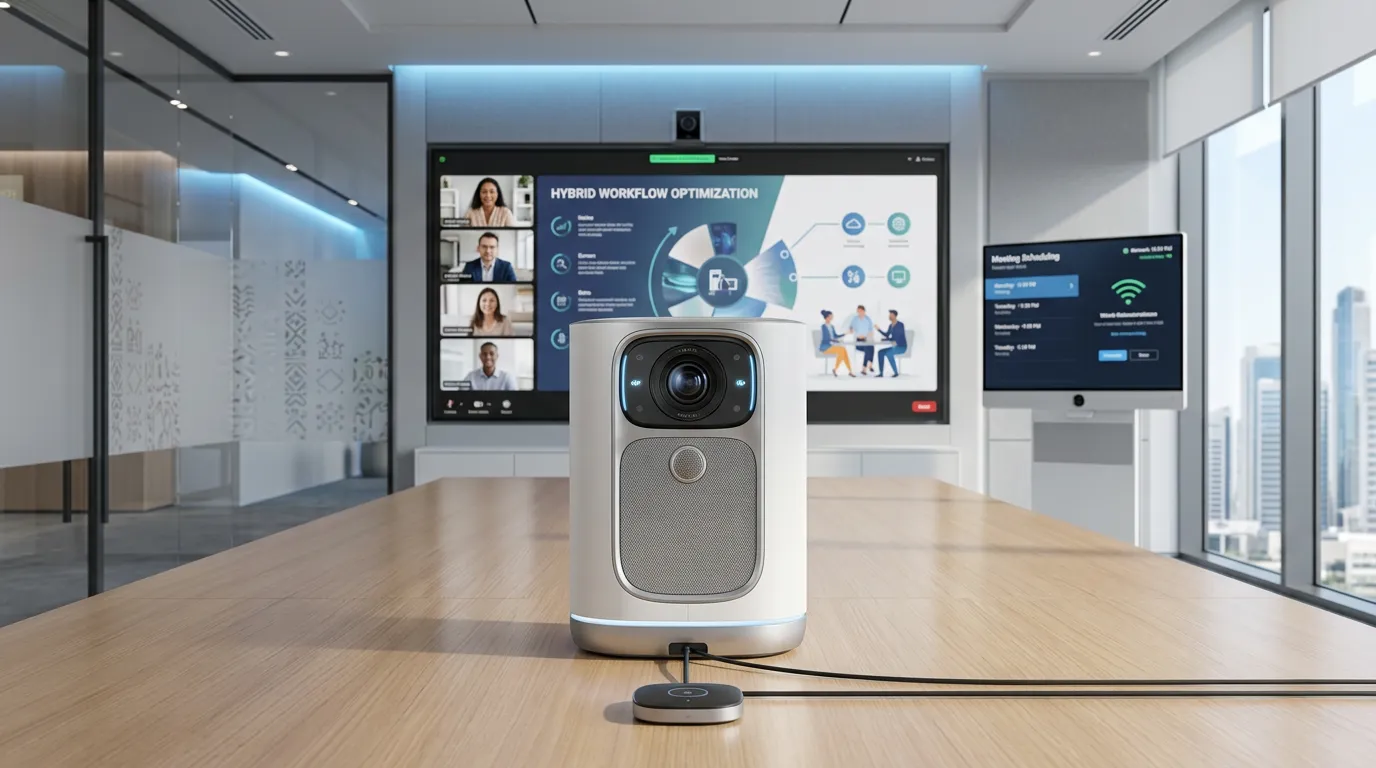
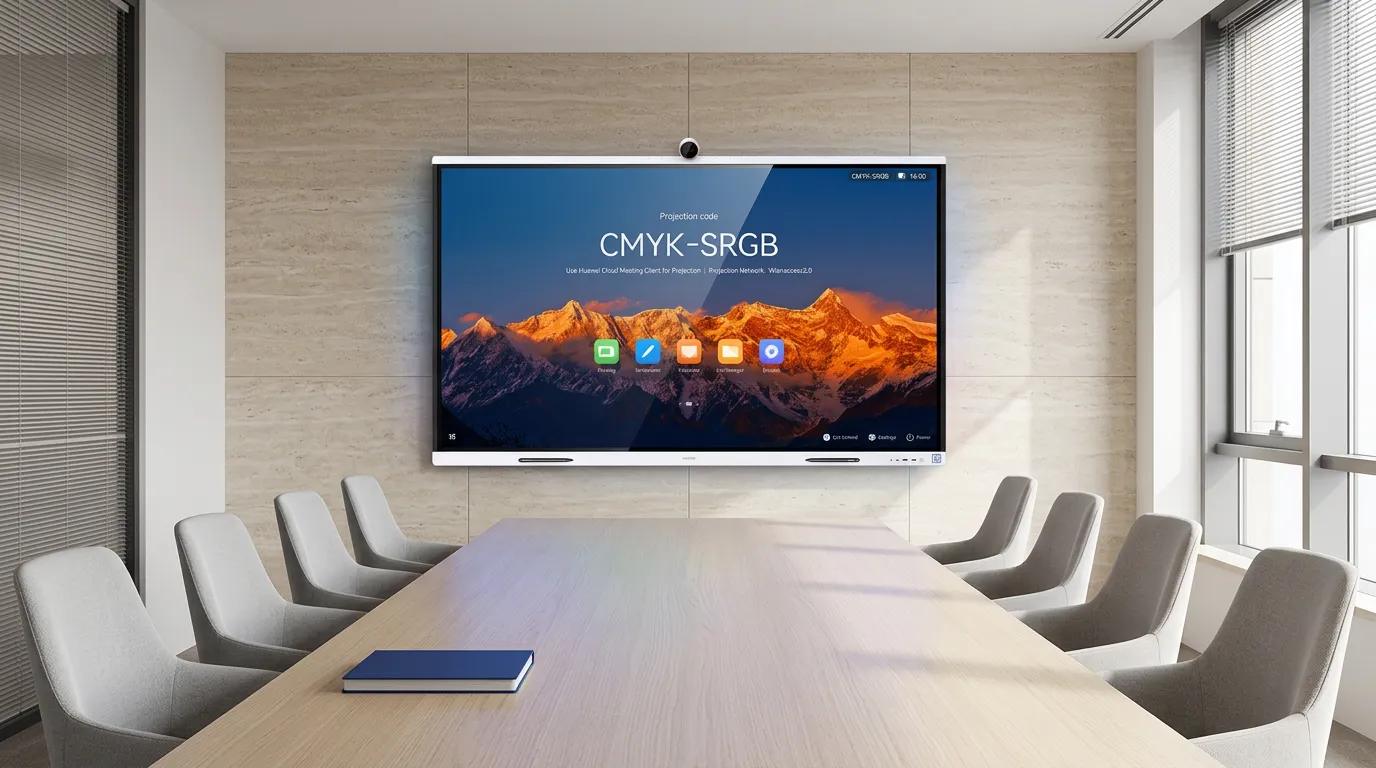
The Huawei IdeaHub B3 Base is a 4K interactive meeting board with a built-in 1080p camera, 8 microphones and speakers, built for Teams and Zoom rooms. It comes in 65, 75, 86 and 98-inch sizes and takes its system from an OPS module, suiting offices that run their own meeting platform rather than Huawei's apps.
Huawei sells three IdeaHub boards with almost the same name: the IdeaHub B3, the IdeaHub B3 Base and the IdeaHub Board 3 Base. They look alike on a product list, but one runs Huawei's own system, one is built for Teams and Zoom, and one has no camera at all. Ordering the wrong one usually shows up on the first video call.
This guide explains what the B3 Base includes, where its system comes from and how it compares with its two near-namesakes. If you are planning the whole room, read our video conferencing guide for Saudi meeting rooms alongside it. We finish with who the B3 Base suits, and the installation checks that matter most for the larger sizes.
What is the Huawei IdeaHub B3 Base?
The Huawei IdeaHub B3 Base is a 4K interactive meeting board with a camera, microphones and speakers built in, designed for rooms that run Teams, Zoom or other meeting apps from a computer. Huawei's datasheet lists:
- Sizes: 65, 75, 86 and 98 inches, model codes IHB3-65AC, IHB3-75AC, IHB3-86AC and IHB3-98AC.
- Display: 4K with a D-LED backlight, 350 nits brightness, an anti-glare coating and TÜV Rheinland low blue light certification.
- Camera: 1920 x 1080 with 5x zoom and auto-framing, which keeps everyone in the room centred in the picture.
- Microphones: an 8-microphone array with 10 m far-field pickup across 180°.
- Speakers: 2.1-channel stereo, two tweeter and full-range units plus a woofer, up to 92 dB.
- Whiteboard: text and shape recognition, mind maps, sticky notes and templates.
- Projection: Wi-Fi Direct casting, the IdeaShare Key, ultrasonic projection and wired projection.
Where does the system come from?
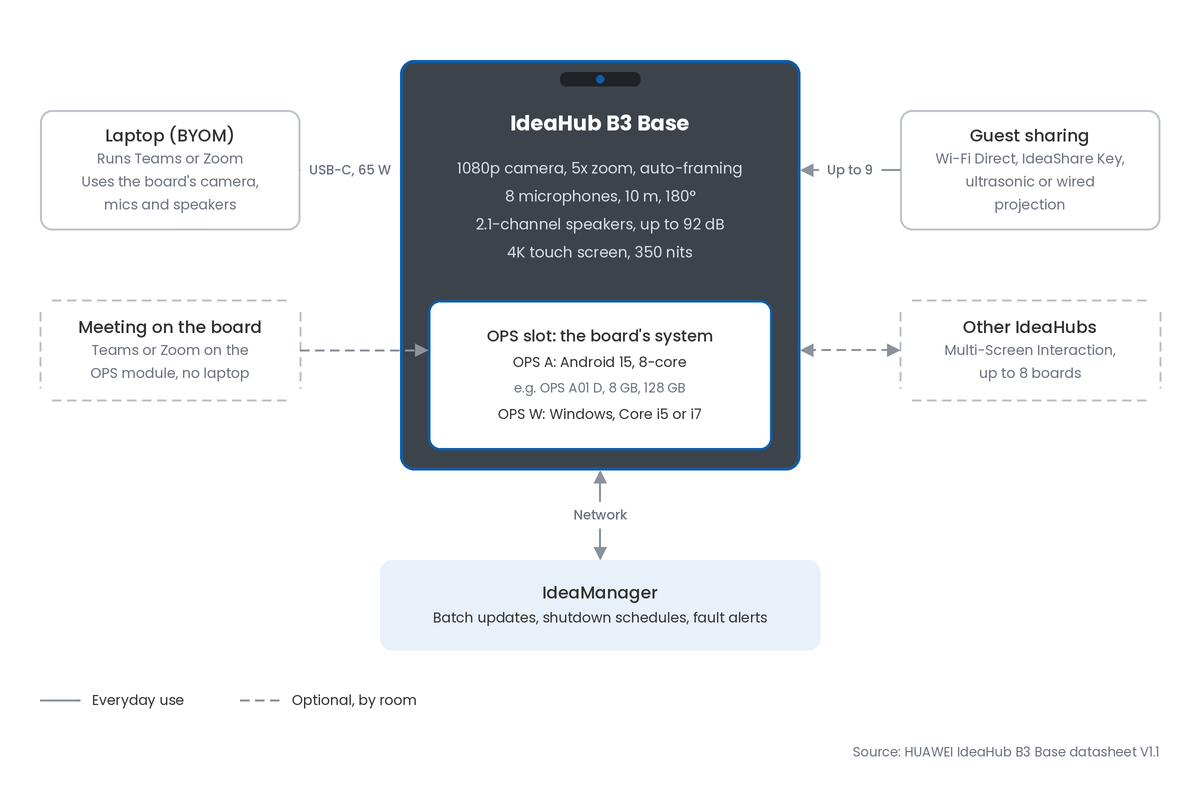
The B3 Base takes its operating system from an OPS module in its slot. Huawei's datasheet pairs it with the Android OPS A series, running Android 15 with an 8-core processor, or the Windows OPS W series with an Intel Core i5 or i7. Blue Edge's B3 Base product pages list the Android 15, 8 GB and 128 GB configuration, which matches the OPS A01 D module.
Does it work with Teams and Zoom?
Yes. Huawei describes the B3 Base as working natively with Zoom and Teams, and it supports bring-your-own-meeting (BYOM), where a laptop runs the call and uses the board's camera, microphones and speakers. That makes it a natural fit for organisations whose meetings already run on those platforms.
How do guests share their screens?
Guests can cast over Wi-Fi Direct, plug in the IdeaShare Key, or connect a laptop by USB-C, which also charges it at up to 65 W. With the 8 GB OPS module the board shows up to 9 shared screens at once, and 4 with the 4 GB module.
How do you choose the right B3 Base?
Choose the size from the room, the module from the software your team uses, and the mount from the weight. These are the key numbers from Huawei's datasheet:
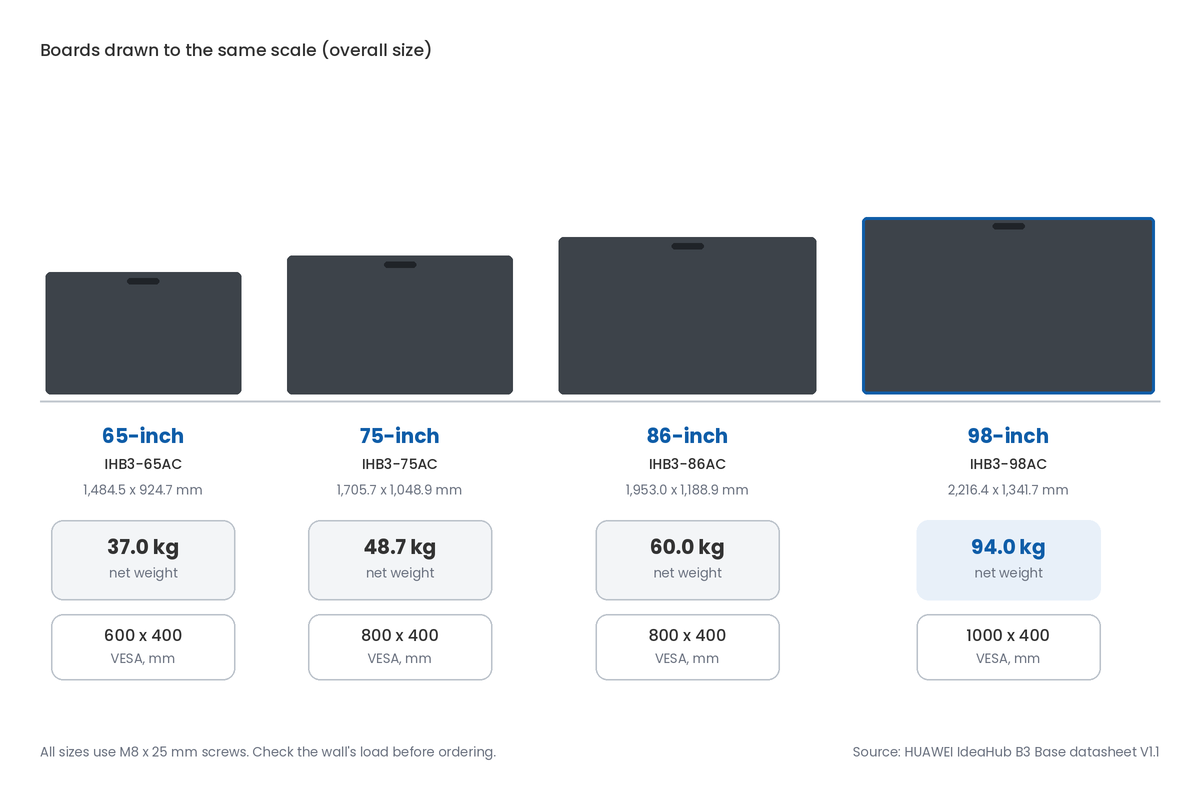
- Weights: 37.0 kg (65-inch), 48.7 kg (75-inch), 60.0 kg (86-inch) and 94.0 kg (98-inch).
- Overall width: 1,484.5 mm, 1,705.7 mm, 1,953.0 mm and 2,216.4 mm.
- VESA pattern: 600 x 400 mm (65-inch), 800 x 400 mm (75 and 86-inch) and 1000 x 400 mm (98-inch), with M8 screws.
- Microphone reach: 10 m across a 180° pickup angle.
- Camera: 1080p with 5x zoom.
- Projection: up to 9 screens with the 8 GB OPS module.
Which size suits the room?
Match the screen to the distance from the board to the farthest seat. A 65 or 75-inch board suits a small to medium meeting room, the 86-inch a boardroom, and the 98-inch a training room or a long boardroom. Because the microphones reach 10 m, the 98-inch is also the size where sound pickup and screen size line up for a large room.
Android or Windows module?
Choose the Android OPS A module when the room runs meetings over BYOM and casting, and the Windows OPS W module when the board itself must run Windows software or join the meeting without a laptop. Blue Edge supplies the OPS A01 D (Android 15, 8 GB, 128 GB) and Windows modules such as the OPS W021 D (Core i5, 8 GB, 256 GB, Windows 11 IoT Enterprise).
How do you tell the models apart?
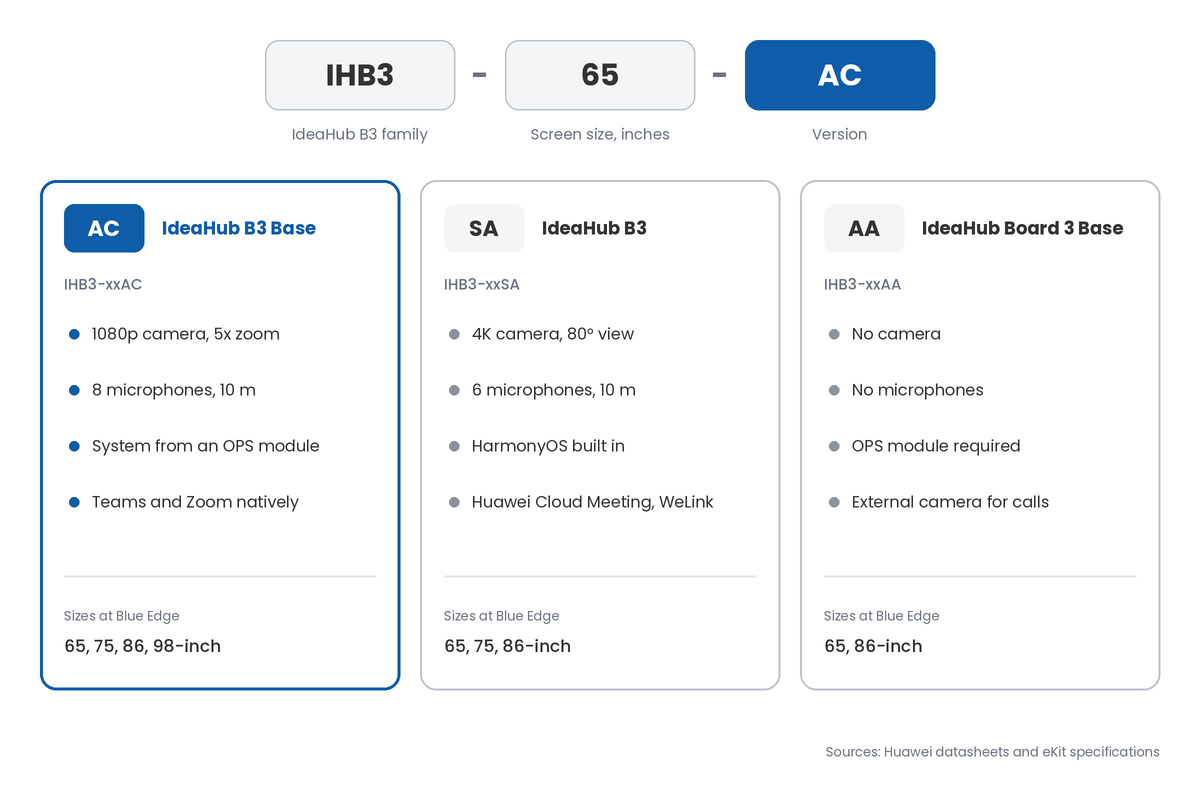
Read the model code, not the name. IHB3 is the B3 family and the two letters at the end set the version: AC is the B3 Base, SA is the standard B3 and AA is the Board 3 Base. Put the full code on the purchase order, because the names alone are easy to mix up.
How does the B3 Base compare with the B3 and Board 3 Base?
The B3 Base sits between the other two: it has a camera and microphones like the B3, but takes its system from an OPS module like the Board 3 Base. The table uses Huawei's specifications for each model.
| Factor | IdeaHub B3 Base (IHB3-xxAC) | IdeaHub B3 (IHB3-xxSA) | IdeaHub Board 3 Base (IHB3-xxAA) |
|---|---|---|---|
| Sizes at Blue Edge | 65, 75, 86 and 98-inch | 65, 75 and 86-inch | 65 and 86-inch |
| System | OPS module: Android 15 or Windows | HarmonyOS built in; Windows with an OPS | OPS required: Android or Windows |
| Camera | 1080p, 5x zoom, auto-framing | 4K, 80° view, auto-framing and tracking | None; external camera needed |
| Microphones | 8, 10 m, 180° | 6, 10 m, 180° | None; external microphone needed |
| Speakers | 2.1-channel, up to 92 dB | 4 units, 30 W total | 2.1-channel, 60 W total |
| Storage | 128 GB (OPS A, 8 GB version) | 64 GB | 128 GB |
| Meeting apps | Teams and Zoom natively; BYOM | Huawei Cloud Meeting and WeLink natively; BYOM | Third-party apps with an external camera and microphone |
| Best fit | Teams and Zoom meeting rooms, up to large rooms | Rooms on Huawei Cloud Meeting or WeLink | Presentation and training rooms, or rooms with a camera kit |
Key takeaway
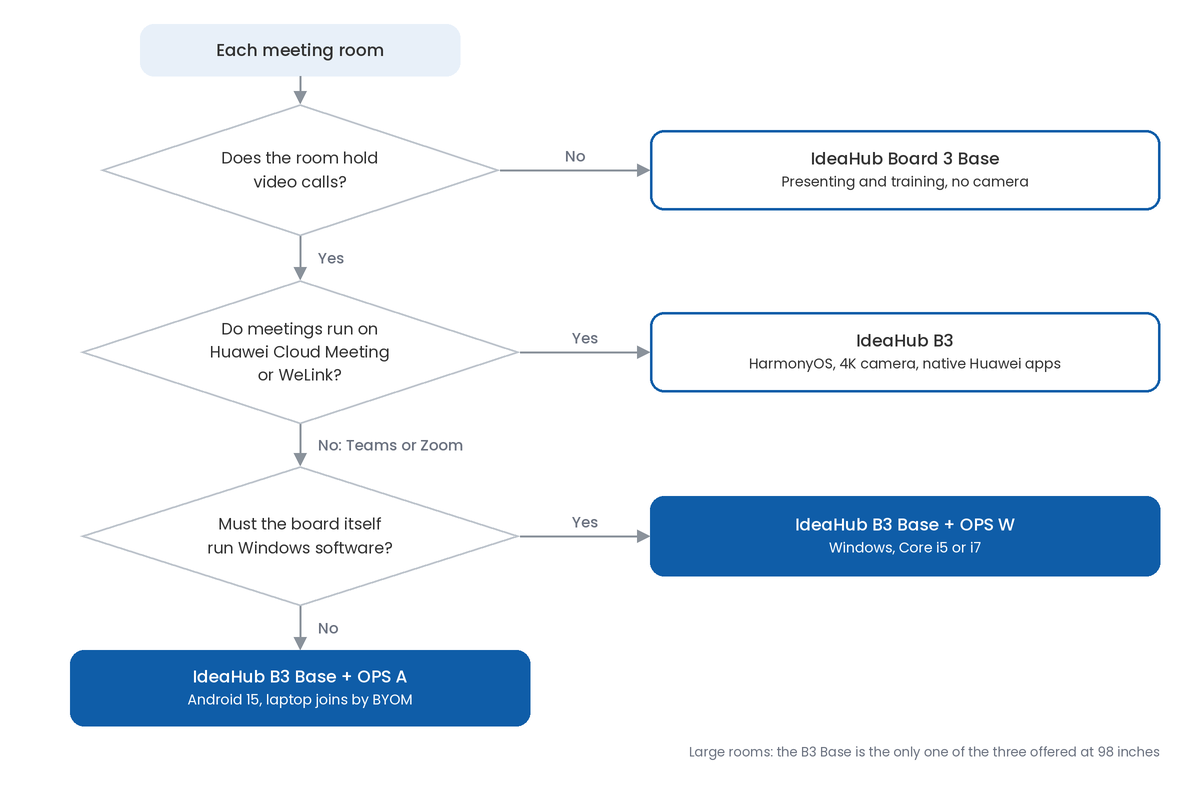
For most organisations whose meetings run on Teams or Zoom, the B3 Base is the IdeaHub to choose, and it is the only one of the three offered here at 98 inches. Choose the standard B3 if your organisation uses Huawei Cloud Meeting or WeLink, and the Board 3 Base for rooms that present and train but rarely hold video calls.
Who is the IdeaHub B3 Base for?
The B3 Base suits organisations that want one board to handle meetings, presenting and whiteboarding without separate camera and microphone hardware. It fits best in four situations:
- Teams and Zoom offices: staff already meet on those platforms and want to bring a laptop and start.
- Large meeting and training rooms: the 98-inch screen and 10 m microphone reach cover rooms that smaller boards cannot.
- Visitor-heavy rooms: guests share without joining the network, through Wi-Fi Direct or the IdeaShare Key.
- Multi-room rollouts: IdeaManager lets IT schedule shutdowns, push updates and receive fault alerts for many boards at once.
It suits less well if your organisation is built around Huawei Cloud Meeting or WeLink, where the standard B3 runs them natively, or if a room never holds calls. For Huawei's slimmer all-in-one range, compare the IdeaHub S3 86.
What do Saudi organisations need to consider?
Four local checks matter more than the spec sheet. Each is quicker to settle in a demo than after delivery.
Will it handle Arabic content?
Huawei's datasheet does not cover Arabic, so test it before ordering. Check Arabic typing, right-to-left text in the whiteboard and in shared documents, and whether text recognition on the whiteboard reads Arabic handwriting as well as English.
How do daylight and glazing affect it?
The B3 Base is rated at 350 nits with an anti-glare coating, which suits a normally lit room but not a screen facing bright glazing. Mount it on a wall away from the windows, or fit blinds where the afternoon sun crosses the screen.
Does the camera raise privacy questions?
Auto-framing and recorded meetings capture people's images and voices, which is personal data under Saudi Arabia's Personal Data Protection Law. Tell staff and visitors when meetings are recorded and how long recordings are kept.
Can the wall take the weight?
The 98-inch model weighs 94 kg before its bracket, so confirm what the wall is built from before ordering, especially gypsum partitions common in fitted-out offices. Plan the bracket, a power point and a network point behind the screen at the same time. [NEED: B3 Base warranty terms and in-Kingdom repair or replacement process]
Blue Edge supplies and supports Huawei eKit IdeaHub interactive screens, including the Huawei IdeaHub range with the B3 Base in 65, 75, 86 and 98-inch sizes and its OPS modules, brackets and stands. See our interactive display solutions, and our IT installation and configuration service for mounting, network set-up and handover.
What are the most common B3 Base buying mistakes?
- Ordering by name instead of model code. The B3, B3 Base and Board 3 Base are easy to confuse, and a board without a camera ordered for a video room means a return or an extra camera kit.
- Leaving out the OPS module. The B3 Base takes its system from the module, so plan which one each board gets before delivery, or the board arrives without the software the room needs.
- Mounting a 98-inch board on an unchecked wall. At 94 kg, a weak partition means reinforcing it after the fact, with rework and delay.
- Choosing the B3 Base for a Huawei Cloud Meeting office. If meetings run on Huawei's own apps, the standard B3 runs them natively and saves a laptop at every meeting.
- Skipping the Arabic and Teams test. One issue found after delivery repeats in every room.
- Forgetting network points. A board on Wi-Fi alone struggles in a busy office, and adding cable after fit-out costs more than planning it.
Confirm the model, module and mount before you order
Start with a room list: size, farthest seat, wall construction and which meeting platform each room uses. That tells you the screen size, whether you need the B3 Base, the B3 or the Board 3 Base, and which OPS module each board gets.
Next, run a demo in a real room with a real call on your platform. Test casting from a guest laptop, the camera's framing from the back seats and the microphones from the far end of the table.
Then confirm the full model code, module, bracket or stand for every board on the order. Add network and power points to the fit-out drawings before the walls close. Our guide to smart meeting room management covers booking and room control once the boards are in.
Schema about: Huawei IdeaHub B3 Base interactive meeting display
Key Takeaways
- The IdeaHub B3 Base is a 4K meeting board with a built-in 1080p camera, 8 microphones and 2.1-channel speakers.
- It comes in 65, 75, 86 and 98-inch sizes, model codes IHB3-65AC to IHB3-98AC.
- Its system comes from an OPS module: Android 15 on the OPS A series or Windows on the OPS W series.
- It is built for bring-your-own-meeting rooms running Teams or Zoom.
- The standard IdeaHub B3 runs HarmonyOS with a 4K camera; the Board 3 Base has no camera or microphones.
- The 98-inch model weighs 94 kg, so check the wall before ordering.
Frequently Asked Questions
-
What camera does the IdeaHub B3 Base have?
A built-in 1920 x 1080 camera with 5x zoom and auto-framing, which keeps everyone in the room centred as people move or join. It is paired with an 8-microphone array that picks up voices up to 10 m away across 180°. The standard IdeaHub B3 has a 4K camera instead, with an 80° horizontal view and speaker tracking.
-
Does the IdeaHub B3 Base need an OPS module?
Yes, Huawei's datasheet pairs it with an OPS module for its operating system: the Android OPS A series with Android 15, or the Windows OPS W series with an Intel Core i5 or i7. Only one module fits at a time. Confirm with your supplier which module comes with each board, and order the Windows module for rooms that need Windows software.
-
What wall mount does the IdeaHub B3 Base use?
It uses standard VESA mounting with M8 screws: 600 x 400 mm for the 65-inch, 800 x 400 mm for the 75 and 86-inch, and 1000 x 400 mm for the 98-inch. Huawei offers a wall-mount bracket and a rolling stand as options. Check the bracket's rated load against the board's weight, which reaches 94 kg for the 98-inch.
-
Can the IdeaHub B3 Base connect several meeting rooms?
Yes. Huawei's Multi-Screen Interaction feature lets up to 8 IdeaHubs share content in multicast, which suits training sessions spread across several rooms. For remote participants, the meeting itself runs on Teams, Zoom or another platform through BYOM or the OPS module, so each room's board joins the call as a normal participant.
-
How is a fleet of IdeaHub B3 Base boards managed?
Through Huawei's IdeaManager platform, which schedules batch shutdowns, pushes software updates to many boards at once, sends fault alerts and runs self-diagnosis for common faults. It saves IT visiting every room for routine updates. Set a shutdown schedule outside working hours so boards are not left on overnight and over the weekend.
Sources & References
- Huawei — HUAWEI IdeaHub B3 Base Datasheet V1.1, hosted on the Blue Edge product page vendor documentation
- Huawei — IdeaHub B3 datasheet, hosted on the Blue Edge product page vendor documentation
- Huawei eKit — IdeaHub Board 3 Base 65 product specifications vendor documentation
Planning IdeaHub B3 Base meeting rooms?
Blue Edge supplies the Huawei IdeaHub B3 Base, OPS modules, wall brackets and rolling stands to projects across Saudi Arabia, with installation and configuration support.
Call or WhatsApp +966 53 9855 188, contact the Blue Edge team, or browse the Huawei IdeaHub range.
About Blue Edge
Blue Edge Company is a value-added technology distributor based in Dammam, Saudi Arabia, supplying interactive displays, smart building systems, networking infrastructure and IT security software to businesses and residential projects across the Kingdom, with installation and technical support.
Learn more about Blue Edge →Published 19 October 2026 • Last updated 13 November 2026 • This article is reviewed when standards, regulations or product guidance change.