Shopping Cart


- Articles
- Enterprise Communication
- Huawei IdeaHub S2 vs S3: Which Should You Buy?
Huawei IdeaHub S2 vs S3: Which Should You Buy?
Huawei IdeaHub S2 vs S3 for Saudi meeting rooms: camera, 6 vs 24 microphones, meeting apps and sizes compared, plus which model suits each room.
By Blue Edge Team | Published Oct 05, 2026 | Updated Oct 05, 2026 | 12 min read
Quick answer
Choose the Huawei IdeaHub S3 for boardrooms and rooms where video calls are the main job, and the IdeaHub S2 for huddle rooms and presentation-led rooms. The S3 adds a dual-lens 4K camera with 5x zoom and 24 microphones with 15 m pickup, against the S2's single 4K camera, 6 microphones and 12 m.
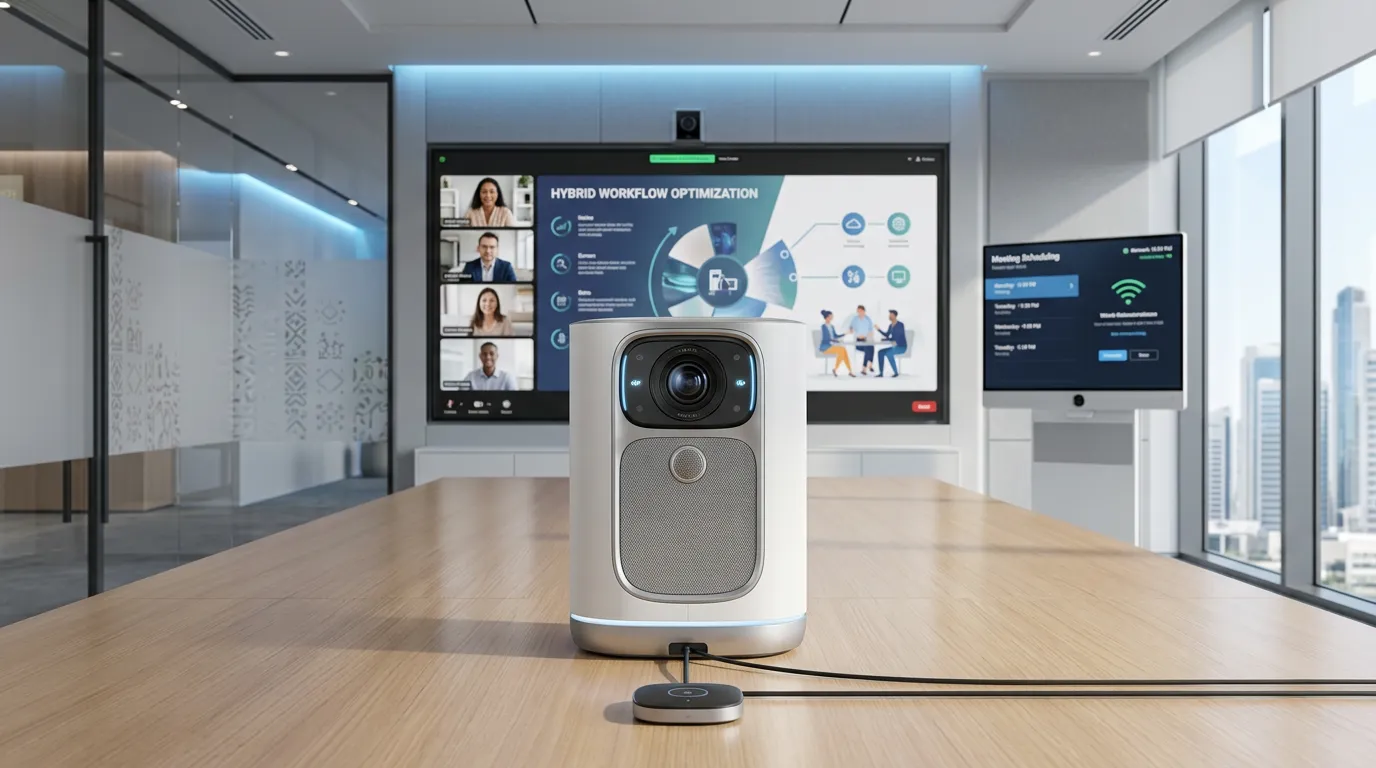
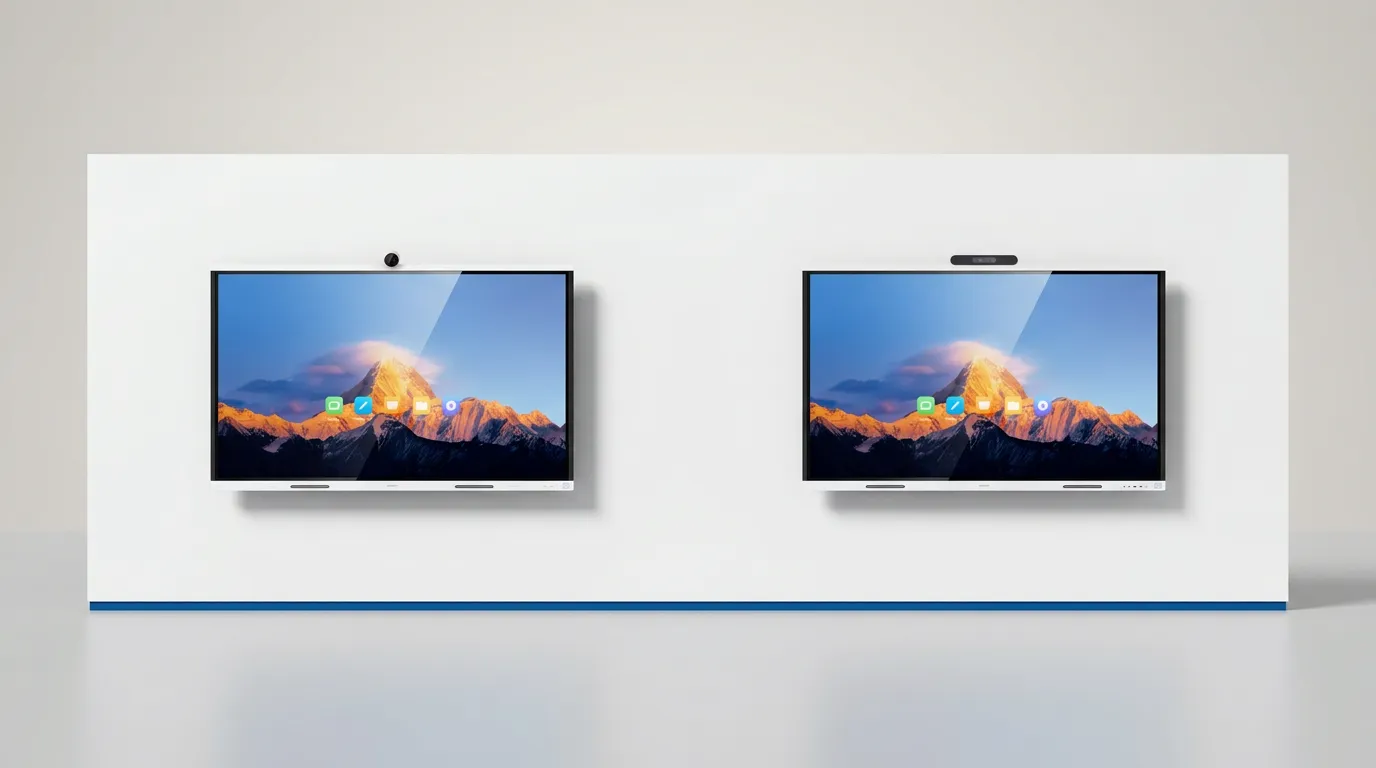
On a quotation, the two models look almost identical: the same 65, 75 and 86-inch sizes, a 4K touch screen, and HarmonyOS with Windows as an option. It is easy to choose on price or on the newer model number, then find out on the first video call that the remote side cannot hear the far end of the table or see who is talking.
The differences that matter sit in the camera, the microphones and the meeting software. If you are still planning the wider room, start with our guide to video conferencing for Saudi meeting rooms. This guide compares the S2 and S3 on Huawei's published specifications, matches each model to the rooms it suits, and covers the Saudi checks and buying mistakes that cost most to fix.
What is the difference between the Huawei IdeaHub S2 and S3?
The IdeaHub S3 keeps the S2's 4K screen and writing performance but upgrades everything a video call depends on. Here is what changes and what stays the same:
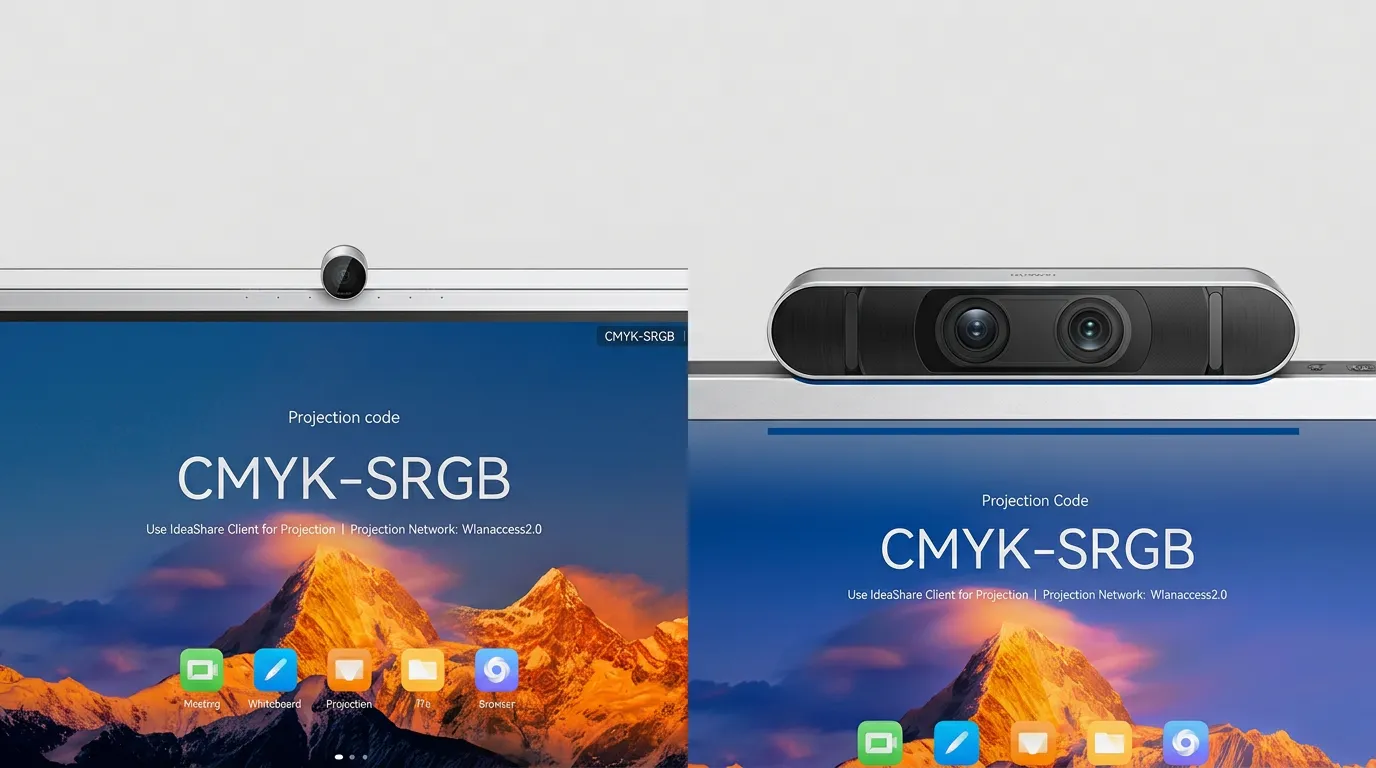
- Camera: a single 4K camera with an 80° view on the S2; an 80° wide-angle plus 65° telephoto lens with 5x zoom on the S3.
- Microphones: 6 microphones and 12 m pickup on the S2, against 24 microphones and 15 m on the S3.
- Speakers: four units and 40 W on the S2; five units including a woofer, 70 W in total, on the S3.
- Storage: 8 GB of RAM on both, with flash storage doubled from 64 GB to 128 GB on the S3.
- Sharing: Wi-Fi 6 projection and NFC on both; the S3 adds ultrasonic device discovery and 9-pane projection.
- Unchanged: the 4K screen, 16 ms writing latency, the three sizes and optional Windows through an OPS module.
Is the IdeaHub S3 a replacement for the S2?
Not in Blue Edge's range. Huawei unveiled the S3 as its flagship conference whiteboard at MWC Barcelona in March 2025, and Blue Edge still supplies the S2 alongside it. If you standardise on the S2 for a multi-year project, ask how long it will keep receiving firmware updates.
Do the S2 and S3 have the same screen?
Yes, for practical purposes. Both use a 4K D-LED panel with zero-gap bonding, quote 16 ms writing latency and recognise handwritten text and 11 types of shapes, and each size has the same width in both ranges. Our explainer on how interactive touch screens work covers the basics.
How do the S2 and S3 compare for video calls?
The S3 is the stronger video-call device. Its camera zooms in on distant participants, and its microphones reach 3 m further.
Which IdeaHub has the better camera?
The S3 has the better camera: a dedicated 65° telephoto lens gives speaker tracking a closer shot of whoever is talking. Huawei also lists Auto-Crop View, which divides participants into 6 panes, and super-resolution that lifts 720p calls to near-1080p in BYOM or OPS-based cloud meetings. The S2's single 4K camera offers voice tracking and Auto-Framing, which is enough when everyone sits close to the screen.
How far can each IdeaHub pick up voices?
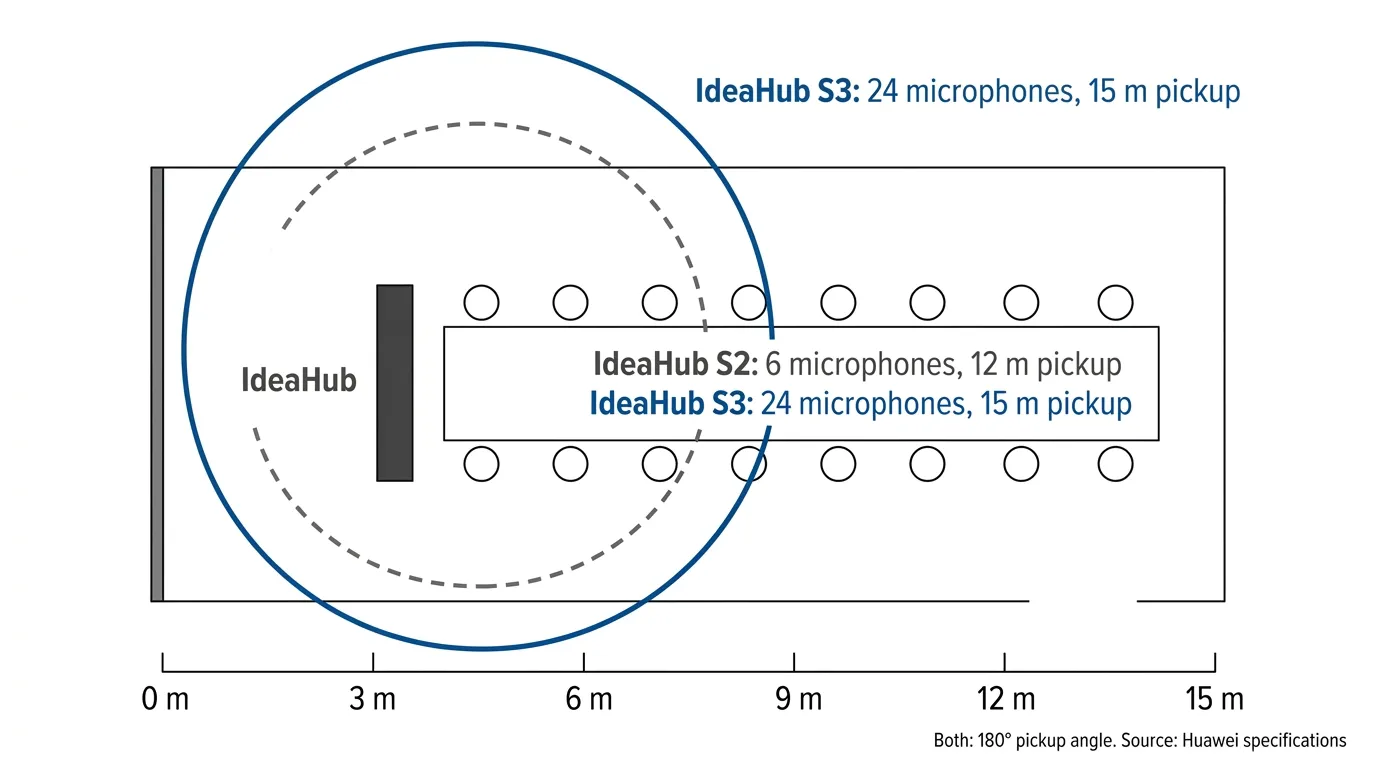
The S2 picks up voices up to 12 m away with 6 microphones, and the S3 up to 15 m with 24; both cover a 180° arc in front of the screen. Both use DNN-based dereverberation and an acoustic baffle against echo and outside noise, and the S3 adds AI noise removal for 300 or more noise types.
Which meeting apps do the S2 and S3 support?
Both run Huawei's own meeting software natively and work with Microsoft Teams, Zoom and other platforms through BYOM or an OPS Windows module. BYOM (Bring Your Own Meeting) moves a laptop call onto the board's camera, microphones and speakers, while an OPS module, sold separately for both, runs Windows apps on the board itself.
The real difference is on-premises video. Huawei lists H.264 and SIP on-premises meetings for the S2 through Huawei CloudLink (a licence is needed for 1080p), alongside Huawei Cloud Meeting and WeLink, while the S3 datasheet lists Huawei Cloud Meeting SmartRooms. If you run a SIP video system, confirm S3 support before ordering.
How do the IdeaHub S2 and S3 specifications compare?
The S3 matches the S2 on screen, writing and sizes, and outranks it on camera, audio, storage and sharing. The last column shows what each difference means in a real room.
| Feature | IdeaHub S2 | IdeaHub S3 | What it means |
|---|---|---|---|
| Sizes and models | 65, 75, 86 in (IHS2-65SA, IHS2-75SA, IHS2-86SA) | 65, 75, 86 in (IHS3-65SA, IHS3-75SA, IHS3-86SA) | Same choice of sizes |
| Camera | Single 4K lens, 80° view | Dual-lens 4K, 80° wide plus 65° telephoto, 5x zoom | Closer shots of distant speakers |
| Microphones | 6 mics, 12 m pickup | 24 mics, 15 m pickup, AI noise removal | S3 for long, noisy rooms |
| Speakers | 4 units, 40 W | 5 units including woofer, 70 W | S3 fills larger rooms |
| Video AI | Voice tracking, Auto-Framing | Speaker tracking, Auto-Framing, Auto-Crop View, 720p super-resolution | Tighter framing for remote viewers |
| Meeting apps | Huawei Cloud Meeting, WeLink, SIP on-premises | Huawei Cloud Meeting SmartRooms, third-party apps via OPS | S2 fits existing SIP systems |
| Memory and storage | 8 GB RAM, 64 GB | 8 GB RAM, 128 GB | Space for apps and saved boards |
| Writing | 16 ms latency | 16 ms latency | No difference |
| Wireless sharing | Wi-Fi 6 direct projection, NFC | Wi-Fi 6, NFC, ultrasonic discovery, 9-pane projection | S3 removes projection codes |
Key takeaway
For most buyers, the S3 is the right choice for boardrooms, VIP rooms, training rooms and any room where video calls are the main job, because remote participants notice the camera and microphones first. The S2 suits huddle rooms, presentation-led rooms and sites running on-premises SIP meetings.
Which IdeaHub has more ports?
The S3 has more wired inputs: two HDMI inputs to the S2's one, plus a fast-charging 65 W USB-C port. Both keep HDMI out, USB 3.0, gigabit RJ45 and 3.5 mm audio in and out.
Which IdeaHub should you buy for your room?
Buy the S2 for huddle and presentation rooms, the S3 where video quality is the priority, and the B3 Base for anything above 86 inches. Start with three numbers for each room:
- Furthest seat: within 12 m, both models are specified to pick up voices; from 12 to 15 m, only the S3; beyond 15 m, plan separate conferencing audio.
- Wall width: 1484.5, 1705.7 or 1953.0 mm for a 65, 75 or 86-inch board of either range, before the bracket or stand.
- Wall load: 35.5, 47.0 and 62.0 kg net for the S2, and 37.0, 49.5 and 64.4 kg for the S3, at 65, 75 and 86 inches.
Which model suits a huddle room or small meeting room?
The S2 suits most huddle rooms and small meeting rooms, because every seat sits well inside its 12 m pickup and Auto-Framing keeps the group in shot. The 65-inch IdeaHub S2-65 (IHS2-65SA) is the natural fit, and if your quote shows a price gap, the S2 stretches the budget across more rooms.
Which model suits a boardroom, VIP room or training room?
The S3 suits boardrooms, VIP rooms and training rooms, where remote participants must see and hear people at the far end of a long table. The 86-inch IdeaHub S3-86 (IHS3-86SA) pairs the largest S-series screen with the 15 m pickup, and S3 boards can form a group, so one main screen broadcasts to the rest.
What if you need a screen bigger than 86 inches?
Neither range goes above 86 inches, so for a large boardroom or lecture-style room, look at the 98-inch IdeaHub B3 Base (IHB3-98AC). Compare its camera and microphone specifications with the S3 first, because a bigger screen does not mean wider audio coverage.
What do Saudi buyers need to consider before choosing an IdeaHub?
Four local factors decide whether an IdeaHub works in a Saudi meeting room: language, data, daylight and support. None of them appears on a spec sheet.
Will Arabic work on the IdeaHub?
Arabic works in the menus, but test handwriting before relying on it. Both models list Arabic as an interface language, yet Huawei's S2 specification names only Chinese and English for handwriting recognition, and the S3 datasheet does not name Arabic. Ask for a demonstration with Arabic handwriting and right-to-left text in your own documents.
Where does meeting and whiteboard data go?
Cloud meetings and QR-code whiteboard saving both send content off the board, so confirm where it is stored before meetings that involve personal data. The Personal Data Protection Law (PDPL) governs how personal data is processed and when it can leave the Kingdom, so ask your IT or compliance team which meeting platforms are approved.
Does daylight from glazed façades affect the screen?
Yes, so plan the screen position around the windows. Huawei's S3 datasheet lists a typical brightness of 350 nits, which suits an indoor meeting room but not a wall facing glass in afternoon sun. Mount the board at right angles to the glazing, or fit blinds, so the screen avoids direct sun and the camera does not face the light behind participants.
What should you ask about warranty and spares?
Ask who handles warranty claims inside Saudi Arabia, how long repairs take and whether stylus pens and IdeaShare Keys are stocked locally. A board sent abroad for repair leaves the room without its main screen until it returns.
Blue Edge Company, founded in 2016 and based in Dammam in the Eastern Province, is a value-added technology distributor supplying projects across Saudi Arabia. It supplies and supports Huawei eKit IdeaHub interactive screens, including the S2 and S3 in all three sizes, and provides IT installation and configuration and structured cabling and networking for the rooms they go into.
What are the most common IdeaHub buying mistakes?
The costliest mistakes come from buying the board before defining the room. They are listed worst first.
- Choosing on screen size alone. A bigger S2 does not hear further: the 86-inch S2 has the same 6 microphones and 12 m pickup as the 65-inch. In a long boardroom, you may pay again for add-on microphones or a new board.
- Ignoring room acoustics. Huawei rates the S3's dereverberation for rooms with a reverberation time (RT60) of up to 1.5 seconds. A glass-walled room that echoes more needs acoustic treatment, which costs more after handover than in the fit-out.
- Relying on Wi-Fi for the call itself. Both boards have a gigabit RJ45 port, and a cable keeps calls steadier than busy office Wi-Fi. Adding a data point after the walls are finished means opening and repainting them.
- Leaving accessories off the order. The wall bracket, rolling stand, OPS module and IdeaShare Key are optional on both ranges. Without them, the board cannot be mounted, run Windows or offer plug-and-play sharing on installation day.
- Rolling out every room before testing one. Run one room on your real meeting platform for a week first. A problem with BYOM, the OPS module or the network is then fixed once, not in every room.
Measure each room, then shortlist the model
Measure each room first: the distance to the furthest seat, the free wall width, the wall construction and the window positions. Those four facts decide the model, the size and where the board goes.
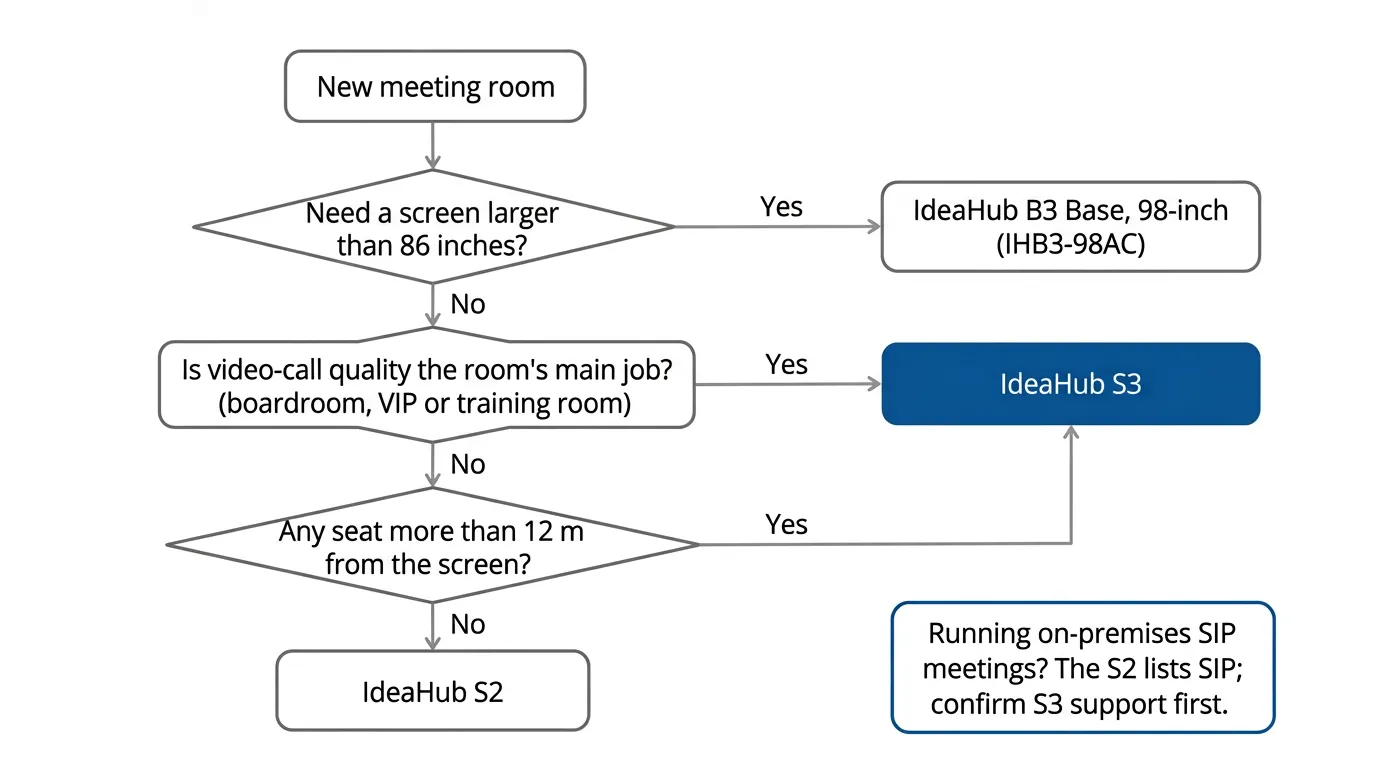
Next, run each room through the flowchart below and note the model and size. Settle the meeting platform at the same time, because it decides whether you need OPS modules or on-premises licences.
Finally, check the delivery route. An 86-inch IdeaHub ships in a 1300 x 2090 x 250 mm carton (H x W x D) weighing up to 78.4 kg, so confirm it fits the lift and doorways.
Key Takeaways
- The IdeaHub S3 upgrades the S2's camera (dual-lens 4K, 5x zoom), microphones (24, 15 m pickup), speakers (70 W) and storage (128 GB).
- The 4K screen, 16 ms writing latency and 65, 75 and 86-inch sizes are the same on both.
- Choose the S3 for boardrooms, VIP rooms, training rooms and rooms where video calls are the main job.
- Choose the S2 for huddle rooms, presentation-led rooms and sites running on-premises SIP meetings.
- For screens above 86 inches, the IdeaHub B3 Base offers a 98-inch model.
- Saudi buyers should test Arabic handwriting, check where meeting data goes under PDPL, keep screens out of direct glare and confirm in-Kingdom repairs.
Frequently Asked Questions
-
Can guests share their screen on an IdeaHub without joining the company Wi-Fi?
Yes. Huawei's Wi-Fi 6 direct projection on the S2 works without the guest joining your local network, and the optional IdeaShare Key gives plug-and-play sharing with no network at all. The S3 adds ultrasonic discovery, which needs no projection code, and Miracast for Android and Windows.
-
Does the IdeaHub have a privacy cover for the camera?
Yes, on both models, but they work differently. The S2's camera has a physical lens cap, while the S3 has an electronically controlled privacy shield, which Huawei announced with the S3 at MWC Barcelona 2025. In executive offices that also host confidential in-person meetings, either design shows visitors that the camera is covered.
-
Does the IdeaHub work with MacBooks and iPhones?
Yes. Huawei lists the IdeaShare app for iOS and macOS as well as Windows, Android and HarmonyOS, and the IdeaShare Key supports Windows and macOS. For BYOM calls on the S2, Huawei's notes specify a wired USB-C connection for Mac laptops. Test the same setup on an S3 before a wide rollout.
-
How do you manage several IdeaHubs across different offices?
Through Huawei's IdeaManager platform, which Huawei lists for both ranges. It manages IdeaHubs remotely and applies configuration, firmware upgrades and shutdown schedules in batches, and the S3 datasheet adds fault alarms. Batch shutdown schedules help when working hours change during Ramadan, because every board updates at once instead of room by room.
-
Can an IdeaHub S2 be upgraded to S3 features later?
No. The S3's dual-lens camera, 24-microphone array, 70 W speakers and 128 GB of storage are hardware, so no firmware update can add them to an S2. If a room may need the S3's zoom and pickup range during the board's working life, buy the S3 at the start.
Sources & References
- Huawei — HUAWEI IdeaHub S2 product page and specifications vendor documentation
- Huawei eKit — IdeaHub S2-86 product specifications (microphone count) vendor documentation
- Huawei — HUAWEI IdeaHub S3 Datasheet V25.1 (revision date June 2026, hosted on the Blue Edge S3 product pages) vendor documentation
- Huawei — Huawei Unveils Flagship IdeaHub ES3/S3, Bringing AI to Offices and Making IdeaHub Everywhere (4 March 2025) vendor documentation (press release)
Need help choosing between the IdeaHub S2 and S3?
Blue Edge supplies the Huawei IdeaHub S2, S3, B3 and B3 Base ranges for projects across Saudi Arabia, with installation and structured cabling.
Call or WhatsApp +966 53 9855 188, send your room list through the Blue Edge contact page, or see every model in the Huawei IdeaHub range.
About Blue Edge
Blue Edge Company is a value-added technology distributor based in Dammam, Saudi Arabia, supplying interactive displays, smart building systems, networking infrastructure and IT security software to businesses and residential projects across the Kingdom, with installation and technical support.
Learn more about Blue Edge →Published 5 October 2026 • Last updated 5 October 2026 • This article is reviewed when standards, regulations or product guidance change.