Shopping Cart


- Articles
- IT Management
- What Is Remote Monitoring and Management (RMM) Software?
What Is Remote Monitoring and Management (RMM) Software?
What RMM software is, how it works, how to choose a platform, and what Saudi organisations need to get right on patching, access and compliance.
By Blue Edge Team | Published Sep 29, 2026 | Updated Oct 03, 2026 | 10 min read

Quick answer
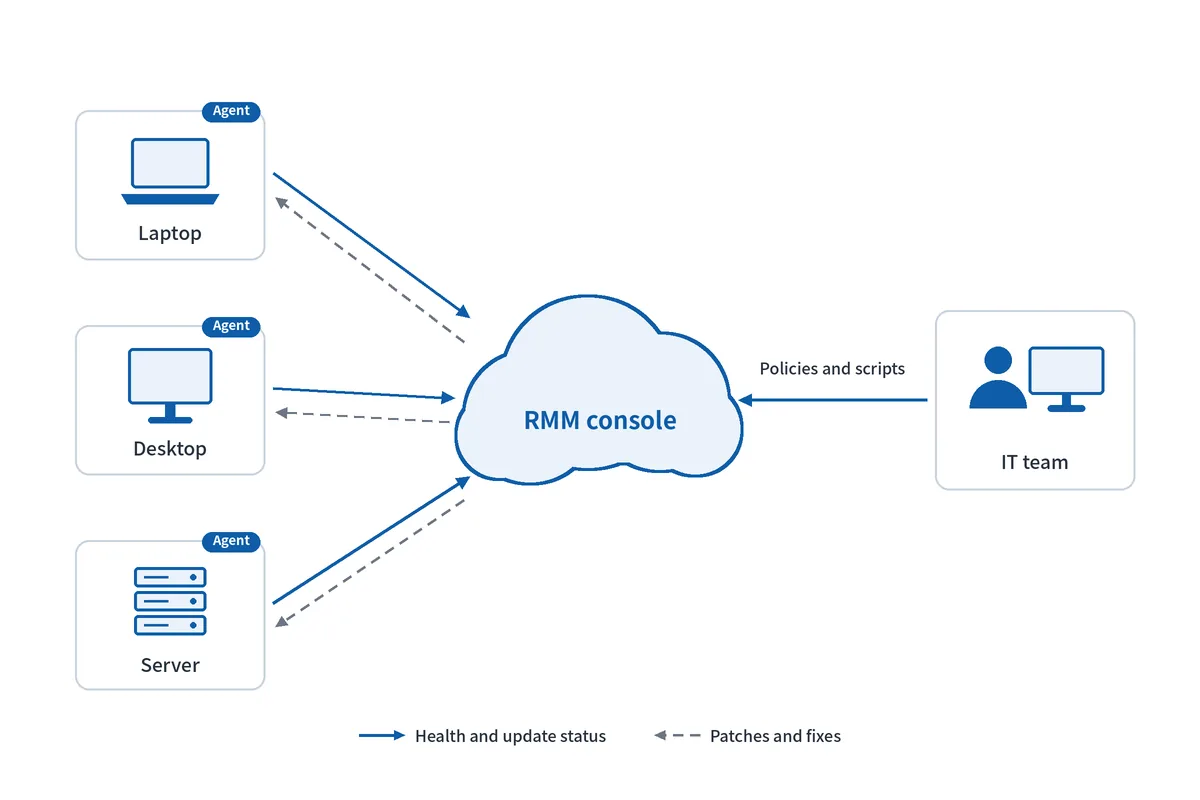
Remote monitoring and management (RMM) software lets an IT team watch, patch and fix every computer and server from one console, without visiting each device. A small agent installed on each machine reports its health and missing updates, so the team can fix most problems remotely, often before users notice them.
Most IT teams find out about problems the same way: a user calls. A laptop is slow, an update failed overnight, a server disk quietly filled up. By the time the call comes in, work has already stopped, and the fix starts with a drive to the office or a long screen-sharing session.
That model breaks down as soon as an organisation has more devices than one person can check by hand, more than one site, or staff working from home. It also leaves the questions an auditor asks without an answer: which devices do we have, and are they all patched? The discipline behind that second question is covered in patch management best practices.
This guide explains what RMM software does, how it compares with traditional IT support and with a managed IT provider, how to choose a platform, and what Saudi organisations need to get right on access, compliance and scheduling.
What Is RMM Software and What Does It Do?
RMM software is a platform that gives an IT team one view of every managed device and the tools to maintain those devices remotely. It replaces checking machines one by one with a console that shows the whole estate at once.
The core capabilities are consistent across serious platforms:
- Monitoring and alerting: CPU, memory, disk space, services and hardware health, with an alert when something crosses a threshold.
- Patch management: operating system and third-party application updates, approved and scheduled by policy rather than installed by hand.
- Remote access: a technician connects to a device to fix it without travelling or asking the user to install anything.
- Scripting and automation: routine tasks such as clearing disk space or restarting a stuck service run automatically across many devices.
- Asset inventory: hardware, software and warranty details for every device, kept current automatically.
- Reporting: patch status, device health and activity, ready for management or an audit.
How does an RMM agent work?
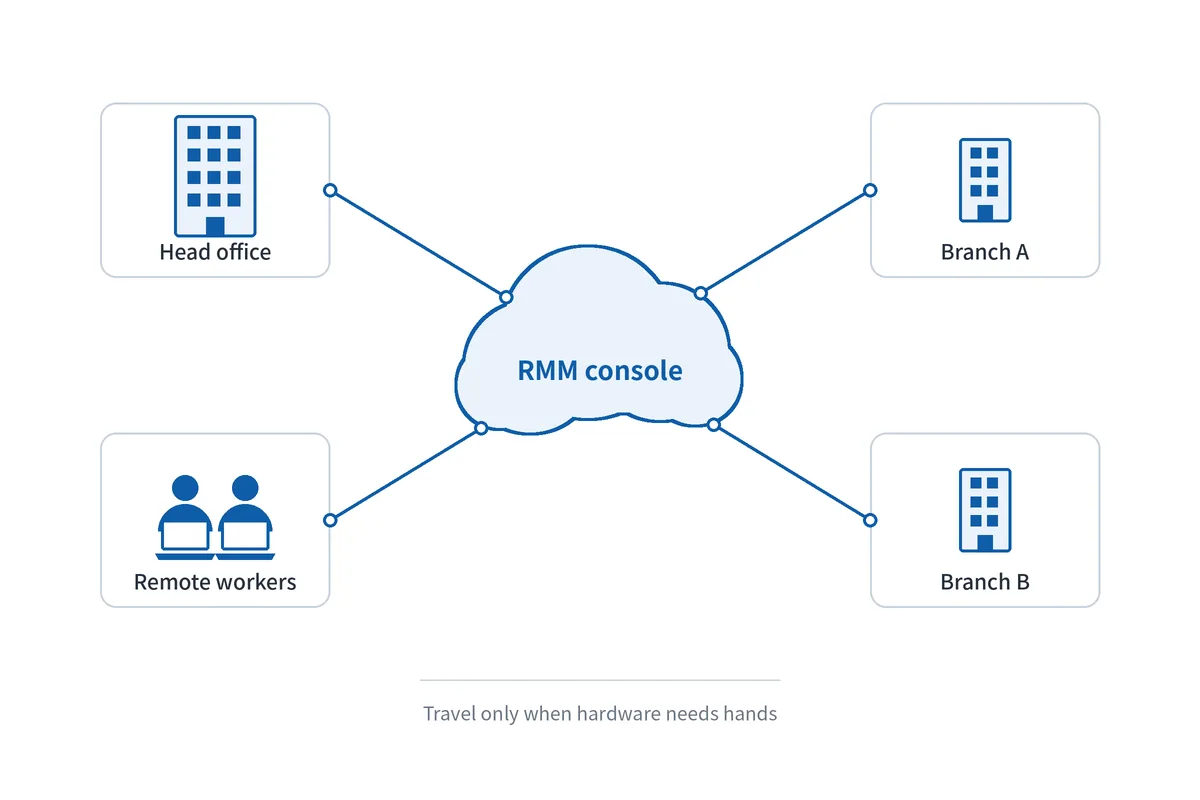
An RMM agent is a small program installed on each computer and server. It runs in the background, checks the device's health and update status, and reports to the central console over the internet. When a technician approves a patch or runs a script, the agent carries it out on the device. Because the agent reports out, a laptop at home or in a branch office is visible in the same way as a desktop at head office.
Is RMM the same as remote desktop software?
No. A remote desktop tool opens a session on one device at a time when someone asks for help. RMM includes remote access, but its purpose is to manage the whole estate continuously: monitoring every device, patching on a schedule and fixing problems automatically, whether or not anyone is connected.
RMM vs Traditional IT vs a Managed IT Provider
The same organisation can run IT support in three broadly different ways. The table below compares them on what matters in practice.
| Criterion | Traditional reactive IT | RMM run by your own team | Managed IT provider using RMM |
|---|---|---|---|
| How problems are found | Users report them | Alerts, often before users notice | The provider's alerts and monitoring |
| Patching | Manual, device by device | Automated by policy | Automated by the provider's policy |
| Device visibility | Partial, often in spreadsheets | Complete, live inventory | Complete, through the provider's reports |
| Who does the work | Internal staff, on site | Internal staff, mostly remote | The provider's technicians |
| Cost model | Staff time and travel | Per-device licence plus staff time | Monthly service fee |
| Control over tools and data | Full, but little data exists | Full | Depends on the contract |
| Best fit | Very small, single-site setups | Organisations with their own IT staff | Organisations without IT staff, or needing out-of-hours cover |
Key takeaway
for most organisations with at least one IT person, running RMM in-house gives the best balance of control and cost, because the team keeps full visibility and the licence replaces a large share of travel and manual work. A managed IT provider suits organisations with no internal IT staff, or those that need cover outside working hours, provided the contract gives them ownership of the RMM account and clear patching and reporting commitments.
How Do You Choose an RMM Platform?
Choose on coverage, patching depth, the workflow around it and security. Feature lists look similar between vendors; these questions separate them.
Which devices and sites must it cover?
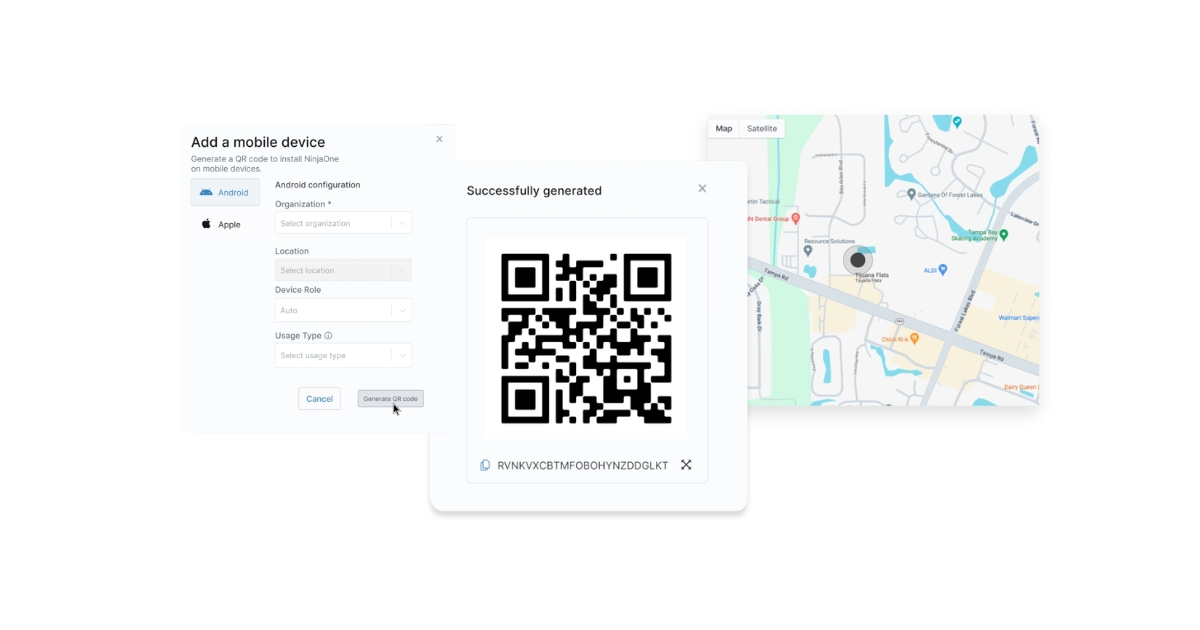
List what you need to manage before comparing products: Windows and macOS computers, Windows and Linux servers, network devices, and whether staff work remotely. Phones and tablets are usually handled by mobile device management, covered in mobile device management solutions in Saudi Arabia, so check whether the platform includes it or integrates with it.
What does it patch, and how are updates approved?
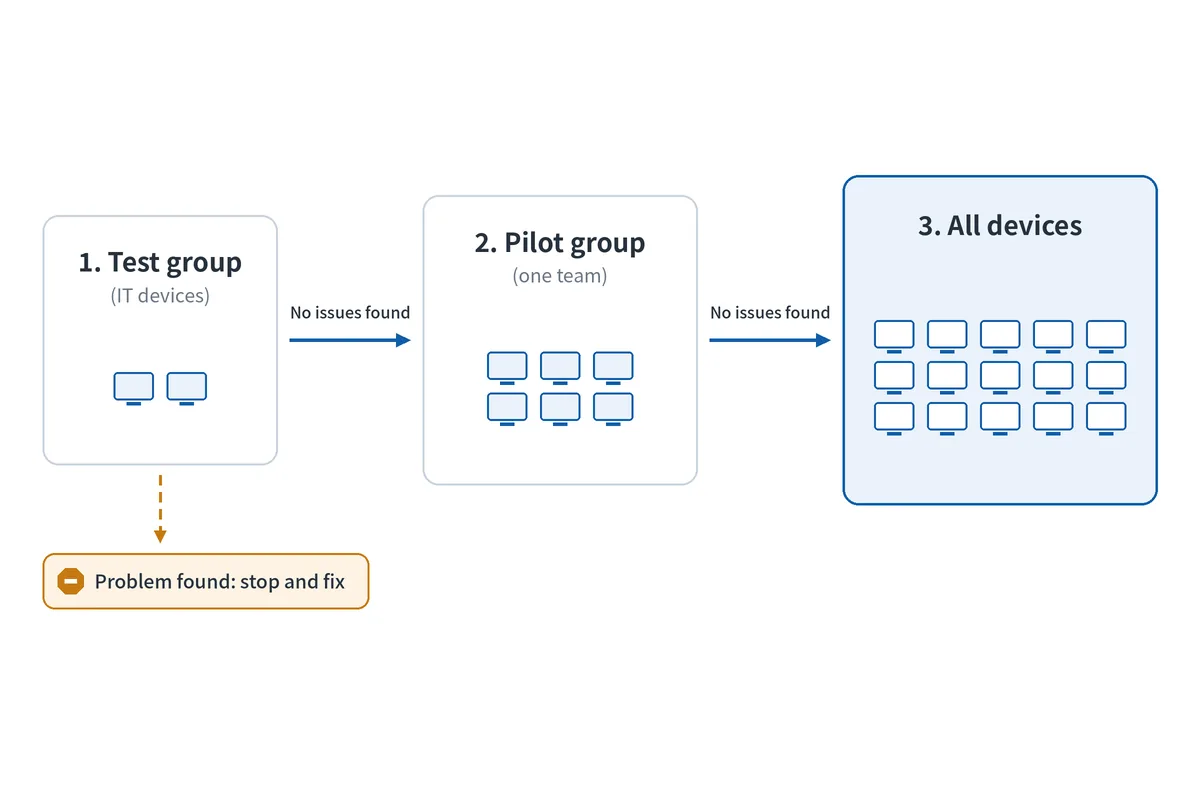
Operating system updates are the minimum. Most real exposure sits in third-party applications such as browsers, PDF readers and runtimes, so confirm those are covered. Look for staged approval: a test group first, then a pilot group, then everyone. How NinjaOne handles this is explained in NinjaOne patch management in Saudi Arabia.
Do you need ticketing and self-service in the same platform?
If your team handles user requests, a built-in help desk links each ticket to the device it concerns, so the technician sees its health and history immediately. A self-service portal lets users reset passwords, find answers and request software without a call, which removes a large share of routine tickets. Together with automated fixes, this is how RMM reduces ticket volume rather than just speeding up replies.
How is access to the console secured?
The RMM console can run commands on every managed device, which makes it the most privileged system in the organisation. Require:
- Multi-factor authentication for every console account, as explained in why multi-factor authentication is non-negotiable
- Role-based access, so technicians only reach the devices and actions their role needs
- Audit logs of every remote session, script and policy change
- Alerts on new administrator accounts and unusual activity
Should You Run RMM Yourself or Use a Managed IT Provider?
Run it yourself if you have IT staff who can own policies and respond to alerts; use a managed provider if you do not, or if you need cover outside working hours. Many organisations combine the two: the internal team owns the platform and a provider handles nights and weekends.
When does a managed IT provider make sense?
A managed IT provider makes sense when nobody internally has time to maintain patch policies, tune alerts and review reports every week. The provider uses its own RMM processes to do that work for a monthly fee. The trade-off is control: what gets patched, when and how quickly becomes a contract term rather than an internal decision.
What should a managed IT service level agreement include?
A useful SLA turns vague promises into numbers you can check. It should cover:
- Response and resolution times by severity, with the hours they apply to
- Patch deadlines, for example how quickly critical security updates are applied after release
- Reporting: what you receive, how often, and in what detail
- Access rules: who at the provider can connect to your devices, and how sessions are logged
- Exit terms: how the provider hands over documentation, scripts and access when the contract ends
Who should own the RMM account?
Your organisation should. If the provider owns the RMM account, your device history, scripts and policies leave with them when you change supplier. Own the licence and give the provider access, so a change of provider is a change of users rather than a rebuild of your IT estate.

What Do Saudi Organisations Need to Consider?
Four factors shape RMM in the Kingdom that general guides miss.
RMM produces the evidence regulators expect. The National Cybersecurity Authority's Essential Cybersecurity Controls expect organisations to know their assets, apply security updates promptly, manage vulnerabilities and keep records. An RMM inventory and patch compliance report answers those questions with data rather than spreadsheets. What the controls cover in practice is set out in Saudi Arabia's NCA Essential Cybersecurity Controls.
Remote sessions touch personal data. A technician connected to a user's computer can see whatever is on screen, including customer and employee records. Under the Personal Data Protection Law, that access needs to be controlled and recorded: limit who can open sessions, log every one, and prefer platforms that notify the user when a session starts. Confirm where the platform stores its data before signing. [NEED: NinjaOne data hosting region options for Saudi customers]
Patch windows should follow the Saudi working week. With the weekend on Friday and Saturday, Thursday evening is the natural maintenance window, and Sunday morning is when failed updates surface. Hours change during Ramadan, so review schedules before it starts rather than after the first complaint.
Distance makes remote work essential. An organisation with sites in more than one city can lose a full day to a single on-site visit. RMM turns most of those visits into remote fixes, and leaves travel for hardware that genuinely needs hands.
Blue Edge, a value-added technology distributor based in Dammam, Saudi Arabia, is an authorised NinjaOne distributor. NinjaOne, previously known as NinjaRMM, is supplied through its NinjaOne remote monitoring and management offering, alongside the IT installation and configuration services organisations use to roll it out across their sites.
What Are the Most Common RMM Mistakes?
Six mistakes cause most RMM disappointments, and the first is by far the most expensive.
Leaving the console weakly protected. One stolen password without multi-factor authentication gives an attacker a tool that already reaches every device. Attackers actively target RMM consoles for exactly this reason.
Pushing patches to every device at once. A faulty update then stops the whole organisation instead of a test group. Staged rings cost a few days and prevent a company-wide outage.
Letting alerts pile up. When every minor warning raises an alert, the team stops reading them, and the one that mattered is missed. Tune thresholds in the first month.
Leaving devices without the agent. Any device missing the agent is invisible, unpatched and absent from every report. Compare the RMM inventory against purchasing records.
Letting a provider own the account. Changing supplier then means rebuilding policies, scripts and history from nothing.
Buying automation nobody configures. The licence pays for scripts and policies that never run, and the team keeps working manually.
Start With an Inventory, Then Automate
Deploy the agent to every computer and server first, then compare the inventory against what you believed you owned. The gaps are usually the first useful finding.
Next, set a patch policy with test, pilot and broad groups, and schedule it around your working week. Tune alerts until each one means something, and secure the console with multi-factor authentication and role-based access before adding more technicians.
Finally, add ticketing and self-service so routine requests stop reaching your team, and review the monthly reports with whoever signs off on IT risk.
Frequently Asked Questions
-
What does RMM stand for?
RMM stands for remote monitoring and management. It describes software that lets an IT team keep watch over computers, servers and other devices from one central console, and fix or update them without being physically present. The term is used both for the software itself and for managed IT services that are delivered using it, which is why "RMM service" often means a provider running the platform on your behalf.
-
How is RMM software different from remote desktop tools?
A remote desktop tool opens a live session on one device when someone needs help, and does nothing in between. RMM software manages the whole estate continuously: it monitors every device, applies patches on a schedule, runs automated fixes and keeps an inventory. Remote access is one feature of RMM, used when a technician needs to see or control a specific machine.
-
Is RMM software suitable for small businesses?
Yes, once a business has more devices than one person can comfortably check by hand, or staff working from more than one location. Small businesses without IT staff often get RMM through a managed IT provider rather than buying and running it themselves. The value comes from automated patching and early warnings, which matter as much to a small office as to a large one.
-
What security risks does RMM software help address?
RMM reduces the risk from unpatched software by applying security updates on schedule and reporting any device that falls behind. It also reveals unknown or unmanaged devices and flags failing hardware before data is lost. The platform itself must be protected, because its console can reach every device: multi-factor authentication, role-based access and audit logs are essential.
-
How long does it take to deploy an RMM solution?
Installing the agent is usually the quick part, because it can be pushed to devices through existing deployment tools or login scripts. Most of the time goes into designing patch policies, tuning alerts and agreeing who can access what. A staged rollout, starting with the IT team's own devices and a pilot group, surfaces problems before the whole organisation is involved.
Sources & References
- NinjaOne — RMM Software: Remote Monitoring and Management vendor documentation
- Cybersecurity and Infrastructure Security Agency (CISA), with NSA and MS-ISAC — Protecting Against Malicious Use of Remote Monitoring and Management Software (advisory AA23-025A, 25 January 2023) government advisory
- National Cybersecurity Authority (NCA) — Essential Cybersecurity Controls (ECC-2:2024) regulator
- Saudi Data and Artificial Intelligence Authority (SDAIA) — Laws and Regulations: Personal Data Protection Law and its Implementing Regulation regulator
Planning an RMM rollout?
Blue Edge supplies NinjaOne across Saudi Arabia, with installation and configuration for multi-site deployments.
Call +966 53 9855 188 or contact our team to discuss your devices and sites.
NinjaOne in Saudi ArabiaAbout Blue Edge
Blue Edge Company is a value-added technology distributor based in Dammam, Saudi Arabia, supplying interactive displays, smart building systems, networking infrastructure and IT security software to businesses and residential projects across the Kingdom, with installation and technical support.
Learn more about Blue Edge →Published 29 September 2026 • Last updated 3 October 2026 • This article is reviewed when standards, regulations or product guidance change.

.webp)