Shopping Cart


- Articles
- Cybersecurity
- Passkeys and the End of Passwords in Saudi Arabia
Passkeys and the End of Passwords in Saudi Arabia
How passkeys block phishing that OTP codes cannot, synced versus device-bound, why recovery becomes the weak link, and what PDPL says about biometrics.
By Blue Edge Team | Published Sep 08, 2026 | Updated Oct 03, 2026 | 14 min read

Quick answer
A passkey is a cryptographic credential that replaces a password, built on the FIDO2 standards WebAuthn and CTAP. The device holds a private key and the service holds only the matching public key, so there is no shared secret to steal. Passkeys resist phishing because the credential is cryptographically bound to the website's domain and simply will not work on a lookalike site.
Multi-factor authentication was supposed to end credential phishing. It did not. Attackers adapted by putting a proxy between the user and the real site, capturing the one-time code as it is typed and relaying it within its validity window. The user sees a normal login. The attacker gets a live session.
Passkeys close that path, and they close it through cryptography rather than through user vigilance. There is no code to relay, and the credential physically refuses to work on the wrong domain.
That makes this the most consequential authentication change in twenty years, and also one where the marketing runs well ahead of the practical reality. This guide covers how passkeys work, why origin binding defeats phishing, the synced and device-bound distinction that matters for regulated organisations, what passkeys genuinely do not solve, and what Saudi organisations should settle before rolling them out.
What Is a Passkey and How Does It Work?
A passkey is a cryptographic credential based on public-key cryptography that replaces a password, defined by the FIDO2 standards: WebAuthn, a specification of the World Wide Web Consortium, and the Client to Authenticator Protocol from the FIDO Alliance.
When an account is registered, the user's device generates a key pair. The private key stays on the device. The public key is sent to the service and stored there. Signing in then works like this:
- The service sends a random challenge to the browser.
- The browser confirms the request comes from the domain the credential was created for.
- The device asks the user to verify locally, using a fingerprint, a face scan or a device PIN.
- The device signs the challenge with the private key and returns the signature.
- The service verifies the signature against the stored public key and grants access.
Two consequences follow, and both are structural rather than incremental. There is no shared secret, so a breach of the service's database yields public keys, which are useless to an attacker. And nothing reusable is transmitted, so there is nothing for an attacker to capture in transit.
A passkey does not send your biometric anywhere. This is the most common objection and it rests on a misunderstanding. The fingerprint or face scan unlocks the private key on the device, exactly as it unlocks the phone itself. The biometric template never leaves the hardware and is never transmitted to the service. What the service receives is a mathematical signature, which reveals nothing about the person. The distinction matters practically as well as legally, as covered later in this article.
Why Do Passkeys Stop Phishing When One-Time Codes Do Not?
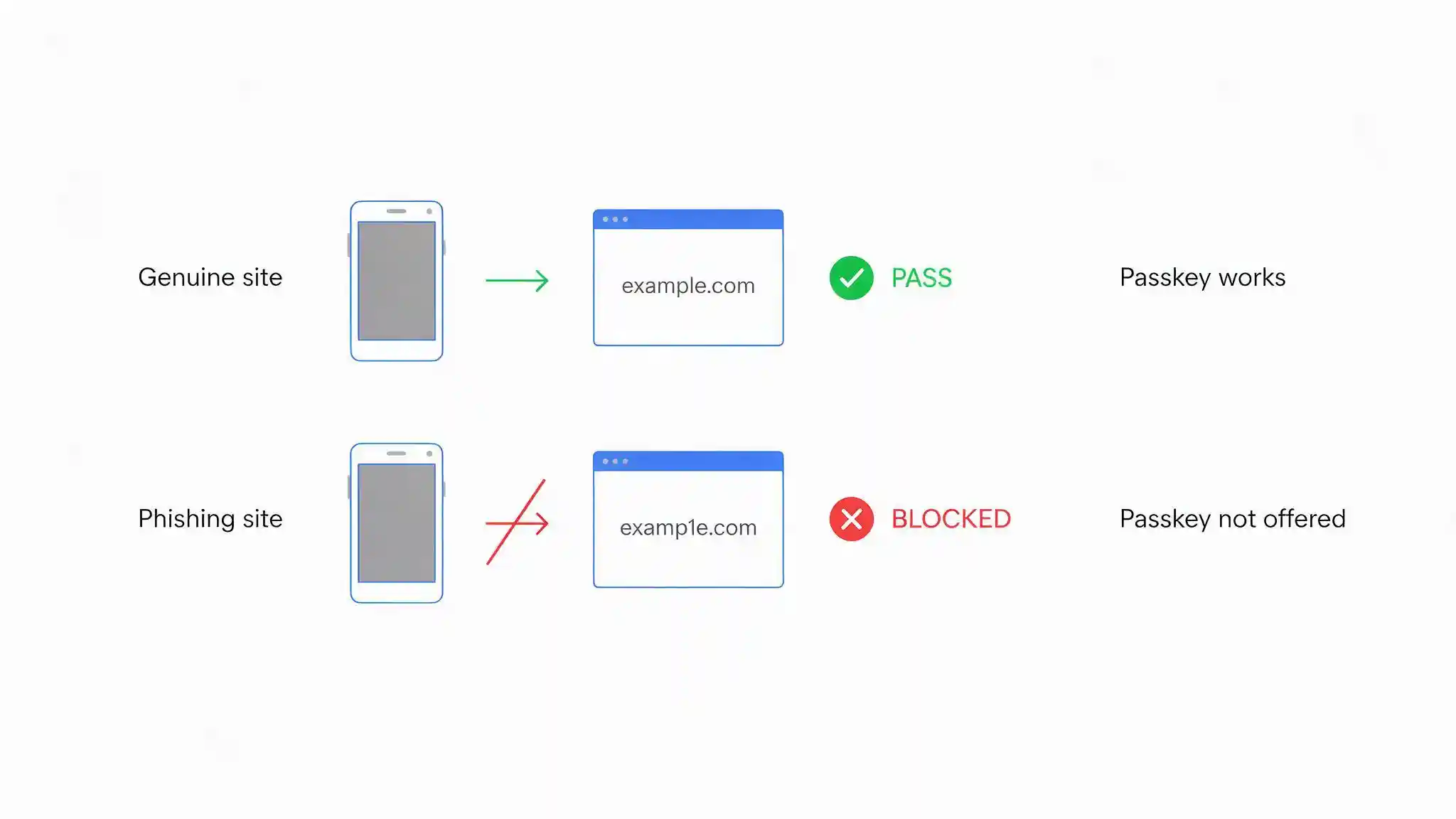
Passkeys resist phishing because the credential is cryptographically bound to the origin, meaning the exact domain it was created for. A passkey registered for a company's real domain will not be offered by the browser on a lookalike domain, and cannot be used there even if the user wants it to be.
Compare that with a one-time code. Modern phishing kits operate as a proxy sitting between the victim and the genuine site. The victim visits a convincing lookalike, enters their password, and is prompted for their code. The kit passes both to the real service in real time and captures the resulting session. Every step looks normal to the user, and the code is valid because it genuinely was generated for that login.
No amount of user awareness defeats this reliably, because the attack is designed to be indistinguishable from the real thing. The only durable defence is a credential that cannot be presented to the wrong destination, which is precisely what origin binding provides.
This is why phishing-resistant authentication is a distinct category rather than a stronger flavour of multi-factor authentication. Text message codes, email codes and authenticator app codes are all relayable. Passkeys and hardware security keys built on the same standards are not. Awareness training remains essential for the attacks that do not involve credentials at all, such as business email compromise and payment redirection, but for credential phishing specifically the technical control now does the work that training could never fully do.
How Do Passkeys Compare With Existing Authentication?
The table below compares the four methods most organisations are choosing between.
| Criterion | Password only | Password plus SMS code | Password plus authenticator app | Passkey |
|---|---|---|---|---|
| Resists phishing | No | No, codes can be relayed | No, codes can be relayed | Yes, bound to the domain |
| Resists credential stuffing | No | Partially | Partially | Yes, no reusable secret exists |
| Exposure if the service is breached | Password hashes stolen | Password hashes stolen | Password hashes stolen | Public keys only, of no value |
| Resists SIM swap | Not applicable | No | Yes | Yes |
| User steps to sign in | Type a password | Password plus a code | Password plus a code | One local verification |
| Works without network on the device | Yes | No, needs signal | Yes | Yes |
| Recovery complexity | Low, and that is the problem | Moderate | Moderate | Higher, must be designed |
| Cost to deploy | None | Per message | Low | Low, or hardware keys for high assurance |
| Best suited for | Nothing at this point | Legacy systems with no alternative | A transitional improvement | Any account worth protecting |
Key takeaway
The decisive column is the first one. Every method that relies on the user typing something into a page can be relayed by a proxy, which means password, SMS code and authenticator app all share the same failure mode against a competent phishing kit. Passkeys break that pattern structurally rather than probabilistically. The practical implication is that an organisation adding an authenticator app today is buying a meaningful improvement over passwords alone and not a solution to phishing, and should plan the passkey step rather than treating app-based codes as the destination.
Synced or Device-Bound: Which Do You Need?
Passkeys come in two forms, and the distinction matters enormously in regulated environments.
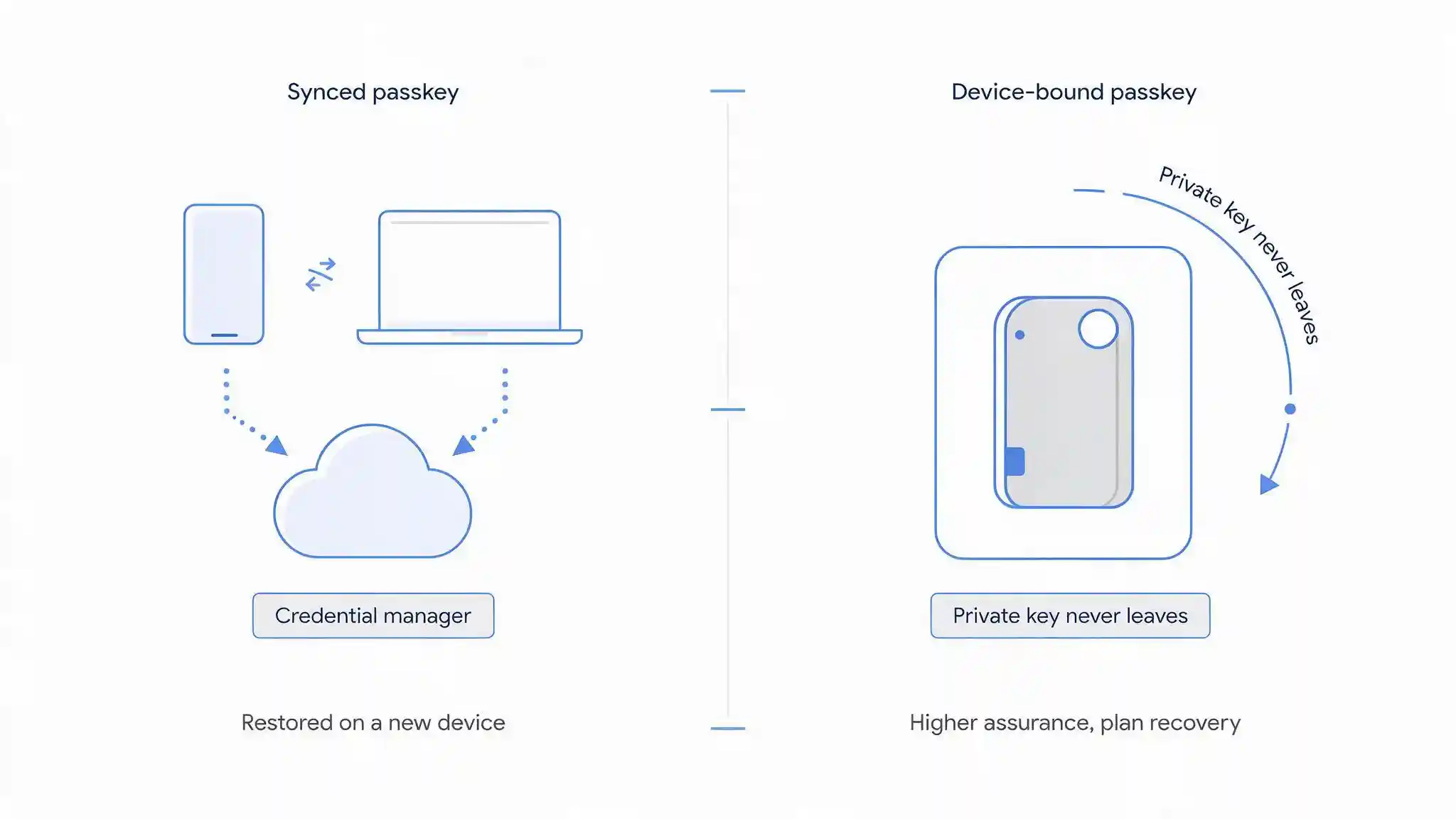
Synced passkeys are stored in a credential manager and replicated across the user's devices, typically through a platform account or a password manager. The user experience is excellent: enrol once, sign in everywhere, and replacing a lost phone restores access automatically. The trade-off is that the private key exists in a synchronised store, so the security of the work credential inherits the security of the account that syncs it.
Device-bound passkeys never leave the authenticator that created them. This usually means a hardware security key connected by USB or NFC, or a device with hardware-backed attestation. There is no sync and no cloud copy, which raises assurance and removes the inheritance problem. It also means losing the authenticator is a genuine event requiring a designed recovery path, and it costs money per user.
For most workforce accounts, synced passkeys are the right choice, because adoption matters more than marginal assurance and a control nobody uses protects nothing. For administrators, finance approvers, and any system under SAMA Cybersecurity Framework obligations or handling regulated data, device-bound credentials are the defensible position. Many organisations run both: synced passkeys as the standard, hardware keys for privileged roles.
Ask one question of any platform before committing. Can the service distinguish synced from device-bound credentials and apply policy accordingly, so that a privileged role can be required to use a hardware key rather than a phone-based passkey. Without that capability the distinction is aspirational.
What Passkeys Do Not Solve
Passkeys eliminate an entire class of attack. They do not eliminate attackers, and the honest limitations determine how a rollout should be designed.
Recovery becomes the weakest link. This is the most important sentence in the article. If a user loses every device holding their passkey, they need a route back into the account, and most implementations fall back to an email link or a text message. That fallback is phishable, which means the organisation has built a phishing-resistant front door with a phishable side entrance. Design recovery deliberately: require at least two registered credentials per account, such as a phone and a hardware key, and where a human process is needed make it a verified one rather than a form submission.
Enrolment is an attack path. Adding a new passkey to an account is functionally equivalent to issuing a new credential. Attackers who cannot phish a passkey will instead call the service desk and ask for one, which is a documented and effective technique. Harden the enrolment and reset process with genuine verification, and treat service desk staff as a control that needs training exactly as much as any user, which is where security awareness training meets identity design.
Passkeys secure the login, not the session. Once authentication succeeds, the user holds a session token. Malware or a compromised browser can steal that token and use the session without ever touching the credential. Session binding, shorter lifetimes and device posture checks address this, and passkeys alone do not.
Compromised devices remain compromised. A passkey on a device running malware protects against remote attackers, not against code already executing with the user's privileges.
Legacy systems will not support it. Applications without WebAuthn support cannot accept passkeys. The usual answer is to put an identity provider in front of everything and let it hold the passkey, which also gives one place to revoke access.
A passkey is one strong factor, not automatically two. It combines something you have, the device, with something you are or know, the local verification, which satisfies most definitions of multi-factor authentication. Whether it satisfies a specific regulator's definition is a question to confirm rather than assume, particularly in financial services.
How Do You Roll Passkeys Out?
Stage the rollout, because the failure mode is not technical breakage but a deployment that never actually removes the password.
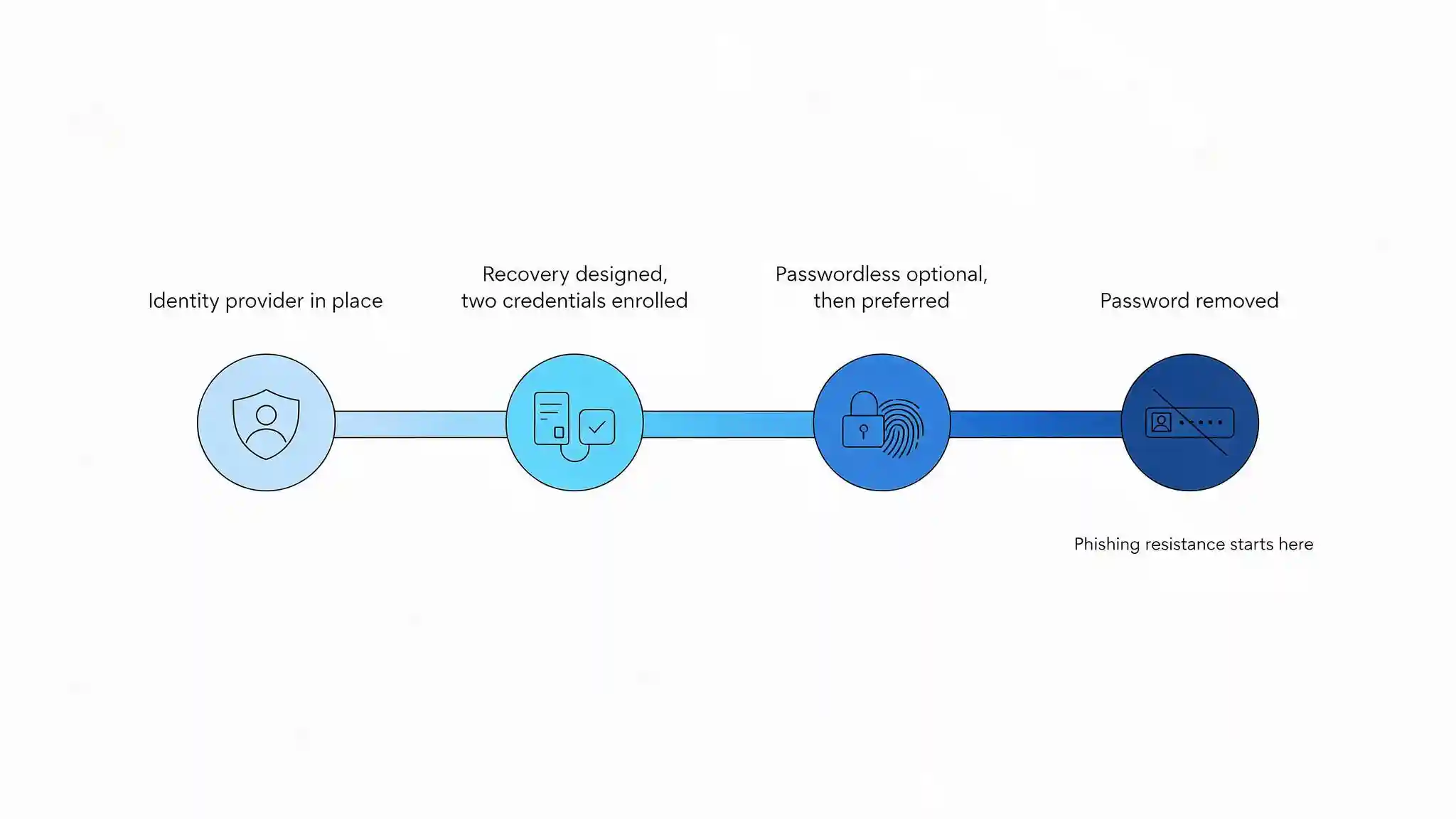
- Put an identity provider in front of the estate first. Passkeys applied at the identity layer cover every application behind it, including those that could never support WebAuthn directly.
- Design recovery before enrolment. Decide how a user with no devices regains access, and make sure that route is not an emailed link. Nothing else in the plan works until this is answered.
- Enrol from an already-trusted state. A passkey registered during an unverified session inherits that lack of verification. Enrol in person, during onboarding, or from a session already authenticated by a strong existing factor.
- Require at least two credentials per account. A phone-based passkey and a hardware key, or two hardware keys for privileged users. A single credential guarantees a recovery event eventually.
- Run passwordless as optional, then as preferred. Let willing users move first and gather the support issues while the password still works.
- Remove the password. This is the step that delivers the benefit. Until the password is disabled for an account, an attacker simply phishes the password and ignores the passkey entirely.
- Harden the service desk in parallel. Verification procedures for enrolment and reset requests, with a defined process rather than staff discretion under pressure.
Step six is where most programmes stop, and stopping there produces the appearance of phishing resistance without the substance. An account with a passkey and an active password is exactly as phishable as it was before.
What Do Saudi Organisations Need to Consider?
Four considerations apply in the Kingdom beyond the general design questions.
The biometric question has a favourable answer. Fingerprint and facial templates are treated as sensitive personal data under the Personal Data Protection Law (PDPL) administered by the Saudi Data and Artificial Intelligence Authority, and organisations are rightly cautious about deploying biometric systems. Passkeys are structurally different from a central biometric system: the template stays on the user's device, is never transmitted, and is never held by the employer or the service. The organisation processes no biometric data at all. This is a stronger data protection position than the centralised biometric readers discussed in biometric authentication, and it is worth stating clearly in internal communications, because employee resistance to passkeys is usually founded on the assumption that the opposite is true.
Work credentials may live in personal cloud accounts. A synced passkey enrolled on an employee's personal phone is stored in that employee's personal platform account. The organisation cannot inspect it, cannot delete it and does not control the account securing it. The correct response is not to ban synced passkeys but to understand what revocation actually means: the employer removes the public key from its own systems, which ends access immediately regardless of what remains on the device. Make that explicit in the offboarding process, and use device-bound credentials where the assurance requirement genuinely warrants them.
This matters more in a market with high contractor and expatriate turnover. Access ends when the public key is removed server-side, and that step belongs in the leaver checklist alongside the account disable.
Regulatory alignment is favourable but should be confirmed. Identity and access management is a control domain within the National Cybersecurity Authority's Essential Cybersecurity Controls (ECC), and phishing-resistant authentication is a strong answer to those expectations rather than a complication. Financial institutions should confirm how their supervisor treats a single passkey against multi-factor requirements before removing a second factor. Separately, workforce authentication is a distinct question from national digital identity: services such as Nafath serve citizen and resident identity verification for government and integrated services, and adopting passkeys internally neither replaces nor conflicts with that.
Enrolment and recovery must work in Arabic and English. Instructions, prompts and, above all, recovery guidance need to be available in both languages. Recovery is attempted by a user who is already locked out, frequently under time pressure, and an English-only flow at that moment produces service desk calls, which returns the process to the human channel attackers target.
Blue Edge, a technology distributor based in Dammam, Saudi Arabia, distributes KnowBe4 security awareness training and human risk management and NinjaOne endpoint and patch management, which cover the service desk and device sides of an authentication programme.
What Are the Most Common Passkey Mistakes?
Six mistakes account for most rollouts that deliver less than expected.
Leaving the password active. An account with a passkey and a working password is still phished through the password. The benefit arrives when the password is removed, not when the passkey is added.
Recovery by emailed link or text message. A phishing-resistant login with a phishable recovery path is protected only until an attacker chooses the easier route.
Registering one credential per account. A single passkey guarantees a lockout eventually, and the resulting emergency recovery process is where controls get bypassed.
Enrolling from an unverified session. A credential registered during an unauthenticated flow inherits whatever weakness allowed that flow.
Leaving the service desk unhardened. Attackers who cannot phish a credential will ask a person to issue one instead.
Assuming the session is protected. Passkeys secure authentication. A stolen session token after a successful login bypasses the credential entirely.

The Password Only Goes Away When You Remove It
Passkeys are the first authentication change in a long time that removes an attack rather than raising its difficulty. Origin binding is a structural property, not a probability, and it defeats the phishing technique that currently works reliably against one-time codes.
The value only arrives at the end of the rollout, though. A passkey added alongside a live password improves nothing, because the attacker goes around it. Plan toward removing the password from the start, and treat every interim stage as progress rather than as arrival.
Design recovery before anything else. Two credentials per account as standard, a verified human process where one is unavoidable, and no reliance on an emailed link. Then harden the service desk, because that is where the attacker goes once the technology closes the front door.
For Saudi organisations there is one message worth repeating internally: passkeys do not collect anyone's biometrics. The fingerprint unlocks the device and nothing leaves it. That single clarification removes most of the resistance a rollout encounters.
Frequently Asked Questions
-
Why do passkeys stop phishing when SMS codes do not?
Because a passkey is cryptographically bound to the exact domain it was created for and will not function on a lookalike site. A one-time code is just a string the user types, so a phishing proxy can capture it and relay it to the genuine service within its validity window, producing a live session for the attacker. The passkey never reaches the fake site at all, which removes the attack rather than making it harder.
-
Do passkeys send my fingerprint to the website?
No. The fingerprint or face scan unlocks the private key stored on your device, in the same way it unlocks the device itself. The biometric template never leaves the hardware and is never transmitted. What the website receives is a cryptographic signature that proves the key was used, and reveals nothing about the person. The organisation operating the service holds no biometric data whatsoever.
-
What happens if I lose the phone holding my passkey?
That depends on the type. A synced passkey is restored automatically when you sign in to your credential manager on a replacement device. A device-bound passkey is gone with the device, which is why at least two credentials should be registered per account, such as a phone and a hardware security key. Where recovery requires human assistance, it should use a verified process rather than an emailed link.
-
Do passkeys replace multi-factor authentication?
A passkey combines something you have, the device holding the private key, with something you are or know, the local biometric or PIN, which satisfies most definitions of multi-factor authentication in a single step. Whether a particular regulator accepts it as sufficient on its own is a question to confirm rather than assume, especially in financial services, so check with your supervisor before removing an additional factor.
-
Are passkeys acceptable under Saudi data protection rules?
Passkeys are a favourable position under the Personal Data Protection Law, because the organisation processes no biometric data at all. The fingerprint or face scan stays on the user's device and only a cryptographic signature reaches the service, unlike a central biometric reader that stores templates the employer must then protect. Identity and access management expectations under the NCA Essential Cybersecurity Controls are also well served by phishing-resistant authentication.
Planning an authentication change?
Blue Edge works with organisations across Saudi Arabia on security awareness, endpoint management and patching.
Call +966 53 9855 188 or contact our team to discuss your requirements.
KnowBe4 in Saudi ArabiaAbout Blue Edge
Blue Edge Company is a value-added technology distributor based in Dammam, Saudi Arabia, supplying interactive displays, smart building systems, networking infrastructure and IT security software to businesses and residential projects across the Kingdom, with installation and technical support.
Learn more about Blue Edge →Published 8 September 2026 • Last updated 3 October 2026 • This article is reviewed when standards, regulations or product guidance change.