Shopping Cart


- Articles
- Cybersecurity
- Web Application Firewalls (WAF) Explained
Web Application Firewalls (WAF) Explained
What a web application firewall blocks, cloud vs on-premise, how to tune it without breaking your site, and the PDPL problem with TLS termination abroad.
By Blue Edge Team | Published Sep 07, 2026 | Updated Oct 03, 2026 | 13 min read

Quick answer
A web application firewall is a security control that inspects HTTP and HTTPS traffic between users and a web application, then blocks requests matching malicious patterns or violating policy. Unlike a network firewall, which filters by address and port, a WAF understands HTTP structure and can inspect headers, parameters and request bodies for attacks such as injection and cross-site scripting.
Most web application firewalls end up doing very little. Not because the technology fails, but because it was switched into blocking mode on day one, it broke the checkout page and the file upload form, and the fastest path back to a working site was to set every rule to permissive.
The result is a control that appears in the compliance evidence and stops almost nothing. That outcome is entirely predictable, and it is a deployment failure rather than a product failure.
This guide covers what a WAF actually inspects, what it blocks and what it cannot, how the deployment models differ, how to roll one out without taking the site down, and the data residency question that Saudi organisations need to answer before choosing a cloud service.
What Is a Web Application Firewall?
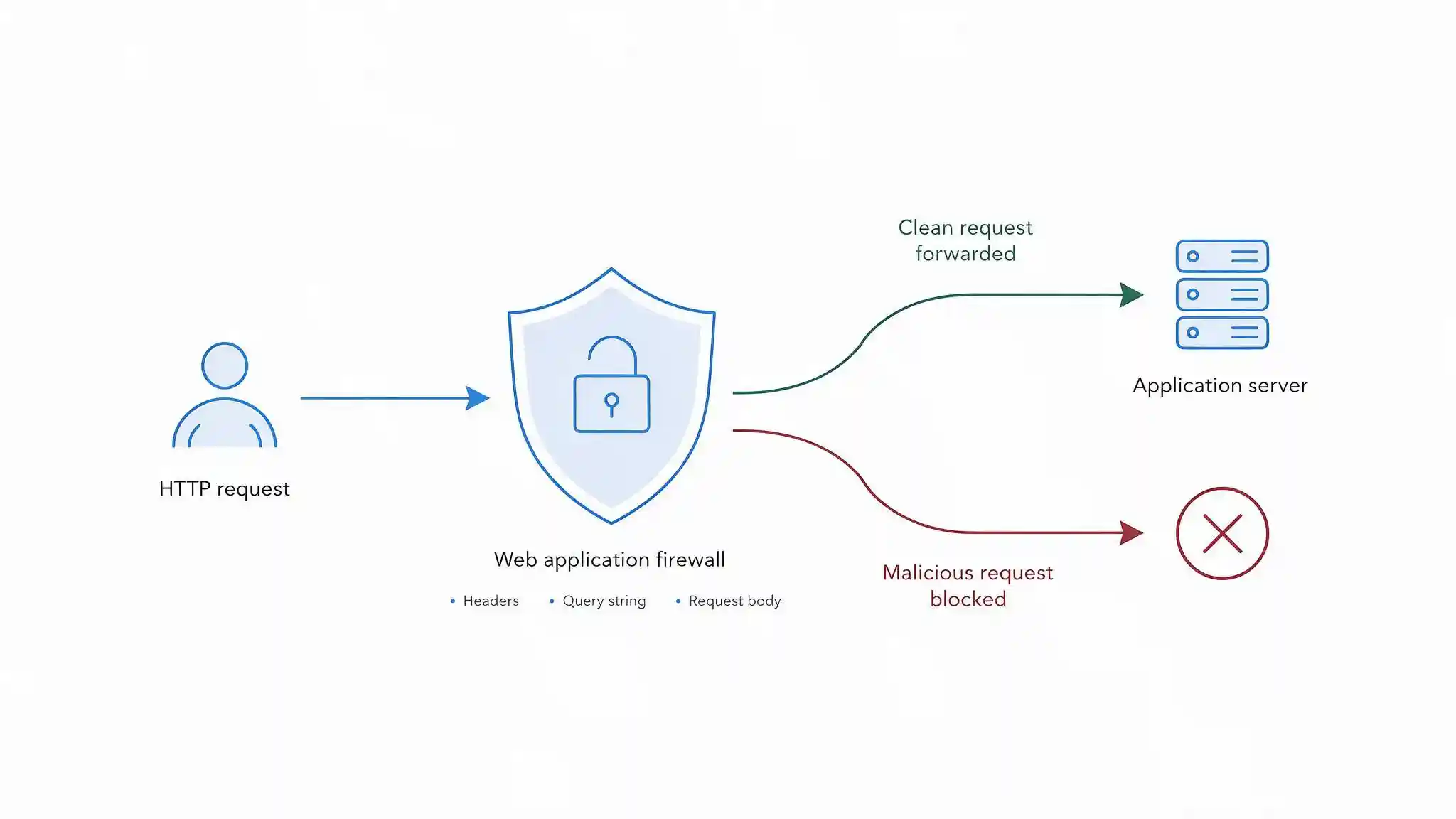
A web application firewall is a security control that inspects HTTP and HTTPS traffic between clients and a web application, and blocks requests that match malicious patterns or violate a defined policy. A WAF sits in front of the application, usually as a reverse proxy, so every request passes through it before reaching the server.
The difference from a network firewall is the layer it understands. A network firewall works with addresses, ports and protocols, so it can decide whether traffic to port 443 is allowed. It cannot see inside that traffic. A WAF parses the HTTP request itself, meaning the method, the URL path, the query string, the headers, the cookies and the request body, and evaluates each of those against its rules.
That is why the two are complementary rather than alternative. A network firewall decides whether a connection is permitted. A WAF decides whether the request carried inside that connection is legitimate.
Because attacks against public web applications arrive over ports that must remain open, a network firewall cannot filter them. A WAF is the control that can, which is why it appears in most application security architectures alongside network segmentation rather than instead of it.
What Does a WAF Actually Block?
A WAF blocks four broad categories of traffic, and the value of each varies considerably by organisation.
Injection and application attacks. SQL injection, command injection, cross-site scripting, path traversal, server-side request forgery and similar techniques against the categories described in the OWASP Top 10. These are the classic WAF use case and the reason rule sets exist.
Automated and bot traffic. Credential stuffing against login endpoints, content scraping, card testing against payment forms, and inventory hoarding on booking and retail sites. Rate limiting, fingerprinting and challenge mechanisms handle these, and for many businesses this is where a WAF delivers the most visible daily benefit. Pair it with multi-factor authentication on the accounts those attacks target.
Application-layer denial of service. Floods of well-formed requests aimed at expensive endpoints such as search queries or report generation. These consume server resources rather than bandwidth, so they pass straight through volumetric protections that measure traffic volume alone.
Virtual patching. Virtual patching is the practice of writing a WAF rule that blocks exploitation of a specific known vulnerability while the underlying code is fixed. When a critical flaw is disclosed in a framework or a third-party application and a vendor patch is weeks away, a targeted rule closes the exposure in hours. For many organisations this single capability justifies the WAF, particularly where applications are supplied by vendors rather than developed in house.
Virtual patching is a delay, not a resolution. The real fix still has to ship, which makes disciplined patch management the other half of the control. A WAF rule that quietly becomes permanent is technical debt with a security label on it.
Cloud, Appliance or Host-Based: Which Deployment Fits?
The table below compares the three deployment models on the criteria that decide the choice.
| Criterion | Cloud WAF service | On-premise or virtual appliance | Host-based module |
|---|---|---|---|
| Where inspection happens | Provider's edge network | Your data centre or cloud tenancy | On the web server itself |
| How traffic reaches it | DNS points to the provider | Traffic routed through the appliance | No routing change, runs in the server |
| TLS termination | At the provider | Under your control | On the server |
| Data residency | Depends on provider point of presence | Fully under your control | Fully under your control |
| Volumetric DDoS protection | Usually included | Not included, requires upstream service | Not included |
| Setup effort | Lowest | High | Medium |
| Operational burden | Provider manages the platform, you tune rules | You manage platform and rules | You manage per server |
| Added latency | Small, and often offset by caching | Minimal | None |
| Bypass risk | High if the origin is reachable by direct IP | Low | Low |
| Cost model | Subscription, often traffic based | Capital plus licensing and maintenance | Low, often open source |
| Best suited for | Public websites, e-commerce, distributed users | Regulated workloads and strict data residency | Single applications and smaller estates |
Key takeaway
A cloud WAF is the practical default for public-facing websites, because it deploys through a DNS change, includes volumetric denial of service protection and requires no hardware. It carries two conditions that are easy to overlook: your TLS is terminated on someone else's infrastructure, and the protection only works if the origin server cannot be reached directly. An on-premise appliance is the right answer where regulation or contract requires that traffic is decrypted inside your own environment, which in Saudi Arabia applies to a significant share of financial and government workloads.
How Do WAFs Decide What to Block?
Three detection models are used, and most production deployments combine them.
Negative security model. The WAF holds signatures of known attack patterns and blocks anything matching. This is quick to deploy and covers well-understood attacks, but it cannot catch a technique nobody has written a signature for, and it produces false positives whenever legitimate input resembles an attack pattern.
Positive security model. The WAF holds a definition of what a valid request looks like for each endpoint, including permitted parameters, types and lengths, and rejects everything else. This is substantially stronger, and substantially more work, because the model has to be built for the application and updated whenever the application changes.
Anomaly scoring. Rather than blocking on a single rule match, each matching rule contributes points to a score, and the request is blocked once the score crosses a threshold. This reduces false positives from a single overly broad rule while still catching requests that trip several rules at once.
The OWASP Core Rule Set is the widely used open rule set built on anomaly scoring, and it underpins many open source and commercial WAF products. It offers paranoia levels from one to four. Level one is the default and produces the fewest false positives. Higher levels detect more, including obfuscated and unusual attack forms, at the cost of blocking more legitimate traffic. Start at level one, tune it until it is clean, then consider raising the level for sensitive applications.
APIs deserve their own treatment. Most traffic to a modern application is API rather than browser HTML, and signature rules written for form submissions handle JSON and GraphQL payloads poorly. Where the API surface matters, look for schema-based protection that validates requests against a published API definition, plus per-endpoint rate limiting.
How Do You Deploy a WAF Without Breaking the Site?
Deploy in stages, because a WAF switched straight into blocking mode with default rules will break legitimate traffic on the first day. File uploads, rich text editors, long search queries, JSON payloads containing special characters and any form accepting free text are the usual casualties.
A working rollout looks like this:
- Deploy in detection mode. The WAF inspects and logs but blocks nothing. There is zero risk to the application at this stage.
- Run for two to four weeks across a full business cycle. Include month-end processing, reporting runs and any seasonal peak, so unusual but legitimate traffic appears in the logs.
- Review what would have been blocked. Separate genuine attacks from false positives, and identify which rules fire against normal application behaviour.
- Tune exclusions narrowly. Exclude a specific rule for a specific parameter on a specific endpoint, never a whole rule category site-wide. Broad exclusions are how a WAF quietly stops working.
- Move to blocking on the least risky application first. Watch support tickets and error rates closely for the first week.
- Extend to remaining applications, then consider raising the paranoia level on the ones handling sensitive data.
- Send WAF logs to your central logging platform so blocked requests are visible alongside other security events rather than sitting in a separate console nobody opens.
Two organisational commitments make the difference between a tuned WAF and a permissive one. Someone must own the false positive queue and have the authority to act on it. And the tuning cycle must repeat whenever the application changes, because a new form field or a new endpoint reintroduces exactly the problems the original tuning resolved.
What a WAF Cannot Do
A WAF is a strong control with clear limits, and understanding them prevents it being relied on for protection it does not provide.
It cannot fix broken access control. If the application lets an authenticated user request another customer's invoice by changing an identifier in the URL, both requests look completely legitimate to a WAF. Only the application knows who should see what, which is why access control flaws remain among the most common serious web vulnerabilities.
It does not replace secure development. A WAF filters exploitation attempts against the vulnerability. The vulnerability remains, and anything that reaches the application by another path still reaches it.
It does not replace patching. Virtual patching buys time, sometimes a great deal of it, but a rule blocking one known exploitation technique does not remove the underlying flaw or cover techniques discovered later.
It only sees traffic that passes through it. Internal service-to-service calls, direct database access, administrative interfaces on separate ports and any route around the proxy are outside its view entirely.
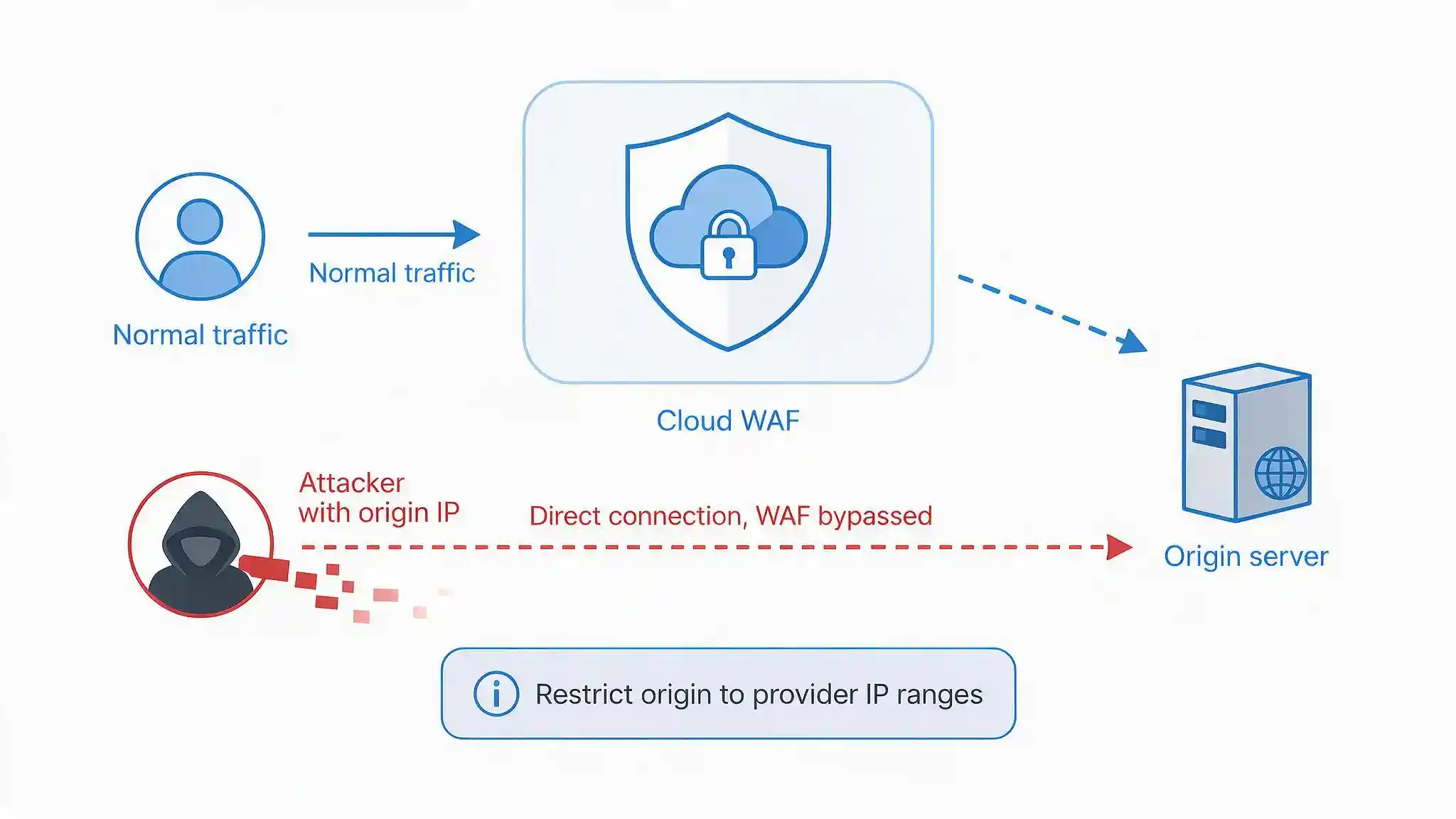
It can be bypassed if the origin is exposed. This is the most common practical failure. With a cloud WAF, DNS points at the provider, but the origin server usually keeps a public IP address. An attacker who discovers that address, through certificate transparency logs, historical DNS records or a misconfigured subdomain, connects to the application directly and the WAF never sees the traffic. Restrict the origin firewall to accept connections only from the provider's published address ranges, or require an authenticated origin connection, and verify it by attempting a direct connection yourself.
What Do Saudi Organisations Need to Consider?
Three factors shape WAF selection in Saudi Arabia beyond the standard technical comparison.
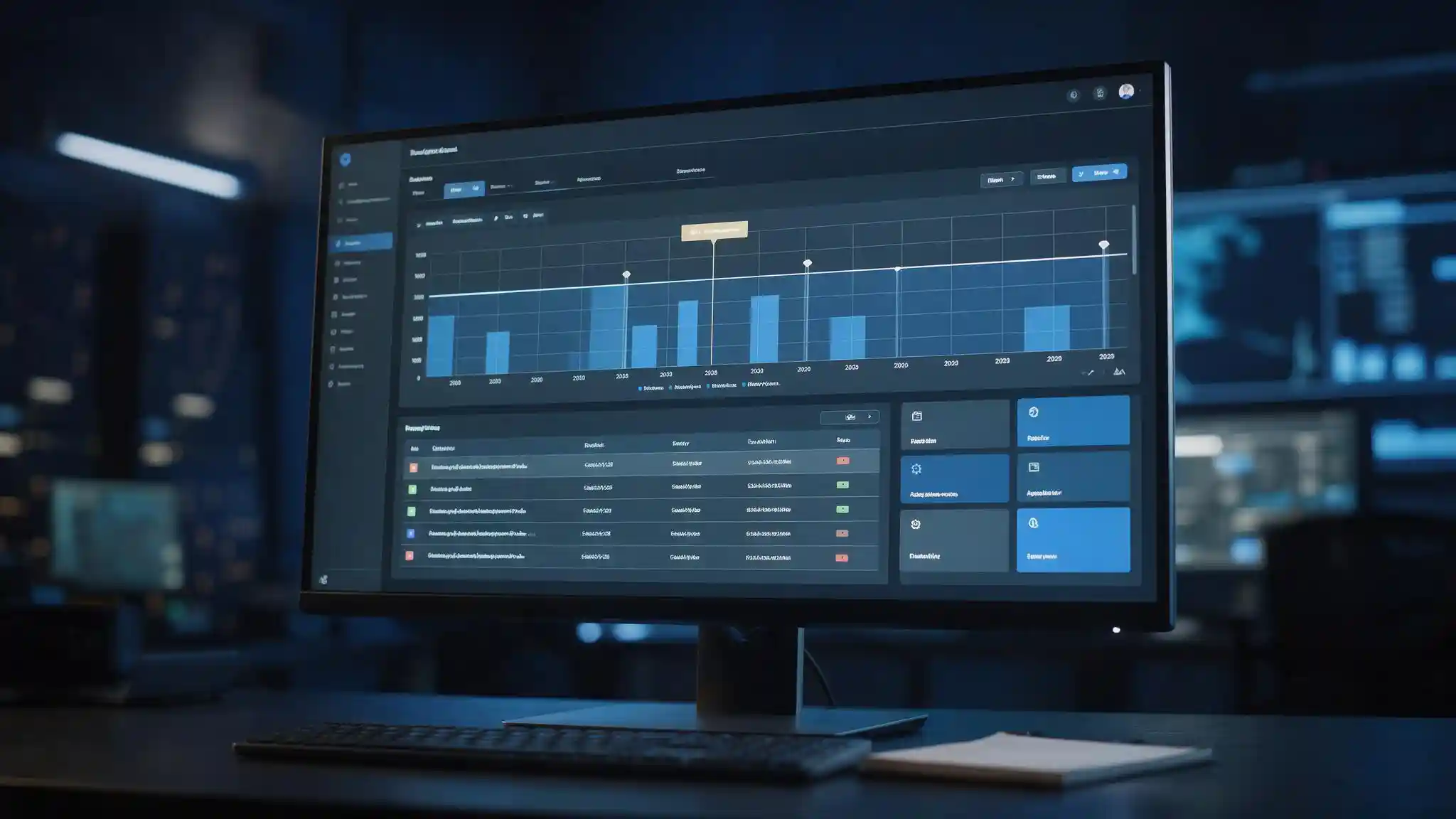
A cloud WAF decrypts your traffic somewhere. To inspect HTTPS, a WAF must terminate TLS. With a cloud service, that decryption happens on the provider's infrastructure, which means login credentials, national identity numbers, IBANs, health information and anything else submitted through your forms exists in plaintext on a third party's systems. If those systems sit outside the Kingdom, that is a cross-border transfer of personal data under the Personal Data Protection Law (PDPL) administered by the Saudi Data and Artificial Intelligence Authority, and it needs to be addressed before signing rather than during an audit.
Three questions belong in the procurement process. In which countries will TLS be terminated and traffic inspected. Is an in-Kingdom or in-region point of presence available and contractually guaranteed. What is logged from request bodies, where are those logs stored, and for how long.
Regulatory frameworks reference application protection. The National Cybersecurity Authority's Essential Cybersecurity Controls (ECC) address protection of web applications and internet-facing services, and the NCA has issued separate Cloud Cybersecurity Controls covering the use of cloud services by Saudi entities. Financial institutions carry the additional requirements of the SAMA Cybersecurity Framework. For regulated workloads these frameworks frequently make an in-Kingdom or on-premise deployment the simpler compliance position, even where a cloud service would be technically preferable.
Test the tuning with real Arabic content. Applications serving Saudi users submit Arabic text in form fields, search boxes and API payloads, which arrives as multi-byte UTF-8. Rules written around ASCII assumptions can flag legitimate Arabic input, and encoding handling is a recurring source of both false positives and evasion. Include genuine Arabic content, mixed Arabic and English fields, and Arabic file names in the detection-mode test period rather than discovering the problem after go-live.
Blue Edge, a technology distributor based in Dammam, Saudi Arabia, distributes NinjaOne endpoint and patch management and KnowBe4 security awareness training, which address the patching discipline and the human layer that sit either side of an application firewall.
What Are the Most Common WAF Mistakes?
Six mistakes account for most WAF deployments that protect nothing.
Enabling blocking mode on day one. Legitimate traffic breaks, pressure arrives immediately, and the fastest fix is to disable rules wholesale. Start in detection mode and tune before blocking.
Leaving the origin reachable by direct IP. An attacker who finds the origin address bypasses the cloud WAF entirely. Restrict the origin to the provider's address ranges and test it.
Excluding broadly instead of narrowly. Disabling a whole rule category to fix one form leaves a gap across every endpoint. Exclude the specific rule for the specific parameter.
Assigning nobody to the false positive queue. Without an owner with authority to tune, the queue grows until someone sets the WAF permissive to stop the complaints.
Treating virtual patching as the fix. Rules that block a known exploit are a holding action. If the underlying patch never ships, the exposure is still there.
Skipping WAF logs in central monitoring. Blocked requests are threat intelligence about who is targeting you. Left in a separate console, nobody sees the reconnaissance that precedes a serious attempt.
Tune It, or You Do Not Have One
A web application firewall is one of the few security controls whose effectiveness is decided almost entirely after purchase. The product choice matters far less than whether someone spent three weeks in detection mode separating real attacks from false positives, and whether that person still has the time and the authority to do it again when the application changes.
Work in order. Deploy in detection mode. Run through a full business cycle including Arabic content and file uploads. Tune narrowly. Move to blocking on the least risky application first. Lock the origin so the WAF cannot be walked around. Send the logs somewhere a person actually looks.
Then settle the residency question honestly. If your forms collect personal data of Saudi individuals, know which country decrypts it and be able to evidence that decision. That is a procurement conversation, and it is far cheaper to have before signing than during an audit.
Frequently Asked Questions
-
How is a WAF different from a network firewall?
A network firewall filters traffic by address, port and protocol, so it can decide whether a connection to a web server is permitted but cannot see what the request contains. A web application firewall parses the HTTP request itself, including the URL, query string, headers, cookies and body, and evaluates that content against its rules. Attacks on public web applications arrive over ports that must stay open, so only a WAF can filter them.
-
What is virtual patching?
Virtual patching is writing a WAF rule that blocks exploitation of a specific known vulnerability while the underlying code is fixed. When a critical flaw is disclosed and a vendor patch is weeks away, a targeted rule can close the exposure within hours. It is a holding action rather than a resolution, because the vulnerability still exists and the rule may not cover techniques discovered later, so the real patch still has to ship.
-
Why does a WAF block legitimate traffic?
Because default rules are written for a generic application, not yours. File uploads, rich text editors, long search queries and JSON payloads containing special characters routinely resemble attack patterns. This is why a WAF should run in detection mode for two to four weeks before blocking, so false positives can be identified and excluded narrowly, rule by rule and parameter by parameter, rather than by disabling whole categories.
-
Can attackers bypass a cloud WAF?
Yes, if the origin server is still reachable by direct IP address. With a cloud WAF, DNS points at the provider, but the origin usually keeps a public address that can be found through certificate transparency logs, historical DNS records or a misconfigured subdomain. Restrict the origin firewall to accept connections only from the provider's published address ranges, or require an authenticated origin connection, and verify it by attempting a direct connection.
-
Where is my traffic decrypted with a cloud WAF?
On the provider's infrastructure, because a WAF must terminate TLS to inspect HTTPS traffic. That means anything submitted through your forms exists in plaintext on their systems, including credentials and identity numbers. If those systems sit outside Saudi Arabia, it is a cross-border transfer of personal data under the Personal Data Protection Law. Confirm the inspection locations contractually and ask whether an in-Kingdom point of presence is available.
Reviewing your application security?
Blue Edge works with organisations across Saudi Arabia on endpoint management, patching and security awareness.
Call +966 53 9855 188 or contact our team to discuss your requirements.
NinjaOne in Saudi ArabiaAbout Blue Edge
Blue Edge Company is a value-added technology distributor based in Dammam, Saudi Arabia, supplying interactive displays, smart building systems, networking infrastructure and IT security software to businesses and residential projects across the Kingdom, with installation and technical support.
Learn more about Blue Edge →Published 7 September 2026 • Last updated 3 October 2026 • This article is reviewed when standards, regulations or product guidance change.