Shopping Cart


- Articles
- Networking
- Huawei eKit Switches Explained: S110 to S630 Series
Huawei eKit Switches Explained: S110 to S630 Series
Huawei eKit switches from S110 to S630 explained: which series is unmanaged, Layer 2 or Layer 3, how to read model names, and where each fits in a network.
By Blue Edge Team | Published Oct 17, 2026 | Updated Nov 13, 2026 | 12 min read
Quick answer
Huawei eKit switches run from unmanaged S110 desk switches, through web-managed S210 and Layer 2 S220 models, to Layer 3 S310 and S530 switches and 10GE S620 and S630 cores. The model name describes the ports: in S220-24P4X, 24 PoE+ ports and 4 x 10GE SFP+ uplinks.
Huawei's eKit range lists dozens of switches with names like S220S-24LP4JX and S630-24X6C, and on a price list they can look interchangeable. They are not: some cannot be managed at all, some route traffic between VLANs, and some are built to sit at the centre of the whole network. Choosing the wrong series usually shows up later, when the network grows or a building system needs its own segment.
This guide sorts the range into its series, explains what each one is for and decodes the model names, so you can read any eKit switch code at a glance. If you are new to switching, start with our guide to choosing a business network switch. All figures come from Huawei's eKitEngine datasheets and product specifications.
What are Huawei eKit switches?
Huawei eKit switches, sold under the eKitEngine name, are Huawei's switch range for small and medium businesses, sold through distribution partners. Huawei describes the S110 datasheet's switches as "designed for the distribution market outside China", and the rest of the range as built for SME networks. The range covers:
- Unmanaged switches: plug-and-play S110 and S110E models for desks and small rooms.
- Web-managed switches: the S210 series, configured through a browser, the eKit App or the cloud.
- Industrial switches: the S210I, for outdoor cabinets and harsh sites.
- Layer 2 managed switches: the S220 and S220S, with VLANs, link redundancy and access security.
- Layer 3 switches: the S310, S310S and S530, which route between networks.
- 10GE core and aggregation switches: the S620 and S630, with 25GE, 40GE or 100GE ports.
How do you read the model names?
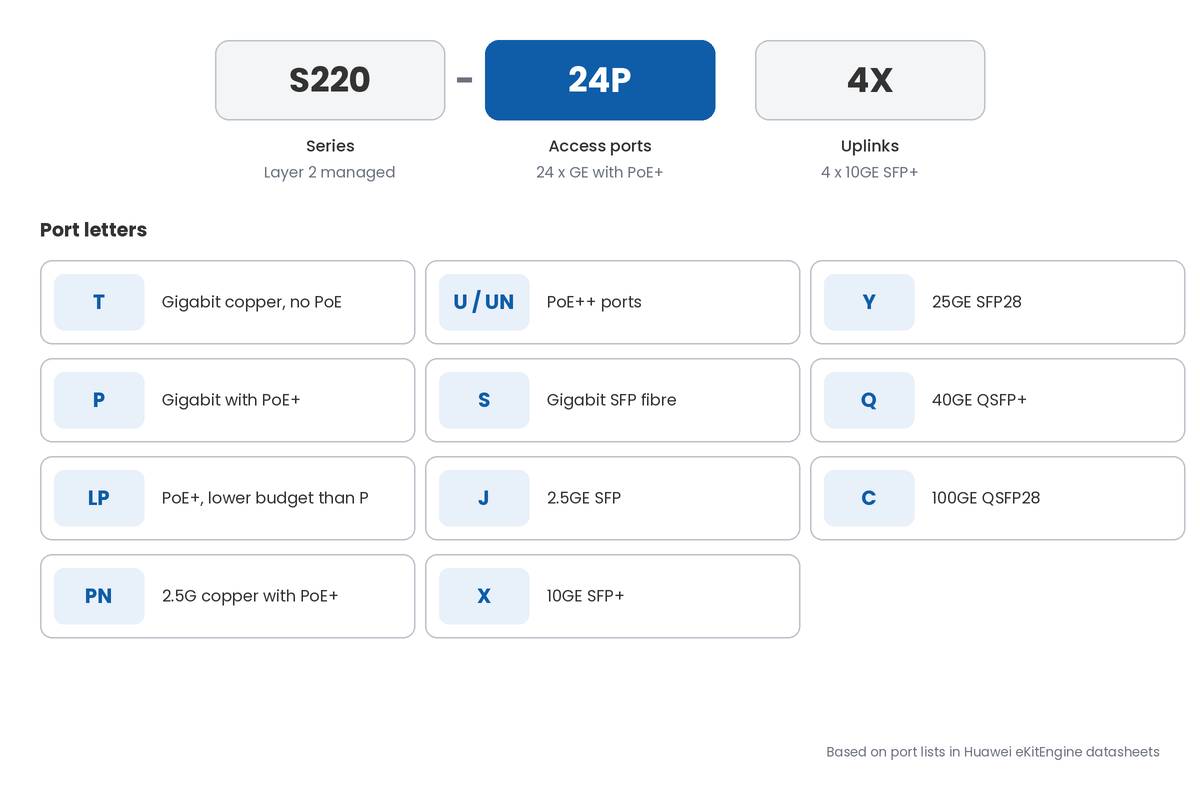
The number is the series, and the letters after the dash describe the ports. In S220-24P4X, for example, there are 24 PoE+ ports and 4 x 10GE SFP+ uplinks. The common letters are:
- T: gigabit copper ports without PoE.
- P: gigabit ports with PoE+; LP means a lower PoE budget than the P version.
- PN: 2.5G copper ports with PoE+; U or UN means PoE++ ports.
- S: gigabit SFP fibre ports.
- J: 2.5GE SFP ports.
- X: 10GE SFP+ ports; Y is 25GE SFP28.
- Q: 40GE QSFP+ ports; C is 100GE QSFP28.
How are eKit switches managed?
Every managed series supports the Huawei eKit App, and most add a web interface and cloud management through Huawei's SNC platform. The S220, S310, S530 and S620 also support CLI and SNMP. Huawei's datasheets say the managed series can switch between cloud and on-premises management as needed.
What does each eKit switch series do?
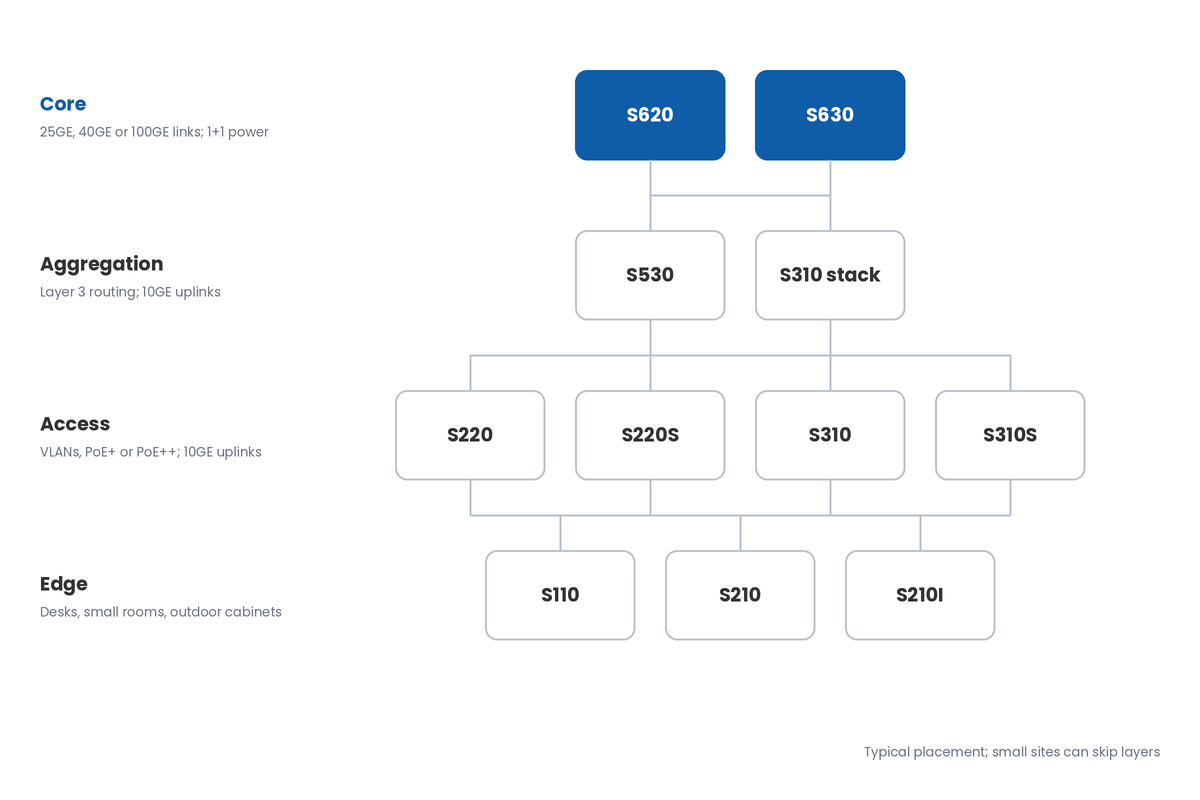
Each series fits a particular place in the network, from a single desk to the core. Here they are from the simplest to the most capable.
S110: unmanaged desk and edge switches
The S110 series is unmanaged: plug in and it works, with no configuration. The 8-port models are fanless with a 124 W PoE+ budget, suiting a small office, a reception desk or a few IP phones and cameras. The S110E-24P2J adds 2.5GE SFP uplinks and a 400 W PoE+ budget.
S210 and S210I: web-managed and industrial
The S210 series is web-managed, with up to 32 VLANs, basic QoS and PoE+ budgets up to 400 W, set up through a browser, the eKit App or the cloud. The S210I is its industrial sibling: fanless, mounted on a DIN rail, powered from 9.6 to 60 V DC and rated to operate from −40 °C to +65 °C in a sealed cabinet.
S220 and S220S: Layer 2 managed access
The S220 series is a Layer 2 managed switch for office access, with 4,094 VLANs, 802.1X authentication, DHCP snooping and ERPS ring protection. Models run up to 48 ports with 10GE SFP+ uplinks and up to 400 W of PoE+. The S220S is the compact version, mostly fanless, with 2.5GE and 10GE uplinks.
S310 and S310S: Layer 3 access
The S310 series adds Layer 3 routing, including static routes and OSPF, and iStack, which combines up to 9 switches into one. It has the widest choice of ports in the range, including 2.5G copper and PoE++ on the S310-24U4X, with up to 2,268 W of PoE with three 1,000 W power modules. The S310S packs Layer 3 into a compact, mostly fanless chassis.
S530: Layer 3 aggregation
The S530 series is what Huawei calls an enhanced Layer 3 switch, for access or aggregation on a campus network. It supports RIP, OSPF, IS-IS and BGP, has four 10GE SFP+ uplinks plus two 10GE stack ports, and takes 1+1 redundant pluggable power modules.
S620 and S630: 10GE core and aggregation
The S620 series is a fully managed 10GE switch that Huawei positions as a core or aggregation switch, with 25GE ports and, on the S620-24T16X8Y2CZ, two 40GE or 100GE ports and 1,568 Gbps of switching capacity. The S630 offers 24 or 48 10GE SFP+ ports with six 40GE (Q models) or 100GE (C models) ports, and two power slots for 1+1 redundancy.
How do you choose the right eKit switch?
Choose by the switch's place in the network, then by the number of ports, the PoE budget and the uplink speed. These are the key numbers from Huawei's datasheets:
- PoE budget: 124 W on S110 8-port models, 400 W on most 24-port PoE+ models, 846 W on the S310-48HP4X, and up to 2,268 W on the S310-24U4X.
- Uplinks: 1GE SFP on the S110, 2.5GE on many S210, S220S and S310S models, and 10GE SFP+ from the S220 up.
- VLANs: up to 32 on the S210, and 4,094 on the S220.
- Stacking: up to 9 switches in an S310 iStack.
- Switching capacity: 128 Gbps on the S220-24P4X and S310-24P4X, and 1,568 Gbps on the S620-24T16X8Y2CZ.
- Operating temperature: 0 to 40 °C on the S110, −5 to +50 °C on the S220, S310 and S530, and up to +65 °C on the S210I in a sealed cabinet.
How do you size the PoE budget?
Add up the power of every device the switch will feed, such as access points, IP phones and cameras, then leave headroom for growth. A 24-port switch with a 400 W budget cannot run every port at the full 30 W PoE+ maximum, so check the total, not just the port count.
How do the eKit switch series compare?
The series step up in management, routing and port speed. The table summarises Huawei's datasheets and product specifications for each.
| Series | Management | Layer | Fastest ports | Highest PoE budget | Typical role |
|---|---|---|---|---|---|
| S110 / S110E | Unmanaged | Layer 2 | 1GE SFP; 2.5GE SFP on S110E | 400 W (S110E-24P2J) | Desks and small rooms |
| S210 | Web, eKit App, cloud | Layer 2 | 2.5GE SFP; 10GE on S210-4P8UN2X | 400 W | Small office access |
| S210I | Web, eKit App, cloud | Layer 2 | 10GE SFP+ | 240 W (with PoE adapter) | Outdoor cabinets, harsh sites |
| S220 | Web, CLI, eKit App, cloud | Layer 2 | 10GE SFP+ | 400 W | Office access |
| S220S | Web, eKit App, SNC | Layer 2 | 10GE SFP+ | 400 W | Compact, mostly fanless access |
| S310 | Web, CLI, eKit App, cloud | Layer 3 (static, OSPF) | 10GE SFP+; 2.5G copper | 2,268 W (S310-24U4X) | Access and small aggregation |
| S310S | Web, eKit App, SNC | Layer 3 | 10GE SFP+; 2.5G PoE++ | 400 W | Compact Layer 3 access |
| S530 | CLI, web, eKit App, cloud | Layer 3 (OSPF, IS-IS, BGP) | 10GE SFP+ | No PoE | Aggregation |
| S620 | eKit App, SNC, CLI, web | Layer 3 (OSPF, IS-IS, BGP) | 25GE; 100GE on S620-24T16X8Y2CZ | No PoE | Core and aggregation |
| S630 | See datasheet | See datasheet | 40GE or 100GE QSFP | No PoE | 10GE core |
Key takeaway
For most small and medium offices, an S220 or S310 at the access layer, with an S530 or S620 to join them together, covers the whole building. Choose the S310 over the S220 when you need routing between VLANs, stacking or PoE++, and keep the S110 for desks and the S210I for harsh sites.
What do Saudi networks need to consider?
Four local conditions change which eKit switch fits. Each is worth settling at design stage, before the switches are ordered.
Which switches suit hot or dusty sites?
Most managed eKit switches are rated to −5 to +45 °C or +50 °C, while the S110 tops out at 40 °C, so keep comms rooms air-conditioned. For dusty sites, the fanless S110 8-port, S210I and most S220S and S310S models avoid drawing dust through fans. For outdoor cabinets, the S210I is rated to +65 °C sealed and +75 °C with a blower. Our guide to network design for extreme desert climates covers cooling and enclosures.
How do eKit switches support network security?
Managed eKit switches support VLANs, 802.1X and MAC authentication, DHCP snooping and ARP attack defence, which help separate guest, staff, camera and building systems. Organisations covered by the NCA Essential Cybersecurity Controls are expected to segment and protect their networks, and unmanaged S110s cannot do that. See our guide to VLANs and network segmentation.
What about power quality?
The S220 and S310 list ±6 kV surge protection and accept 90 to 290 V AC, and the S110 8-port models list ±4 kV. On sites with unstable power, use a UPS for core and aggregation switches, and choose the S530, S620 or S630 with 1+1 redundant power for the network core.
Who supports the switches locally?
Ask who holds spares, who handles firmware updates and how quickly a failed core switch is replaced, because one failed core switch stops the whole building. [NEED: warranty and in-Kingdom replacement terms for Huawei eKit switches supplied by Blue Edge]
Blue Edge supplies Huawei eKit switches across the S110 to S630 series to projects across Saudi Arabia; see the Huawei eKit switch range for every model. Our cabling and networking service designs, installs and configures the network around them. [NEED: confirm Blue Edge's status for the Huawei eKit switch line before publishing]
What are the most common eKit switch mistakes?
- Using unmanaged switches where VLANs are needed. An S110 cannot separate guest, staff and camera traffic, so the switch has to be replaced once the network grows.
- Counting PoE ports, not the PoE budget. A switch with 24 PoE ports can still run out of power, leaving cameras or access points dark.
- Buying 1GE uplinks for a busy floor. Many users sharing one gigabit uplink slow down together; 10GE SFP+ uplinks from the S220 up avoid it.
- Putting an access switch in the core. A building's core needs routing, redundancy and fast ports, which is what the S530, S620 and S630 are for.
- Installing standard switches in outdoor cabinets. Office switches rated to 45 or 50 °C fail early in a sun-heated cabinet; that is what the S210I is for.
- Ignoring firmware updates. Managed switches receive security fixes, and Huawei's Online Upgrade Platform makes updating straightforward.
Map your network, then choose a series for each layer
Start by listing every room and device type: how many wired users, access points, phones and cameras each area has, and how much PoE they draw. That tells you the port count and PoE budget for each access switch.
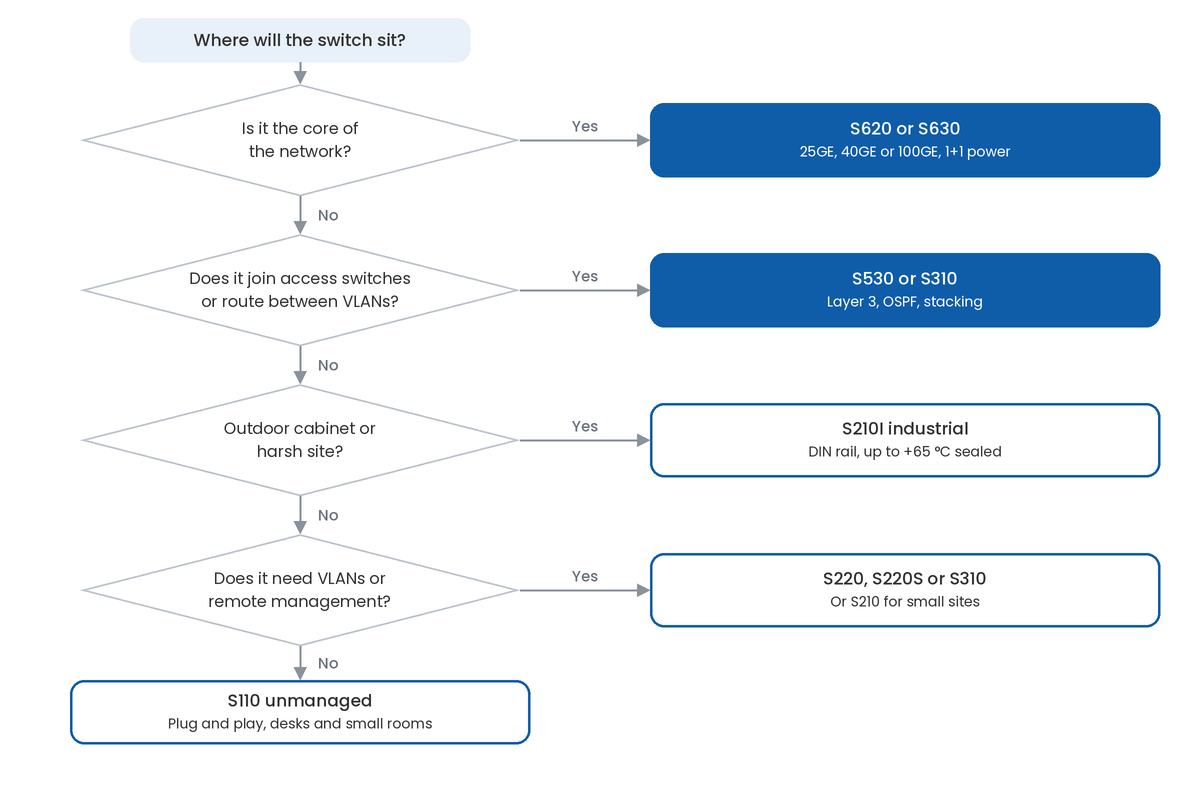
Next, decide where routing happens and choose the core: an S530 for a single building, or an S620 or S630 where 25GE, 40GE or 100GE links are needed. Choose access switches with 10GE uplinks to match it.
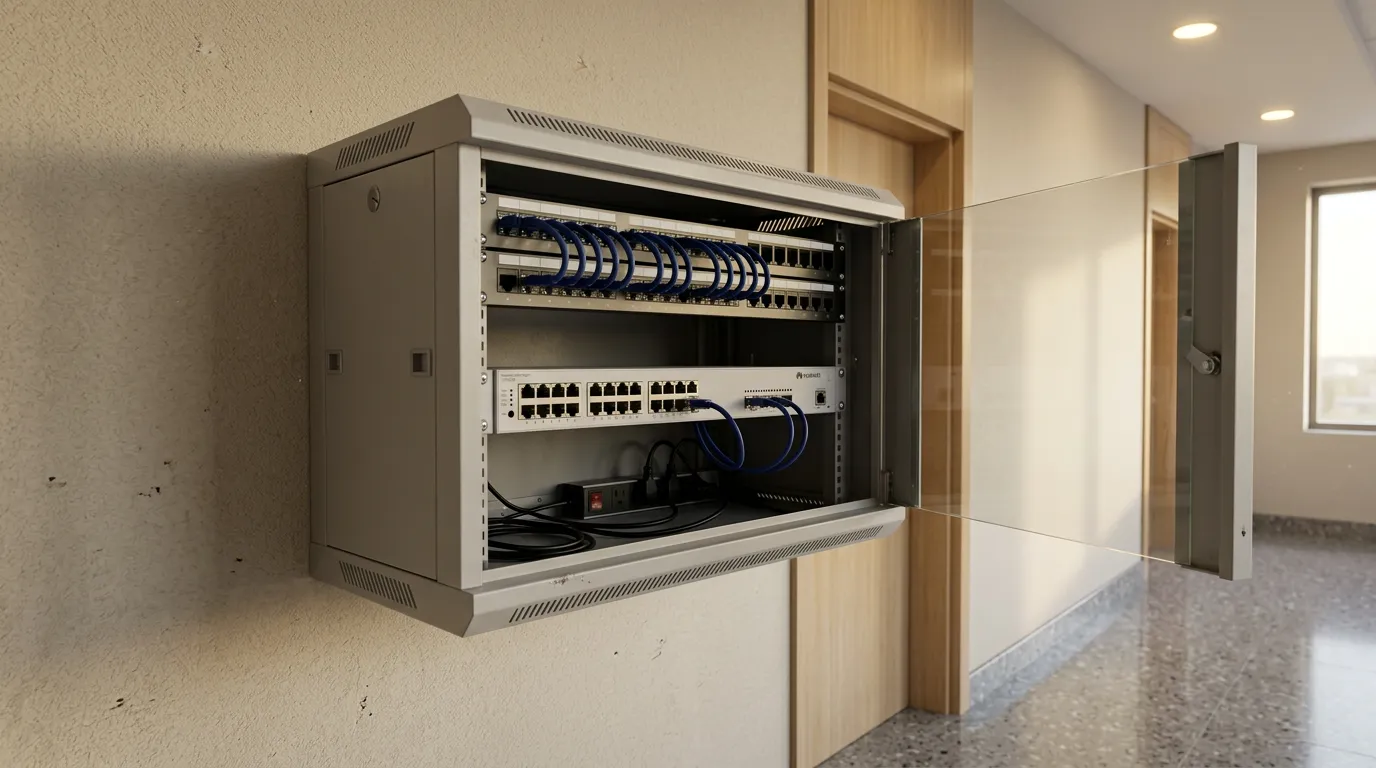
Then plan the cabinets, cooling and power for each switch, and set up management in the eKit App or SNC before handover. Name each switch by location so faults can be found quickly.
Schema about: Huawei eKit network switch series for small and medium businesses
Key Takeaways
- Huawei eKit switches run from unmanaged S110 desk switches to S620 and S630 10GE switches for the network core.
- The S110 is unmanaged; the S210 is web-managed; the S220 and S220S are Layer 2 managed.
- The S310, S310S, S530 and S620 support Layer 3 routing, such as OSPF.
- Model names describe the ports: P is PoE+, J is 2.5GE SFP, X is 10GE SFP+, C is 100GE.
- The S310-24U4X offers up to 2,268 W of PoE++ with three power modules.
- The industrial S210I is rated to operate up to +65 °C in a sealed cabinet.
Frequently Asked Questions
-
What is the difference between the Huawei S220 and S310?
The S220 is a Layer 2 managed switch, while the S310 adds Layer 3 routing, including static routes and OSPF, and iStack stacking of up to 9 switches. The S310 also offers more port options, such as 2.5G copper and PoE++. Choose the S220 for simple access, and the S310 where the switch must route between VLANs or be stacked.
-
Can Huawei eKit switches be stacked?
Yes, in the higher series. Huawei's S310 datasheet allows up to 9 switches in one iStack, managed as a single virtual switch, and the S530 has two dedicated 10GE stack ports. The S620 also supports iStack. Stacking adds redundancy and simplifies management, since the whole stack is configured from any member switch.
-
Which eKit switches suit Wi-Fi 7 access points?
Wi-Fi 7 access points can need more than gigabit links and more power. The S310-24PN4X and S310-48PN4X have 2.5G copper ports with PoE+, and several S210, S220S and S310S models add 2.5G PoE++ ports. Check the access point's power draw against the switch's per-port and total PoE budget before you buy.
-
Are any Huawei eKit switches fanless?
Yes. The 8-port S110 models, the industrial S210I and most S220S and S310S models cool by natural convection, with no fans. Larger 24-port PoE models generally use fans with automatic speed control. Fanless switches are quieter for offices and avoid drawing in dust, but still need ventilation and a cool room.
-
How do eKit switches differ from Huawei's CloudEngine switches?
eKit is Huawei's range for small and medium businesses, sold through partners and designed for simple set-up, including cloud and app management. CloudEngine switches are Huawei's enterprise campus and data centre range. For most offices, schools and hotels, the eKit range covers the access, aggregation and core needs of a single site.
Sources & References
- Huawei — eKitEngine S110 Series Switch Data Sheet vendor documentation
- Huawei — eKitEngine S210 Series Switches Datasheet, hosted on the Blue Edge product page vendor documentation
- Huawei — eKitEngine S210I Series Extended-Temperature Switches Datasheet vendor documentation
- Huawei — eKitEngine S220 Series Switches Datasheet, hosted on the Blue Edge product page vendor documentation
- Huawei — eKitEngine S220S Series Switch datasheet vendor documentation
- Huawei — eKitEngine S310 Series Switches Datasheet, hosted on the Blue Edge product page vendor documentation
- Huawei — eKitEngine S310S Series Switches Datasheet, hosted on the Blue Edge product page vendor documentation
- Huawei — eKitEngine S530 Series Switch Datasheet vendor documentation
- Huawei — eKitEngine S620 Series Switches Datasheet, hosted on the Blue Edge product page vendor documentation
Planning a Huawei eKit network?
Blue Edge supplies Huawei eKit switches to organisations and projects across Saudi Arabia, with cabling and network configuration support.
Call or WhatsApp +966 53 9855 188, contact the Blue Edge team, or see the Huawei eKit switch range.
About Blue Edge
Blue Edge Company is a value-added technology distributor based in Dammam, Saudi Arabia, supplying interactive displays, smart building systems, networking infrastructure and IT security software to businesses and residential projects across the Kingdom, with installation and technical support.
Learn more about Blue Edge →Published 17 October 2026 • Last updated 13 November 2026 • This article is reviewed when standards, regulations or product guidance change.