Shopping Cart



Email Authentication: SPF, DKIM and DMARC Setup Guide
Set up SPF, DKIM and DMARC correctly with record examples, the 10-lookup limit, alignment rules and a safe p=none to p=reject rollout for Saudi businesses.
By Blue Edge Team | Aug 31, 2026

Email Authentication: SPF, DKIM and DMARC Setup Guide
Quick answer: SPF, DKIM and DMARC are three DNS records that together stop attackers from sending email that appears to come from your domain. SPF lists the servers authorised to send on your behalf, DKIM cryptographically signs every outgoing message, and DMARC tells receiving servers what to do when a message fails. Publish all three, start DMARC at p=none, then move to p=reject.
Email was designed without any way to verify who sent a message. Anyone with a mail server can put your company's domain in the From field, and unless you have told the internet otherwise, receiving servers will deliver it. That is the mechanism behind most invoice fraud and executive impersonation attacks against businesses in Saudi Arabia.
SPF, DKIM and DMARC close that gap. They are not products and they cost nothing to publish. They are three DNS records that tell every receiving mail server which messages genuinely come from you and what to do with the ones that do not.
This guide covers what each record does, the exact syntax to publish, the alignment rule that decides whether DMARC passes or fails, a phased rollout that will not accidentally block your own payroll notifications, and what Saudi regulators expect. It also explains, honestly, what email authentication cannot protect you from.
What Is SPF and How Do You Set It Up?
Sender Policy Framework (SPF) is a DNS record that lists the mail servers authorised to send email on behalf of a domain, defined in RFC 7208. When a receiving server gets a message, it looks up the sending domain's SPF record and checks whether the connecting server's IP address appears in that list.
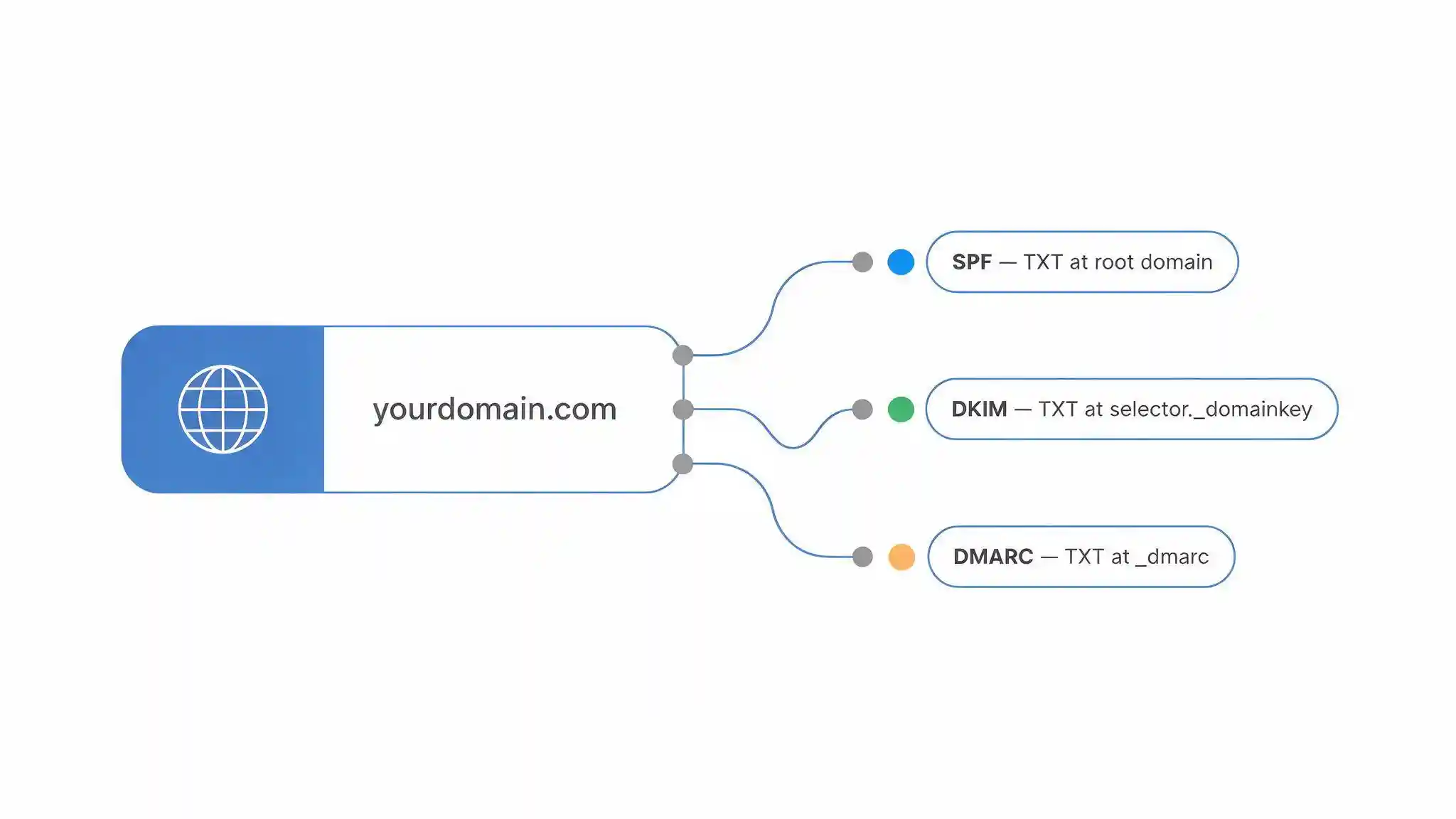
An SPF record is a single DNS TXT record published on your root domain. A typical record for a business running Microsoft 365 plus a marketing platform looks like this:
v=spf1 include:spf.protection.outlook.com include:_spf.example-esp.com ~all
The final mechanism sets the policy for everything not listed. Use ~all (softfail) during rollout and -all (hardfail) once you are confident every sending source is covered. Never publish +all, which authorises the entire internet to send as your domain.
What is the SPF 10 DNS lookup limit?
SPF permits a maximum of 10 DNS lookups when evaluating a record, and exceeding that limit produces a permanent error that causes SPF to fail entirely. Each include, a, mx, ptr, exists and redirect mechanism consumes a lookup, and nested includes inside your providers' records count too. Direct ip4 and ip6 entries do not.
This limit catches businesses that accumulate sending services over time. A company using Microsoft 365, a CRM, a marketing platform, an e-invoicing tool and a helpdesk can breach the limit without realising it. Flattening the record into explicit IP ranges is one fix; consolidating sending sources is the better one.
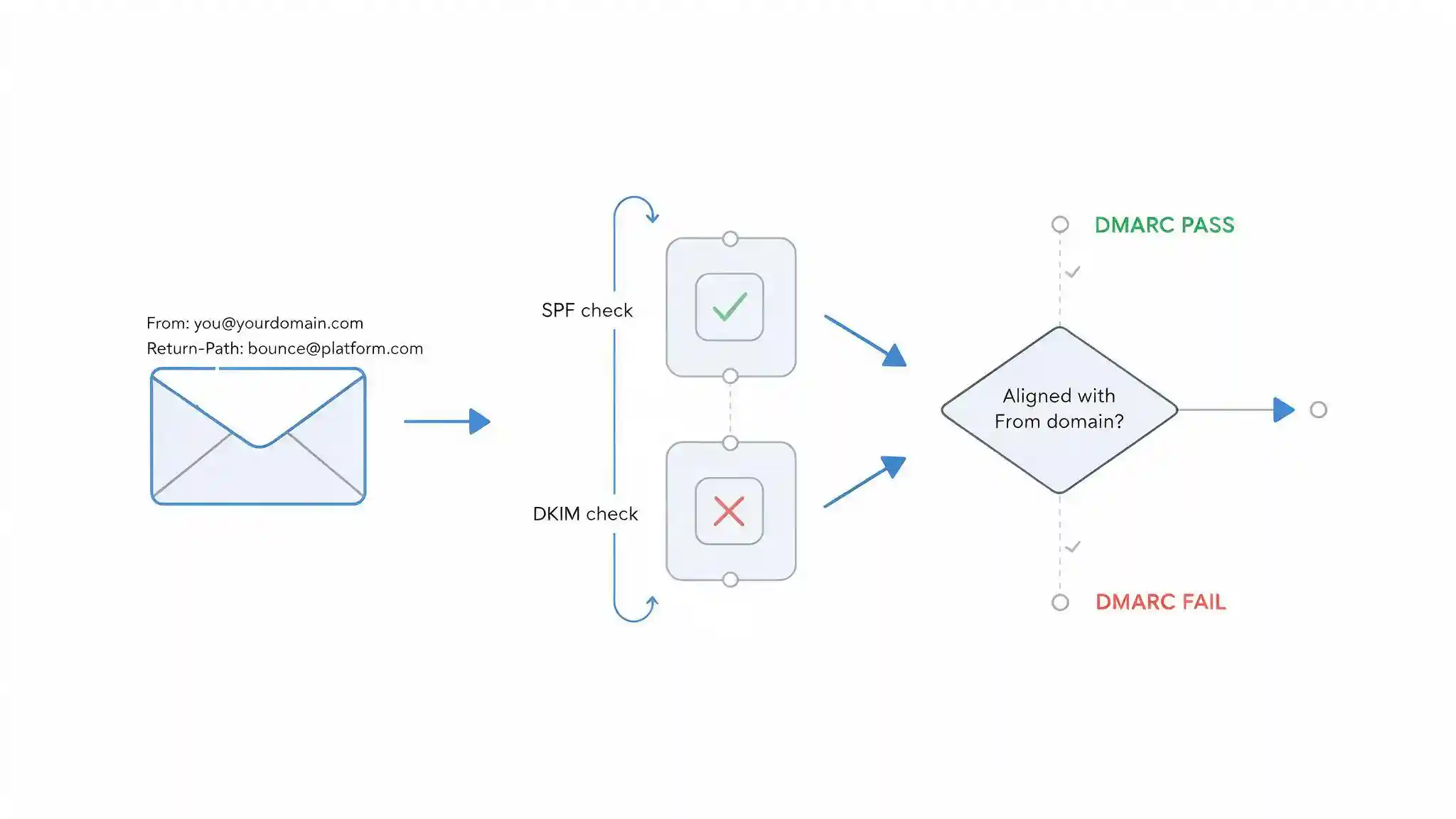
Two further rules matter. A domain must have exactly one SPF record, because two records produce a permanent error rather than merging. And SPF validates the Return-Path address in the message envelope, not the From address a recipient actually sees, which is precisely why SPF on its own cannot stop spoofing.
What Is DKIM and How Do You Set It Up?
DomainKeys Identified Mail (DKIM) is an authentication method that adds a cryptographic signature to every outgoing message, defined in RFC 6376. The sending server signs selected headers and the message body with a private key, and the receiving server verifies that signature against a public key published in your DNS.
The public key lives in a TXT record at a selector-based hostname:
selector._domainkey.yourdomain.com
The selector is a label chosen by each sending service, which is what allows multiple providers to sign for the same domain simultaneously. Microsoft 365 uses two selectors, Google Workspace uses one by default, and each marketing or transactional platform issues its own. Every service that sends mail as your domain needs its own DKIM key published.
Three technical points decide whether DKIM works reliably:
Key length. Generate 2048-bit RSA keys. Older 1024-bit keys still validate at most receivers but are increasingly treated as weak, and very short legacy keys are rejected outright by some providers.
Key rotation. Rotate DKIM keys every six to twelve months, publishing the new selector before retiring the old one so in-flight mail continues to validate.
Body modification. DKIM signatures break if the message body changes in transit. Mailing lists that append footers and some security gateways that rewrite content will invalidate the signature, which is a common cause of unexplained DMARC failures.
DKIM's advantage over SPF is that it survives forwarding. When a message is forwarded, the connecting IP changes and SPF fails, but the cryptographic signature travels with the message and still validates.
What Is DMARC and What Does Each Policy Mean?
Domain-based Message Authentication, Reporting and Conformance (DMARC) is a DNS policy record that tells receiving servers what to do with messages that fail authentication, and where to send reports about those failures. DMARC is defined in RFC 7489 and published as a TXT record at _dmarc.yourdomain.com.
A starting record looks like this:
v=DMARC1; p=none; rua=mailto:dmarc@yourdomain.com; fo=1
The p tag carries the policy, and there are three values:
p=none instructs receivers to take no action on failures and simply send reports. This is monitoring mode. It provides visibility without any delivery risk, and it is where every rollout begins.
p=quarantine instructs receivers to treat failing messages as suspicious, which in practice means the spam or junk folder.
p=reject instructs receivers to refuse failing messages at the SMTP level. The message is bounced rather than filtered, and it never reaches the recipient. This is the only policy that actually stops domain spoofing.
Two optional tags are worth setting from the start. The sp tag sets a separate policy for subdomains, which matters because attackers frequently spoof subdomains that were never used for mail. The pct tag applies the policy to a percentage of failing messages, which allows a gradual ramp rather than a single switch.
What Is DMARC Alignment and Why Does Mail Still Fail?
DMARC alignment is the requirement that the domain a recipient sees in the From header must match the domain validated by SPF or DKIM. Alignment is the reason a message can pass SPF and still fail DMARC, and it is the single most misunderstood part of email authentication.
DMARC passes when either of these conditions is true:
- SPF passes and the Return-Path domain aligns with the From domain, or
- DKIM passes and the signing domain in the d= tag aligns with the From domain
Only one needs to succeed. This is why publishing both SPF and DKIM gives you redundancy: forwarded mail loses SPF but keeps DKIM, while a modified message body loses DKIM but may keep SPF.
Alignment operates in two modes. Relaxed alignment, the default, treats subdomains as aligned with the organisational domain. Strict alignment requires an exact match. Set aspf=s and adkim=s only when you have confirmed every sending source uses your exact domain, because strict mode breaks many third-party platforms.
The classic failure looks like this. A marketing platform sends on your behalf, SPF passes because the platform's servers are authorised, but the Return-Path is the platform's own bounce domain rather than yours. SPF passed; alignment failed; DMARC failed. The fix is to configure a custom Return-Path or bounce domain on your own domain, which most platforms support and most businesses never enable.
SPF vs DKIM vs DMARC: What Each Record Actually Does
The three records solve different problems and none replaces another. The table below sets out where each one applies.
| Criterion | SPF | DKIM | DMARC |
|---|---|---|---|
| What it validates | The IP address of the sending server | A cryptographic signature on the message | Alignment between the From domain and SPF or DKIM |
| DNS record location | Root domain, TXT | selector._domainkey.domain, TXT | _dmarc.domain, TXT |
| Standard | RFC 7208 | RFC 6376 | RFC 7489 |
| Checks the visible From address | No, it checks the Return-Path | Indirectly, through the d= tag | Yes, this is its core function |
| Survives forwarding | No | Yes, unless the body is modified | Depends on whether SPF or DKIM survives |
| Stops From-header spoofing alone | No | No | Yes, at p=reject |
| Provides reporting | No | No | Yes, through aggregate rua reports |
| Main failure mode | Exceeding the 10 DNS lookup limit | Body modification in transit, or a missing selector | Publishing p=none and never progressing |
Key takeaway: SPF and DKIM prove that a message came from an authorised source, but neither one examines the address the recipient actually sees. DMARC is the record that connects authentication to the visible From header and gives receiving servers an instruction. Publishing SPF and DKIM without DMARC leaves your domain spoofable. Publishing DMARC at p=none and leaving it there is monitoring, not protection.
How Do You Roll Out DMARC Without Blocking Legitimate Mail?
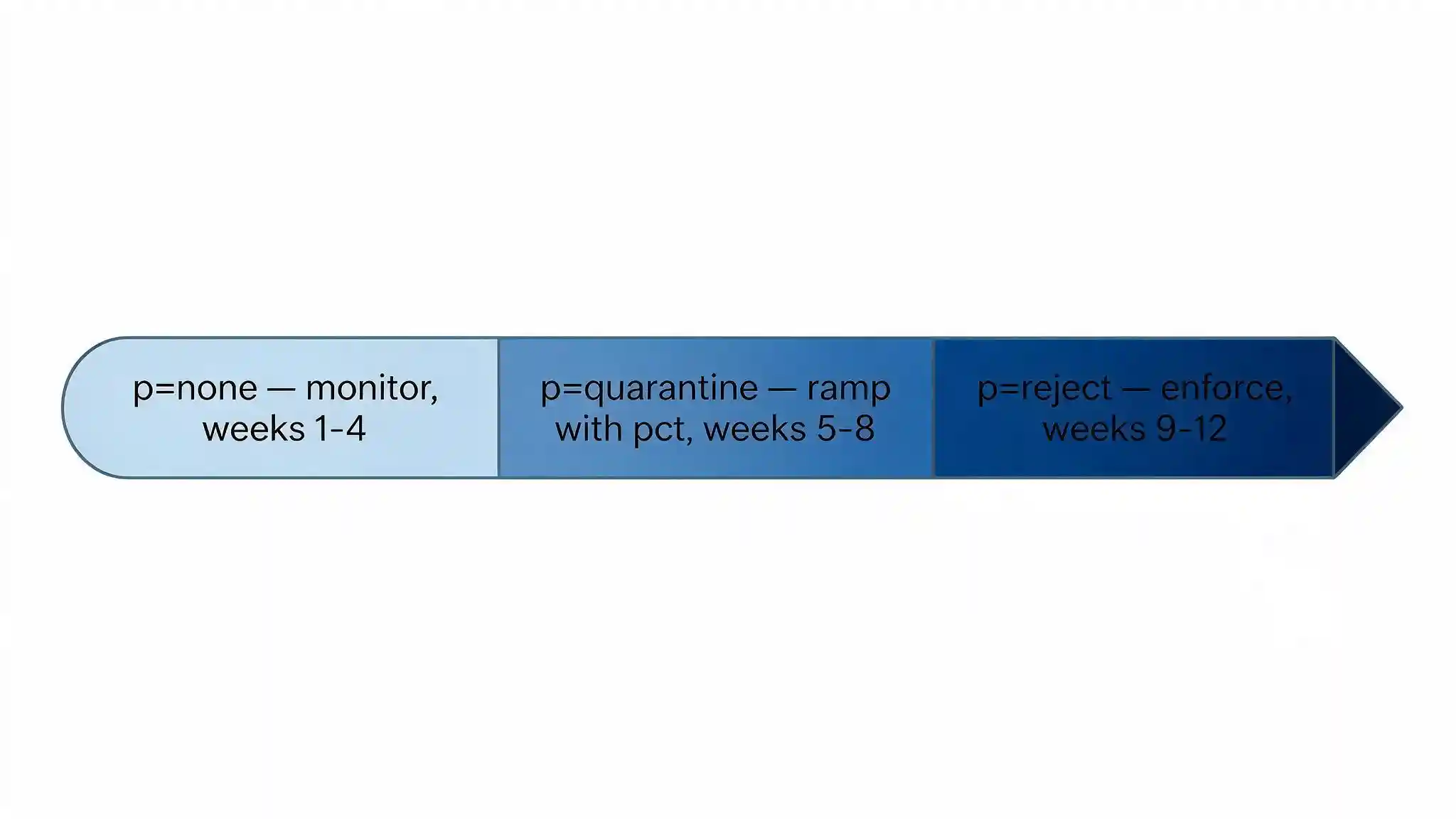
Move to enforcement in stages, because the risk in a DMARC project is not attacker mail getting through, it is your own invoices, payroll notifications and system alerts getting blocked. A structured rollout typically takes eight to twelve weeks for a mid-sized organisation.
- Inventory every sending source. List everything that sends mail as your domain: the mail platform, CRM, marketing tools, e-invoicing and accounting systems, HR and payroll platforms, helpdesk, monitoring alerts, and any application server that sends notifications. This step is where most projects underestimate the work.
- Publish or repair SPF. One record, all sources included, within the 10 DNS lookup limit, ending in ~all.
- Enable DKIM on every sending source. Each platform generates its own selector and key. A source without DKIM will depend entirely on SPF alignment.
- Publish DMARC at p=none with an rua address. This starts the report flow with zero delivery risk.
- Read the aggregate reports for two to four weeks. Reports arrive as XML, so use a DMARC reporting platform rather than reading them by hand. Identify every legitimate source that is failing and fix its SPF or DKIM configuration.
- Move to p=quarantine, ramping with pct. Start at a low percentage, monitor for a week, then raise it. Keep watching reports at every increment.
- Move to p=reject. Only when aggregate reports show every legitimate source authenticating and aligning consistently. Then tighten SPF to -all and set a subdomain policy.
Do Google, Yahoo and Microsoft Require DMARC?
Yes, the major mailbox providers now require email authentication from bulk senders, and non-compliant mail is rejected rather than filtered. Google and Yahoo announced shared requirements in October 2023 and began enforcement in February 2024, and Microsoft introduced equivalent requirements for Outlook.com from May 2025.
For senders delivering roughly 5,000 or more messages per day to those providers' consumer inboxes, the baseline is consistent:
- SPF and DKIM configured, with DMARC published at a minimum of p=none
- Authentication aligned with the visible From domain
- One-click unsubscribe on bulk and marketing mail, implemented through the List-Unsubscribe and List-Unsubscribe-Post headers under RFC 8058
- Spam complaint rates kept below 0.3 percent
Smaller senders are not exempt from authentication itself. Google expects at least SPF or DKIM from every sender, and Yahoo expects both. Google has also clarified that its bulk sender requirements apply to messages sent to personal Gmail addresses rather than to Google Workspace intra-domain mail.
The practical consequence for a Saudi business is straightforward. Email authentication is no longer only a security control. It is a deliverability requirement, and a misconfigured domain now produces bounced invoices and undelivered customer notifications.
What Do Saudi Regulations Require for Email Security?
Email authentication supports several Saudi compliance obligations, and the reporting side of DMARC carries a data protection consideration that most guides omit.
The National Cybersecurity Authority's Essential Cybersecurity Controls (ECC) require organisations to protect email services against threats including spoofing and phishing, and to maintain secure configuration across systems. SPF, DKIM and DMARC are the standard technical evidence that this control is implemented. Financial institutions carry the additional obligations set out in the SAMA Cybersecurity Framework, which addresses email security within its broader control requirements.
The data protection point concerns DMARC reporting. Aggregate reports, sent to the rua address, contain IP addresses, sending domains and authentication results rather than message content. Forensic reports, sent to the ruf address, can contain message headers and in some implementations fragments of message content, which may include personal data of employees or customers. Under the Personal Data Protection Law (PDPL) administered by the Saudi Data and Artificial Intelligence Authority, that creates a processing obligation. Most organisations should publish rua only and leave ruf unset, which is also the practical default because few receivers still send forensic reports.
Three further factors apply specifically to businesses operating in the Kingdom:
- Sending source sprawl. Saudi organisations commonly run a mix of international platforms and local ERP, accounting and e-invoicing systems, several of which send mail as the company domain. Each one needs SPF inclusion and its own DKIM selector.
- Bilingual correspondence. Companies sending both Arabic and English mail often route them through separate platforms or templates, and the second platform is regularly the one missing from SPF.
- Lookalike domain registration. Attackers targeting Saudi companies frequently register near-identical domains rather than spoofing the real one. Monitor for these separately, because DMARC on your domain does nothing about a domain you do not own.
What Are the Most Common Email Authentication Mistakes?
Six mistakes account for most failed or ineffective deployments.
Publishing two SPF records. A domain with two TXT records beginning v=spf1 produces a permanent error, and SPF fails for all mail. Merge them into one.
Exceeding the 10 DNS lookup limit. The record silently stops working. Audit the lookup count whenever a new sending platform is added.
Stopping at p=none. Monitoring mode blocks nothing. A domain sitting at p=none for two years is spoofable, and the reports nobody reads are the only output.
Forgetting non-sending and parked domains. Domains that never send mail should still publish v=spf1 -all and a DMARC record at p=reject, because attackers prefer domains with no protection at all.
Ignoring alignment. SPF passing is not the same as SPF aligning. Configure a custom Return-Path on every third-party platform that supports one.
Jumping straight to p=reject. Payroll notifications, e-invoices and system alerts stop arriving, the change gets rolled back under pressure, and the project stalls for a year.
What Email Authentication Cannot Protect You From
SPF, DKIM and DMARC protect your domain from being impersonated. They do not protect your people from being deceived, and the distinction matters when you are deciding what else to fund.
At p=reject, an attacker can no longer send mail that claims to come from your exact domain. They will simply change tactics. Lookalike domain registration, display name spoofing from a free consumer mailbox, reply-chain hijacking from a genuinely compromised supplier account, and deepfake voice or video follow-ups all bypass DMARC completely, because none of them forges your domain.
This is why business email compromise remains effective against organisations with correct authentication records. The technical control closes one attack path and the attacker moves to the next one, which runs through a person rather than a protocol.
Blue Edge, a technology distributor based in Dammam, Saudi Arabia, distributes KnowBe4 security awareness training and human risk management, which addresses the layer email authentication cannot reach through phishing simulation and employee security training. Pair the DNS records with email security best practices and multi-factor authentication on every mailbox, and the common attack paths close together rather than one at a time.

Publish All Three, Then Get to Enforcement
Email authentication is one of the highest-value security changes available to a business, because it costs nothing beyond configuration time and it closes an attack path that is otherwise wide open. The work is not the DNS records themselves. It is the inventory of sending sources and the discipline to read reports and progress through the policy stages.
Set a target date for p=reject at the start of the project. Without one, DMARC deployments stall at p=none indefinitely, and a domain in monitoring mode offers the same protection as no DMARC record at all.
Need help with email authentication? Blue Edge works with businesses across Saudi Arabia on email security, endpoint protection and security awareness training. Call +966 53 9855 188 or contact our team to review your current configuration. Learn more about KnowBe4 in Saudi Arabia.
Frequently Asked Questions
-
Do I need all three records, or is SPF enough?
You need all three. SPF alone cannot stop spoofing, because it validates the Return-Path address in the message envelope rather than the From address the recipient sees. An attacker can pass SPF using their own domain in the envelope while displaying your domain in the From field. DMARC is the record that checks the visible From address, and it needs SPF or DKIM underneath it to have something to validate against.
-
What happens if my SPF record exceeds 10 DNS lookups?
SPF evaluation returns a permanent error and the check fails entirely, which means mail that should pass will fail. The limit counts include, a, mx, ptr, exists and redirect mechanisms, including nested lookups inside your providers' own records. Direct ip4 and ip6 entries do not count. Fix it by consolidating sending platforms, replacing includes with explicit IP ranges, or using an SPF flattening service.
-
How long does it take to get from p=none to p=reject?
A mid-sized organisation typically needs eight to twelve weeks. Most of that time is spent inventorying sending sources and correcting the ones that fail alignment, not editing DNS. Spend two to four weeks reading aggregate reports at p=none, ramp through p=quarantine using the pct tag, and move to p=reject only when reports show every legitimate source authenticating consistently.
-
Will my email be rejected if I do not have DMARC?
Possibly. Google and Yahoo have required SPF, DKIM and DMARC from bulk senders since February 2024, and Microsoft introduced equivalent requirements for Outlook.com from May 2025. Senders delivering roughly 5,000 or more messages per day to those consumer inboxes without valid authentication face rejection at the SMTP level rather than spam filtering. Smaller senders still need SPF or DKIM at minimum.
-
Will DMARC stop phishing attacks against my company?
DMARC at p=reject stops attackers spoofing your exact domain, which eliminates one common attack path. It does not stop lookalike domains, display name spoofing from consumer mailboxes, or phishing sent from a genuinely compromised supplier account, because none of those forge your domain. Combine DMARC with security awareness training and multi-factor authentication to cover the attacks that reach your staff by other routes.
_.webp)