Shopping Cart


- Articles
- Cybersecurity
- Mobile Threat Defense for Corporate Devices in KSA
Mobile Threat Defense for Corporate Devices in KSA
Why MDM is not enough, the four threat vectors MTD covers, handling BYOD without surveillance, and why SMS and WhatsApp are the unfiltered channel.
By Blue Edge Team | Published Sep 08, 2026 | Updated Oct 03, 2026 | 13 min read
Quick answer
Mobile threat defense is a security capability that detects and responds to threats on mobile devices, covering device compromise, network attacks, malicious applications and phishing. It differs from mobile device management, which enforces configuration such as passcodes and encryption but cannot tell whether a device has been compromised, is on a hostile network, or is running a malicious application.
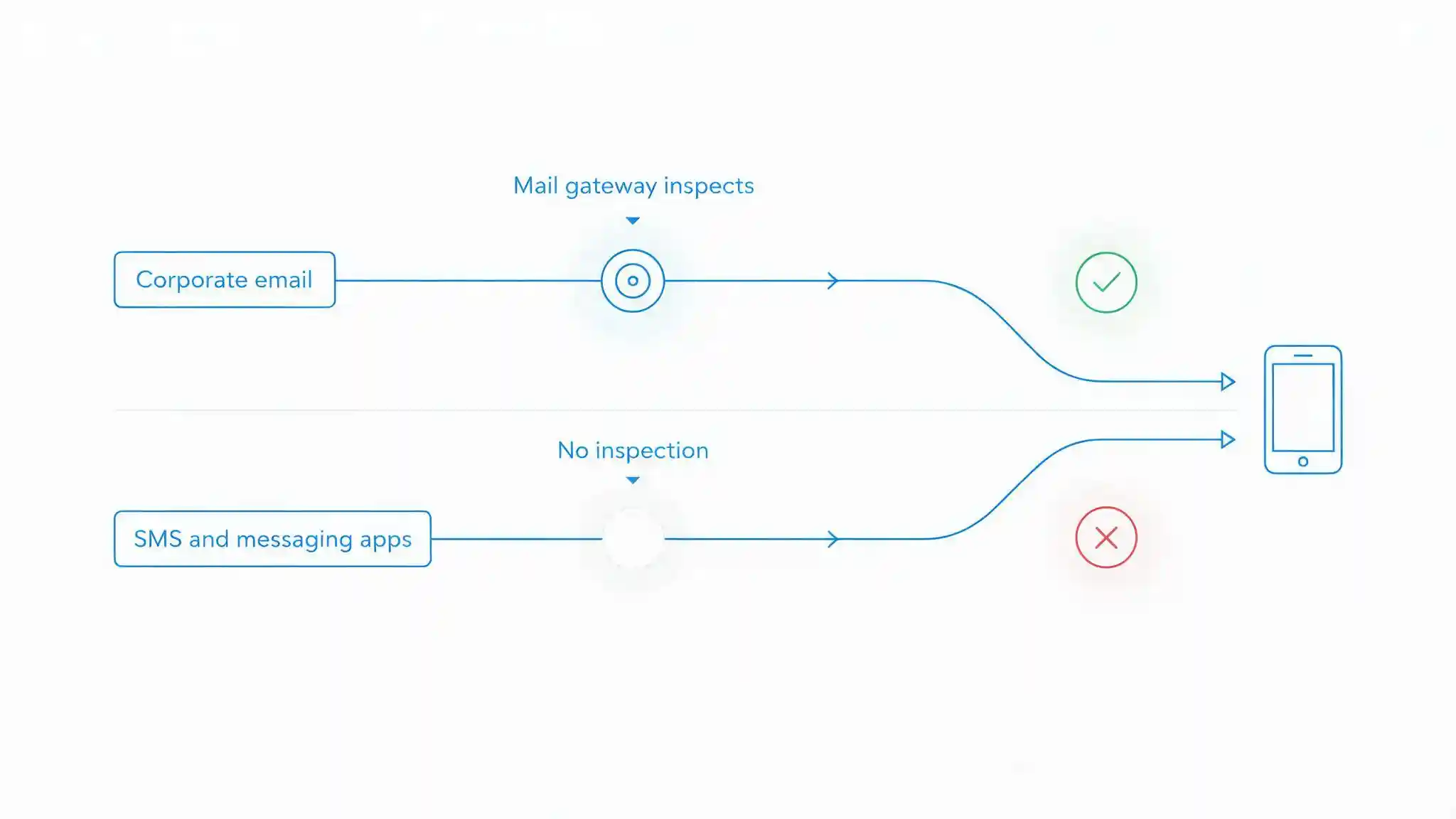
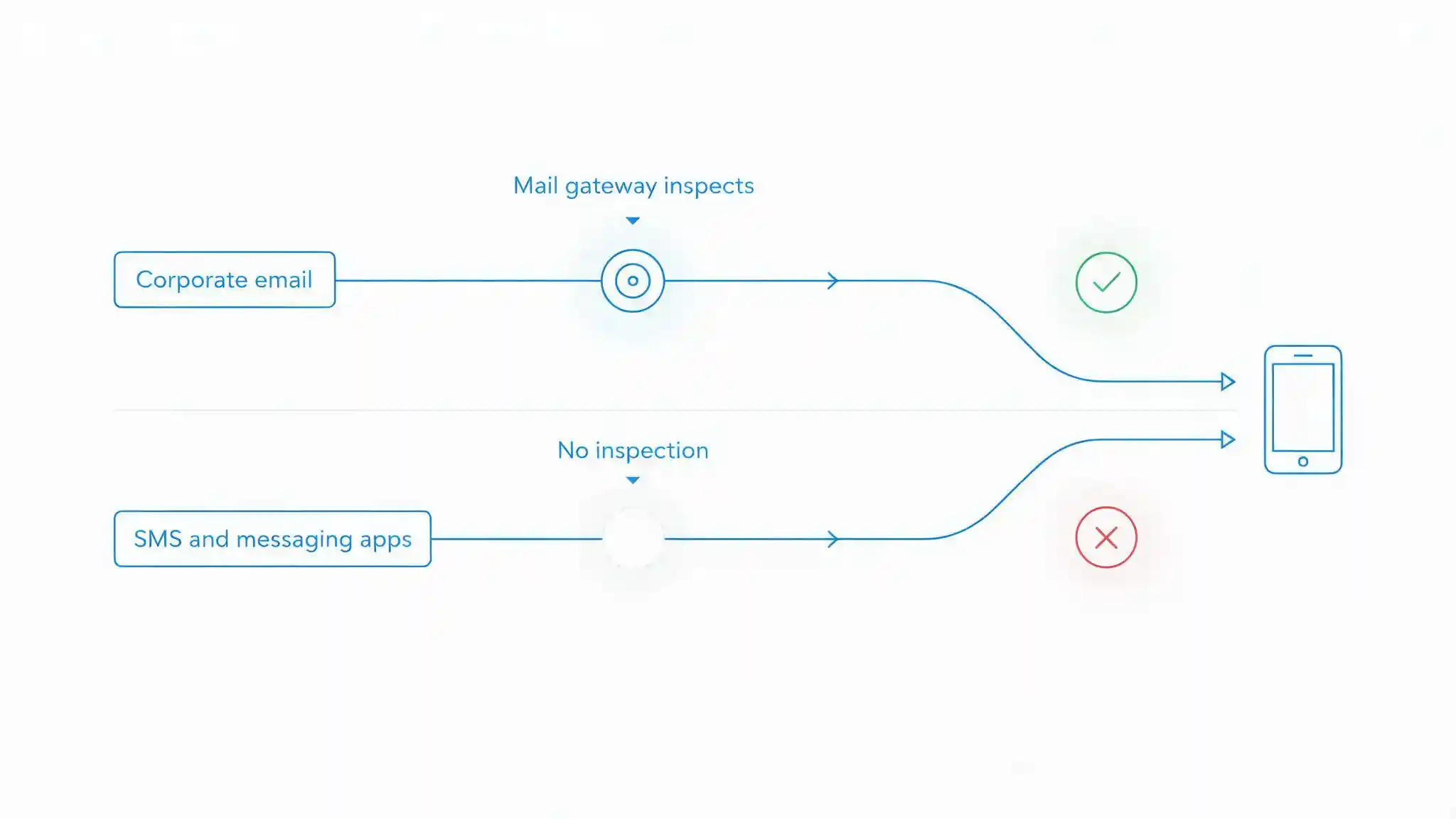
Corporate email is defended. Messages pass through a gateway, get scanned, get quarantined, and the sender is checked against authentication records. Twenty years of investment went into that channel.
Then an employee receives a text message on the phone that holds their work mailbox, their approvals app and their file access. That message passed through nothing. No gateway inspected it, no policy evaluated it, and no record of it exists anywhere the security team can see.
Attackers noticed this before most organisations did. This guide covers what mobile threat defense actually does, why device management is not a substitute, why the small screen makes phishing more effective rather than less, how to deploy on personal devices without producing something employees switch off, and what a Saudi mobile estate specifically requires.
What Is Mobile Threat Defense, and Why Is MDM Not Enough?
Mobile threat defense is a security capability that detects and responds to threats on mobile devices, covering the device itself, the networks it connects to, the applications installed on it and the content delivered to it.
Mobile device management, and the broader unified endpoint management category, does something different. It enforces configuration. It sets a passcode policy, requires encryption, distributes approved applications, restricts settings and can wipe a lost device. Those are valuable controls and they are the correct foundation.
What device management cannot do is assess whether anything has gone wrong. An enrolled device with a compliant passcode, current policy and full encryption can simultaneously be running a malicious application harvesting contacts, connected to a rogue access point intercepting traffic, and displaying a phishing page indistinguishable from the company sign-in screen. Every management check passes, because none of them look at any of that.
The distinction is worth stating plainly, because budget decisions are frequently made on the assumption that they overlap. Device management manages posture. Mobile threat defense detects threats. An organisation with only the first has configured its phones well and has no visibility into what is happening on them.
MDM, MTD, or Both?
The table below sets out what each layer covers.
| Capability | MDM / UEM alone | Mobile threat defense alone | Both, integrated |
|---|---|---|---|
| Enforce passcode, encryption, OS version | Yes | No | Yes |
| Distribute and restrict applications | Yes | No | Yes |
| Remote lock and wipe | Yes | No | Yes |
| Detect malicious or high-risk applications | No | Yes | Yes |
| Detect rogue networks and interception | No | Yes | Yes |
| Detect jailbreak, root or exploitation | Basic checks only | Yes, including exploit indicators | Yes |
| Block phishing links outside email | No | Yes | Yes |
| Assess live device risk | No | Yes | Yes |
| Act on risk by restricting access | Policy compliance only | Only if integrated | Yes, through conditional access |
| Suitable for personal devices | With a work profile | Yes, scoped appropriately | Yes |
| Main gap | No threat visibility | No configuration control or wipe | Enrolment and user acceptance |
Key takeaway
Device management and mobile threat defense are complementary layers rather than alternatives, and the value of the combination is in the last active row. Detection that cannot restrict access produces a dashboard. Configuration that cannot detect compromise produces a well-configured compromised device. The two together allow a device assessed as high risk to lose access to corporate data automatically until it is remediated, which is the outcome worth paying for.
What Threats Does Mobile Threat Defense Detect?
Coverage falls into four categories, and organisations usually assume the first is the whole problem when the fourth causes the most incidents.
Device threats. Jailbreak and root detection, including techniques that hide themselves from simple checks. Indicators of exploitation. Operating systems running versions with known vulnerabilities. Unexpected configuration profiles, sideloaded certificates and developer mode left enabled.
Network threats. Rogue access points imitating a legitimate network. Interception of encrypted traffic, where a device is presented with a certificate it should not accept. Downgrade attempts, manipulated DNS responses and hostile captive portals. A phone moves between the office, a mall, a hotel and an airport in a single day, joining networks nobody assessed.
Application threats. Applications that are outright malicious, applications requesting permissions far beyond their function, applications quietly transmitting contacts or location, and applications sideloaded from outside the official stores. Risk also arrives through third-party components inside otherwise legitimate applications.
Content and phishing threats. This is the category that matters most, and it deserves its own explanation.
Why has mobile become the phishing channel?
Because it is the channel nobody filters. Smishing is phishing delivered by text message, and the same technique now arrives through messaging applications, QR codes and in-app links. Corporate email passes through a gateway that scans it, checks sender authentication and quarantines what fails. A text message and a WhatsApp message reach the user directly, with no inspection of any kind.
The device makes the attack more effective rather than less. A mobile browser shows a truncated address, so a lookalike domain that would be obvious on a desktop fits comfortably inside the visible portion. The address bar hides as the page scrolls. The sign-in page renders identically to the real one, because on mobile almost every sign-in page looks the same. And users treat their phone as a personal, trusted device in a way they do not treat a work laptop.
Attackers exploit the same pretexts consistently: a delivery notice requiring a small fee, a message that appears to come from a bank about a suspicious transaction, a government service notification, or an urgent request that appears to come from a manager. The lure is ordinary. The channel is what makes it work.
This is why mobile phishing protection has to sit on the device rather than at the mail gateway, and why awareness training needs to include messaging channels rather than treating phishing as an email problem. The follow-up is frequently a voice call or a voice message, which is where deepfake fraud increasingly appears.
How Do You Handle BYOD Without It Feeling Like Surveillance?
Personal devices hold corporate data whether or not policy permits it, so the question is not whether to address them but how to do it in a way people accept. An agent employees believe is spyware gets disabled, uninstalled or never enrolled, and an unenrolled device provides no protection at all.
Three things resolve it.
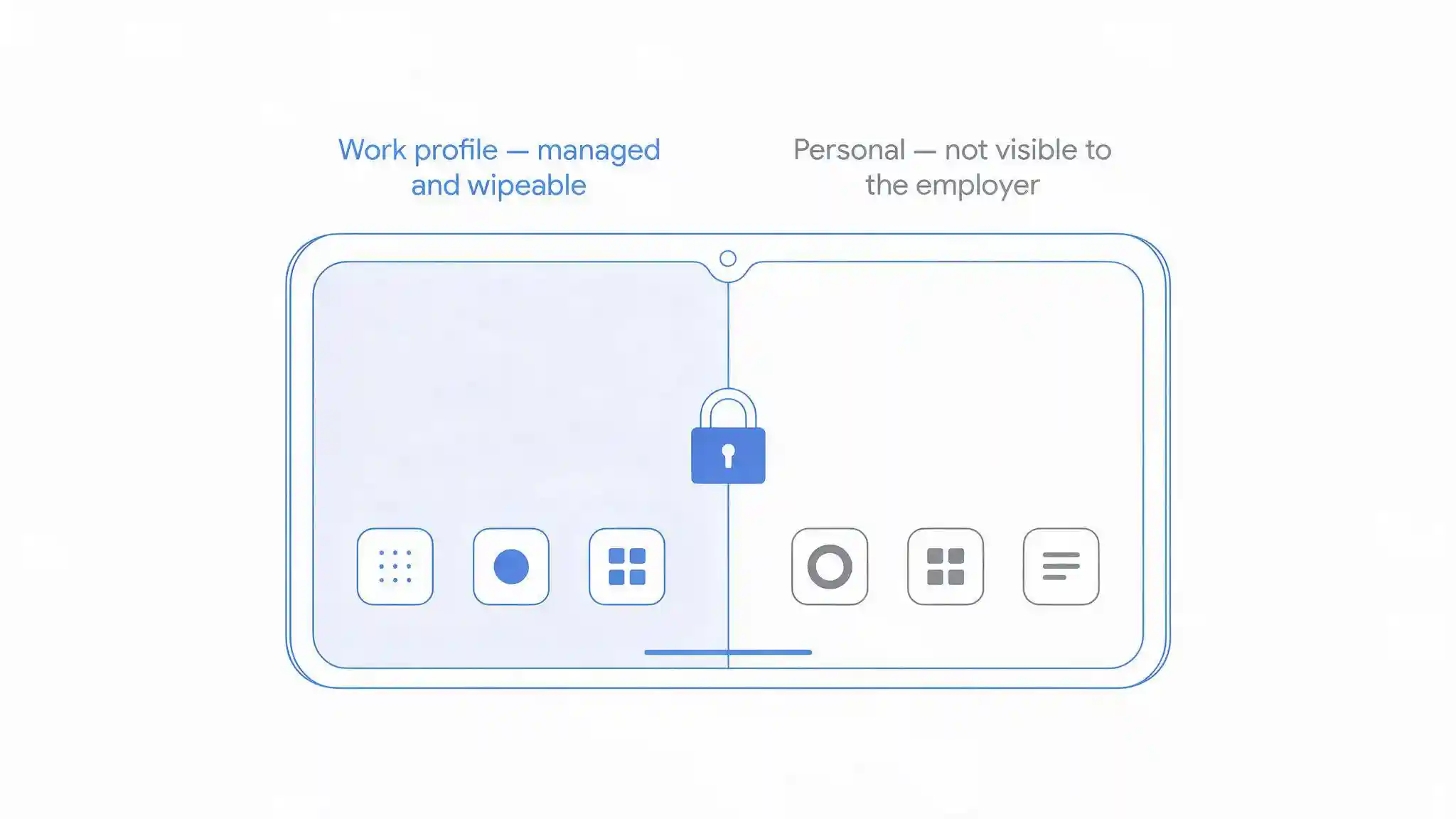
Containerise. A work profile on Android or user enrolment on iOS separates corporate applications and data from personal content at the operating system level. The employer manages and can wipe the work container. Personal photos, messages and applications sit outside it and remain untouched, including when the employee leaves. This separation is the foundation of any credible BYOD position.
Understand and state the privacy model. Modern mobile threat defense is designed to assess risk without reading content. Application risk is generally evaluated from identifiers and metadata rather than by inspecting personal data. Network risk is assessed from connection characteristics rather than traffic contents. Phishing protection can frequently be performed on the device itself, so browsing history is never transmitted to the employer.
That said, configurations differ, and some deployments do send more than others. Ask the vendor directly what leaves the device, what the employer's administrators can see, and what appears in reports. Then publish that answer to staff, in writing, before enrolment opens.
Treat it as a data protection question, because it is one. Monitoring an employee's personal device involves processing that employee's personal data, which brings it within the Personal Data Protection Law (PDPL) administered by the Saudi Data and Artificial Intelligence Authority. Establish a basis for the processing, limit collection to what the security purpose requires, be transparent about it, and where practical scope the agent to the work container rather than the whole device.
Transparency is not only a compliance step. It is the difference between an eighty percent enrolment rate and a twenty percent one, and enrolment determines whether any of this works.
How Do You Make Detection Actually Do Something?
Detection without enforcement is a report nobody reads. The value of mobile threat defense is realised through integration with the identity provider, so that device risk influences access to corporate resources in real time.
The mechanism is conditional access. The identity provider consults the device's current risk assessment before granting access. A device flagged as compromised, running a malicious application, or connected through an intercepting network is denied access to corporate applications until the condition is cleared. The user receives a remediation instruction rather than a silent failure.
Three design points make this workable:
- Tier the response to the risk. A device on a suspicious network might be restricted to low-sensitivity applications, while a device showing exploitation indicators loses everything. Binary allow-or-block policies produce either excessive lockouts or no protection.
- Give the user a clear path back. The block message should say what is wrong and what to do. Blocks that only surface as a helpdesk call push the resolution into a human channel, which is precisely where social engineering lives.
- Log the events centrally. Device risk events belong alongside other security telemetry rather than in a separate mobile console, so that a device compromise and an unusual sign-in are visible as one story.
Pair this with phishing-resistant authentication where possible, because a stolen credential on a compromised device is a different problem from a compromised device alone, and multi-factor authentication is the baseline for every account reachable from a phone.
What Do Saudi Organisations Need to Account For?
Four factors shape mobile risk in the Kingdom more sharply than in many markets.
Business genuinely runs on messaging. Saudi Arabia is a mobile-first market with very high smartphone penetration, and a large share of routine business communication happens through messaging applications rather than email. Suppliers send invoices through them. Managers approve things through them. Contractors coordinate site work through them. That traffic is entirely outside the corporate mail gateway, which means the channel carrying a substantial portion of business communication has no inspection at all. Any mobile security programme that protects only the corporate mailbox is protecting the smaller half of the problem.
Arabic-language lures need testing. Phishing messages targeting Saudi users arrive in Arabic, in English, and frequently in a mix of both. Detection capability trained predominantly on English content may perform differently on Arabic lures, and awareness training built from English examples does not prepare people for the messages they actually receive. Test detection with Arabic-language samples during evaluation, and run phishing simulations in both languages rather than translating an English programme.
The device estate is diverse and partly out of support. A workforce with a high proportion of expatriate staff brings devices purchased in different markets, on different update schedules, and in some cases running versions that no longer receive security updates at all. A phone that stopped receiving operating system patches two years ago cannot be made safe by policy, and device management will report it as compliant if the policy does not check the version. Set a minimum supported operating system version, enforce it through conditional access, and accept that some devices will need replacing rather than remediating.
Public network exposure is high. Substantial time is spent on networks in malls, hotels, airports and cafes, and that exposure is where network-layer detection earns its cost.
Two regulatory anchors apply. Mobile devices are endpoints within the scope of the National Cybersecurity Authority's Essential Cybersecurity Controls (ECC), which address endpoint protection and secure configuration. Financial institutions carry the additional obligations of the SAMA Cybersecurity Framework, which is relevant wherever mobile applications provide access to financial systems.
Blue Edge, a technology distributor based in Dammam, Saudi Arabia, distributes KnowBe4 security awareness training and human risk management, including phishing simulation across channels, and NinjaOne endpoint and patch management for the wider device estate.
What Are the Most Common Mobile Security Mistakes?
Six mistakes account for most mobile programmes that leave the organisation exposed.
Treating device management as complete. A fully compliant enrolled device can still be compromised, on a hostile network and running a malicious application, because none of those are configuration settings.
Deploying detection with no enforcement. Risk assessments that do not influence access to corporate data produce alerts nobody has authority or time to act on.
Pretending BYOD does not exist. Corporate data reaches personal phones through ordinary applications regardless of policy. An unmanaged personal device holding company mail is the estate, whether it is acknowledged or not.
Being vague about what is monitored. Employees who suspect the agent reads their messages will remove it, and an uninstalled agent protects nothing. State the privacy model in writing before enrolment.
Protecting only email. The attack moved to text messages and messaging applications years ago, and those channels have no gateway in front of them.
Ignoring devices past their update life. A phone no longer receiving operating system patches cannot be secured by policy and should be replaced rather than accommodated.
Protect the Channel Nobody Is Watching
The reason mobile security keeps getting deferred is that the phones appear to be handled. They are enrolled, they have passcodes, they are encrypted, and a report says every device is compliant. All of that is true and none of it says anything about whether a device is compromised.
Start with the gap rather than the product. Corporate email is inspected and messaging is not, so the first practical question is what protects an employee who receives a convincing message on WhatsApp about an invoice they are genuinely expecting. If the answer is that they should recognise it, the control is training alone, and training has never been sufficient against a well-built lure on a small screen.
Then make detection consequential. Device risk that feeds the identity provider and restricts access to corporate data is worth several times the same detection sitting in a console.
And settle the privacy question before enrolment opens rather than after the first employee objects. Containerise, publish exactly what the employer can and cannot see, and scope the agent to the work profile where the platform allows it. Enrolment rate is the metric that determines whether any of this protects anyone.
Frequently Asked Questions
-
How is mobile threat defense different from mobile device management?
Mobile device management enforces configuration: passcode policy, encryption, approved applications, operating system version and remote wipe. Mobile threat defense detects threats: compromised devices, malicious applications, hostile networks and phishing content. A device can pass every management compliance check while running a malicious application on an intercepting network, because management controls do not examine any of that. They are complementary layers, not alternatives.
-
What is smishing and why is it so effective?
Smishing is phishing delivered by text message, and the same technique now arrives through messaging applications and QR codes. It is effective because those channels pass through no security gateway, so nothing inspects the message before it reaches the user. Mobile browsers also show truncated addresses and hide the address bar while scrolling, which makes a lookalike domain far harder to spot than it would be on a desktop.
-
Can mobile threat defense run on an employee's personal device?
Yes, and it should, because corporate data reaches personal devices regardless of policy. The workable approach is containerisation: an Android work profile or iOS user enrolment separates corporate applications and data from personal content, so the employer manages and can wipe only the work container. Scope the agent to that container where the platform allows, and publish the privacy model to staff before enrolment opens.
-
Does mobile threat defense read employee messages and browsing?
Well-designed deployments do not. Application risk is generally assessed from identifiers and metadata rather than personal content, network risk from connection characteristics rather than traffic contents, and phishing protection can be evaluated on the device without sending browsing history to the employer. Configurations differ, so ask the vendor exactly what leaves the device and what administrators can see, then state that answer to employees in writing.
-
What should you do about phones that no longer receive OS updates?
Replace them. A device that has stopped receiving operating system security updates carries unpatched vulnerabilities that no policy, agent or configuration can close, and device management will report it as compliant if the policy does not check the version. Set a minimum supported operating system version, enforce it through conditional access so out-of-support devices cannot reach corporate data, and budget for replacement rather than exception.
Reviewing your mobile security?
Blue Edge works with organisations across Saudi Arabia on security awareness, endpoint management and patching.
Call +966 53 9855 188 or contact our team to discuss your requirements.
KnowBe4 in Saudi ArabiaAbout Blue Edge
Blue Edge Company is a value-added technology distributor based in Dammam, Saudi Arabia, supplying interactive displays, smart building systems, networking infrastructure and IT security software to businesses and residential projects across the Kingdom, with installation and technical support.
Learn more about Blue Edge →Published 8 September 2026 • Last updated 3 October 2026 • This article is reviewed when standards, regulations or product guidance change.